Monday, November 2, 2020

Web Hosting Vs. Website Builder

Building your first website can feel a lot like doing your taxes.

It’s confusing, there’s a TON of information out there, and if you get something wrong it could come back to bite you in a big way down the line.

One of the biggest decisions you’ll make early on is whether or not to build the website yourself using a web host and CMS, or just turn to a website builder. This decision determines where your website “lives” and how you customize it.

There are pros and cons aplenty for both. But it’s absolutely crucial that you know the difference between them and what they offer before you make a decision.

That’s why you’re here (I assume). Whether you’re a beginner blogger building your first website, or you’re a seasoned vet who’s looking for an alternative to what you have, we want to help.

We’ve put together this guide to help break down the basics when it comes to web hosting and website builders. They each offer different benefits, features, and tools. What you ultimately choose though is up to you.

What we’ll cover:

  • How a website works
  • What is web hosting?
    • Types of web hosting
    • The pros and cons of web hosting
  • What is a website builder?
    • Key features of a good website builder
    • The pros and cons of a website builder
  • Conclusion: Which one is better?

Let’s jump in.

How a website works

Before we jump into the nitty gritty of web hosts and builders, we need to make sure you understand how a website works.

When you distill it down, a website is simply a collection of digital assets such as images, videos, or text. These assets live on physical pieces of hardware called “web host servers.”

Every single website on the Internet exists on servers. They’re typically housed in physical data centers all over the world.

There are many different types of web hosts out there—but we’ll jump into that later.

People access websites using a browser such as Google Chrome or Firefox. That connects your computer to the server allowing you to access the website.

Takeaway: The comparison between web hosts vs website builders is misleading. Websites created on website builders are also on web hosts.

However, you can build a website without a website builder. That just means you’ll have to find a web host and connect to it yourself (again, more on that later).

Think of websites as books. It can have as many or as little pages as you want. You can have different images or text on those pages.

Think of website servers as the shelves you store your book on. If you want to gain access to that book, you’ll need to walk to the shelf to get it (web browsers).

What is web hosting?

As explained above, web hosts are where your website will live. It’s the way in which your audience will access your blog, videos, pages, images, and whatever else you want to show the world.

If you choose this route for your website, it means that you’ll have to choose three things:

  • Web host. These are services that provide you with a variety of different types of hosting options.
  • Domain name. This is going to be the URL for your website, or what people type into the URL bar to access your content.
  • Content management system (CMS). This is the software you’ll use to add and create content for your website.

Going with a web host is a much more involved way of creating your website. However, that results in more customization and greater control over your content.

Ultimately, it’s the method I recommend for anyone creating a website. But there are plenty of good reasons to choose a website builder too.

Go deeper: Want a full breakdown of exactly how web hosting works? Here’s our comprehensive guide on web hosting for more information.

Types of web hosting

There are a ton of different types of web hosting out there. The one you choose depends on a wide variety of different factors:

  • How much traffic you anticipate on getting
  • How big you want your website to be
  • The type of content you want on your website
  • Your budget

…and more! Let’s take some time now to look at the most common types of web hosting. I’ll briefly explain how they work and why it might be a good fit for you.

Shared web hosting

Shared web hosting is the most common type of hosting—and it’s the one I recommend for beginners.

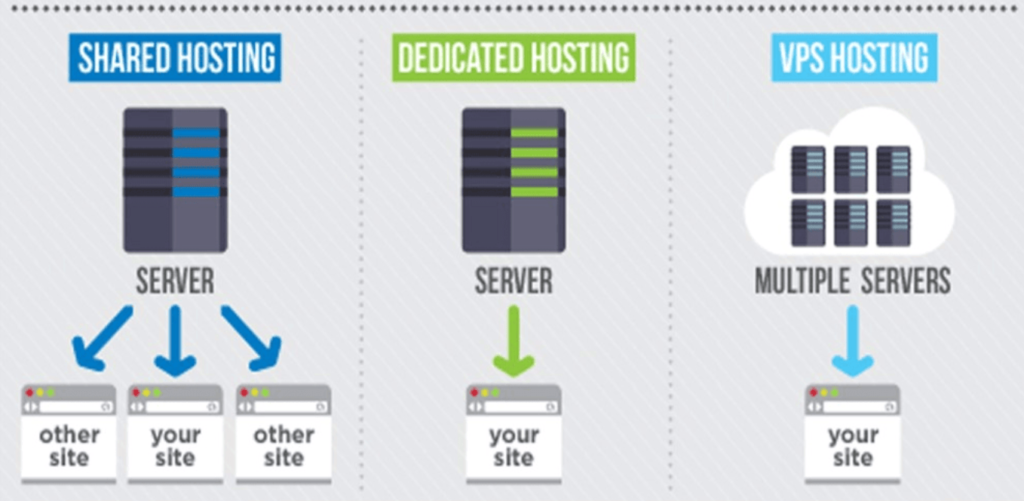
Your website is hosted on a server that’s shared between you and other websites (thus the name “shared web hosting”). All the resources of that server are split between you all.

Pros: It’s cheap! Think of it like splitting an apartment with roommates. You’ll share some of the same resources, but you’ll be able to split the bill with them so it won’t be as expensive.

Cons: But that means that if there’s a spike in traffic on any of the other websites, there’s a chance your website could slow down or even crash.

VPS web hosting

Virtual private server (VPS) web hosting is the next step up from shared web hosting. It’s one you should look towards if you want more resources for your website.

Like shared web hosting, your website splits a server with other websites. However, the difference is the amount of websites you’re splitting the server with is lower. Also, the server is partitioned off into a virtual server for your website. It essentially acts as its own dedicated server.

Pros: It’s more powerful and gives you more resources than a shared server. It’s a lot like renting an apartment all to yourself rather than splitting one with roommates.

Cons: It’s more expensive than a shared web host. Also, to really take full advantage of it, you’re going to need a little bit more technical know how.

Cloud web hosting

This type of hosting gives your website the ability to live on several different servers (aka the cloud) rather than on a single one.

That means if you encounter an issue with one server or data center, your website will likely be fine because it can rely on the network of servers.

Pros: This is an incredibly scalable type of web hosting. It’s great if your website occasionally needs more or less resources.

Cons: This is another more expensive option when it comes to hosting. Adding more servers also requires more effort than merely buying a plan that already includes those resources.
Dedicated web hosting
This is arguably the “best” type of web hosting. It entails getting your own dedicated server for your website to live on—and only your website.

That means no sharing resources. No worrying about spikes in traffic to other websites potentially taking down your website. Instead, it’s just for you and your business.

Pros: This is like having an entire house to yourself. You can use all the resources for yourself and customize it however you please.

Cons: You’ll be on the hook for any maintenance costs for your server. Dedicated web hosting is also typically the most expensive option.

Other types of web hosting

Above were just some of the most popular options when it comes to web hosting. In truth, there TONS more out there—a few that we often cover here on Quicksprout.

If you’re interested in learning more about all the wide variety of web hosting options—or if you’re looking for a more in-depth explanation of the ones we already covered—check out our resources below:

The Pros and Cons of Web Hosting

If you choose to go the route of choosing your own web host and building your own website using a CMS like WordPress, you should know about the benefits and pitfalls of doing so.

Even though I highly recommend this method for anyone trying to build a blog or a website for their business, it’s not for the faint of heart.

Let’s take a look at three pros and three cons of going this route now.

Pro: Greater control over your website

When you choose the do-it-yourself method of building a website, you’re ultimately going to have greater control over the way your website looks, feels, and performs.

A big part of this is because you’ll be able to choose your own content management system (CMS). This is how you’ll manage every asset that goes into your website such as blogs, videos, and pictures.

With the right CMS, you’ll also be able to customize the look of your website in any way that you want.

Also, choosing your own web host means if you’re unhappy with your current web host, you can always switch to a better one that suits your needs. Of course, migrating web hosts can be a bit of a pain in the butt—but many web hosting companies offer to do it for free for you.

Pro: Better performance

Perhaps the most important aspect of a good website is fast loading times. In fact, this should be near the top of your priorities list once you create your site.

Why? Simple: Web pages that take a long time to load lose traffic. This isn’t just hearsay either. There’s loads of data to back this up.

In fact, slow loading times have been found to lead to very high abandonment rates. 40% of people abandon websites that take more than 3 seconds to load.

You read that correctly. Just 3 seconds can mean the difference between losing nearly half your potential web traffic or not.
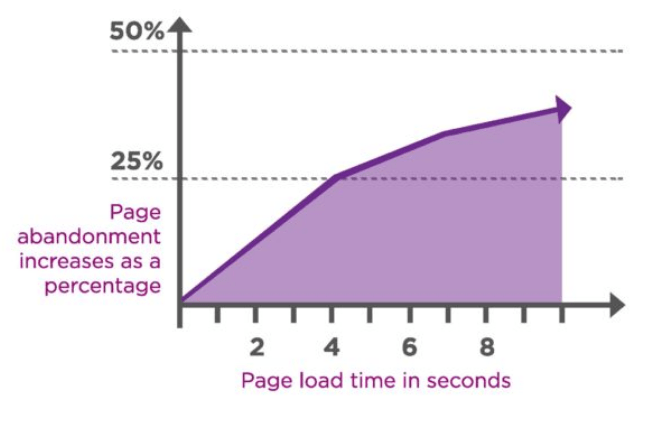
Now just being able to choose your web host doesn’t necessarily mean that you’ll have better loading times. However, it does mean that you’ll have greater control over the things that do determine loading times such as the ability to reduce HTTP requests, browser caching tools, and the ability to reduce file sizes of your images.

Pro: More pricing options

Choosing to go this route means that there’s more flexibility when it comes to pricing. If there’s a web host that’s too expensive, you can scale back easily.

Of course, that doesn’t necessarily mean that going this route is the cheapest option (we’ll get into that with the first con). But it does afford you more flexibility. If there’s a feature or tool you don’t like with a certain web host, you can opt out of those features and tools.

The same can’t necessarily be said with a website builder which often locks you into certain plans. These plans can be limited and don’t offer the range of pricing options that you have when you’re choosing your own hosting options and CMS.

With that said ….

Con: Often more expensive

Good web hosts give you more resources for your website, higher uptime rates (how often your website stays up and doesn’t crash), greater loading speeds, and more.

However, the catch is you’ll wind up paying more for those web hosting options.

Yes, there are “free” web hosting options available. But those are extremely limited in what they offer, and you’re not going to get a good, world-class website with those options.

Instead, if you choose a good web hosting provider like BlueHost, you’ll be getting quality servers and support for your website no matter what you need. But that means you’ll see a bigger hit to your pocket book—especially if you want some of their better features.

Con: More work for you

Let’s make this clear if it wasn’t already: going the do-it-yourself route means you’ll have to do everything yourself.

From choosing a web host, to connecting your domain name to the host, to choosing a good CMS, to design—everything is going to be up to you.

Of course, you could just hire someone to do all of it for you, but that takes money and resources you might not have.

It’s not the hardest thing to do in the world. But this method will take more time than simply signing up for a website builder and letting them take care of the majority of the work. This is especially true when it comes to the design of your website.

Luckily, there are a wealth of resources out there that can help even the newest website manager build a great website. Here are a few from us at QuickSprout:

Okay, that’s a pretty solid introduction to web hosting. Now let’s take a look at website builders!

What is a website builder?

Website builders are platforms that take care of the vast majority of the work of creating a website for you.

The way they work is very simple: go to their website, pick a domain name, design your web pages, and voila! You have a website.

They’ll walk you through every step, which makes a website builder a perfect solution for beginners. It allows you to create a world-class looking website in just a few minutes. Seriously, some of these website builders help you create one that looks like you paid six figures to a developer for it. They’re that good.

I highly recommend using a website builder if you a). Don’t need to be serious about building traffic and b). Just looking to create a website with 1-3 pages so visitors get an idea about you and your business.

As such, website builders are great for:

  • Restaurants
  • Local businesses
  • Freelancers
  • Hobby sites
  • Student groups
  • Community projects
  • “Resume” sites
  • Short term projects

There are a ton of great website builders out there too. Each one offers their own benefits, features, and tools to help you create a great website for your needs.

However, when we break it down by the top one million websites, there’s one website builder that stands out as the clear favorite for most users: Squarespace.

In fact, according to a trends breakdown from Built With, Squarespace accounts for 41% of the market share of all website builders.
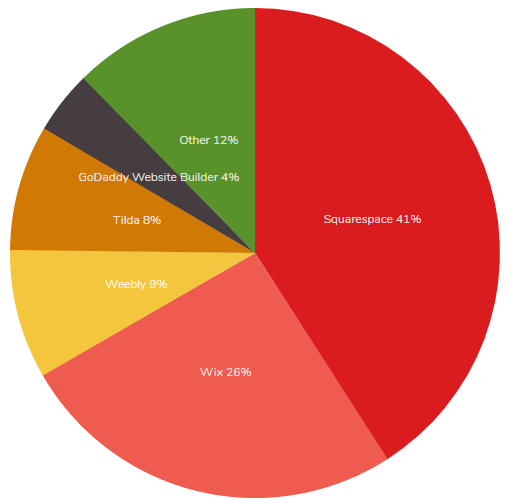
Does that mean you should use Squarespace? No, not necessarily. Squarespace does offer some very good features and benefits. However, there are plenty of good things to say about a lot of other website builders out there.

To help you narrow down your choices, here are the five best ones we recommend.

Key features of a good website builder

When taking a look at all the website builders out there, there are a few things that you should keep in mind.

Templates

Each website builder acts as its own CMS. That means the good ones will provide you with plenty of attractive templates to help you easily design your website.

Here are a few website templates from Wix, a great website builder for ecommerce websites:
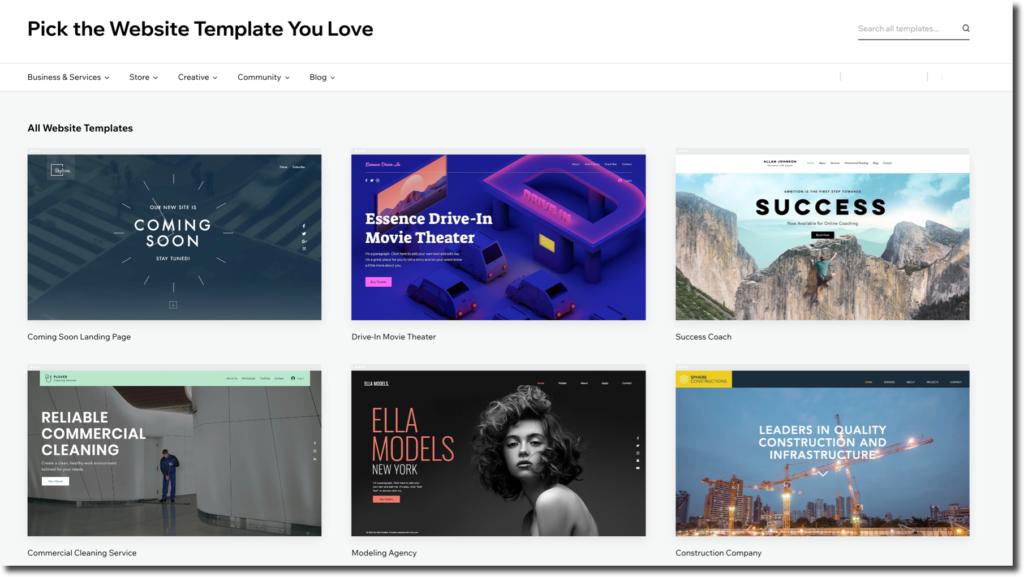
Not only are there a lot of templates, but each one looks great right out of the box. All you need to do is jump in and change some of the copy and maybe a few images.

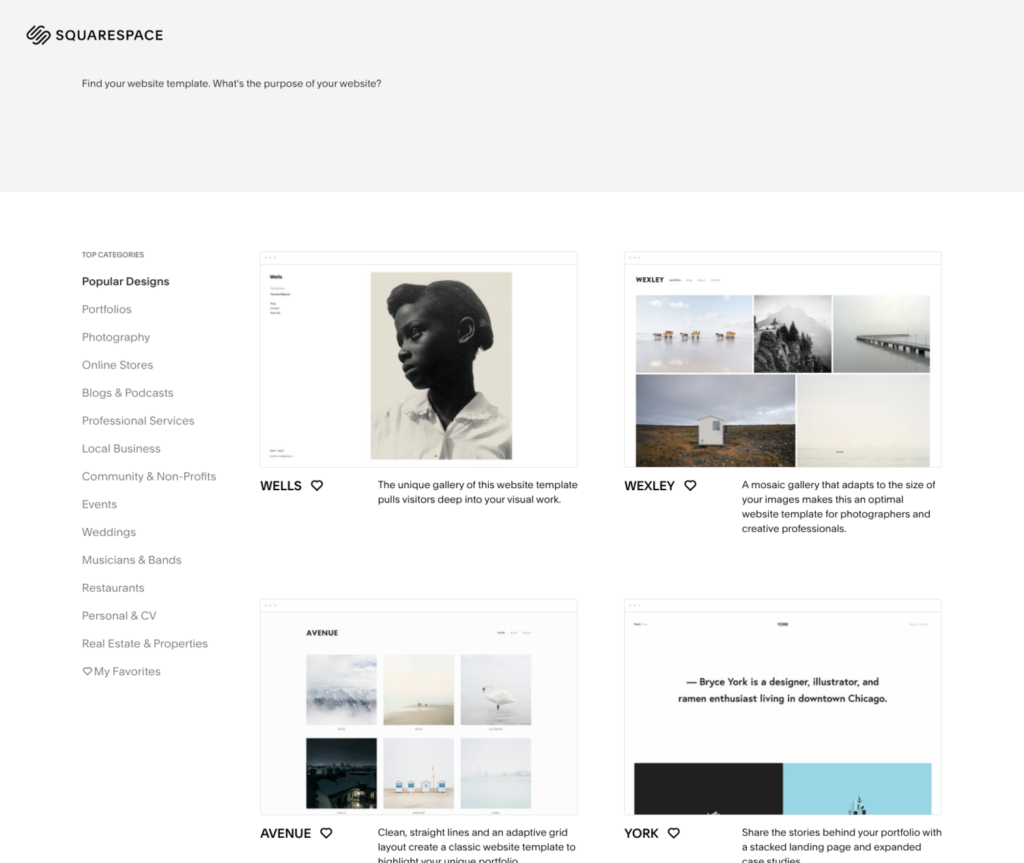
Make sure the website builder you’re looking at offers a lot of templates too, across a wide variety of different topics/industries. For example, in the image below Squarespace offers templates in industries and topics such as portfolios, photography, online stores, blogs, events, weddings, musicians, CVs, and more.
SEO tools

Make sure the website builder you’re considering includes a robust set of tools to help your search engine performance. This is crucial for being discovered organically in this day-and-age.

The tools they might include are customizable meta titles (this is the title of your page that appears in the search engine result), keyword planning tools (in case you want to target certain keywords), and alt tags for images (in case your image doesn’t load properly).

Wix has an entire suite of great SEO tools to help you plan out your marketing strategy.
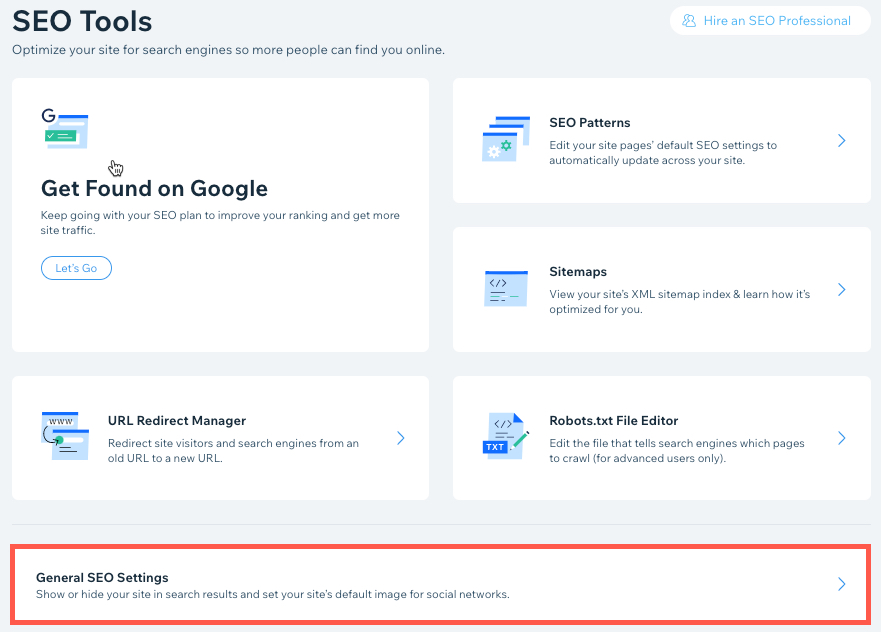
It even helps you automatically optimize across your entire site, so you don’t have to go through page by page to adjust copy and images. Very helpful.

Easy to use

This one might seem like a no brainer, but it’s incredibly important–especially if you’re a beginner and want more of a hands-off experience with your website.

You need to make sure that your website can easily be edited by you. Everything from the copy, to the designs, to the images, to the videos needs to be able to easily customized or removed entirely.

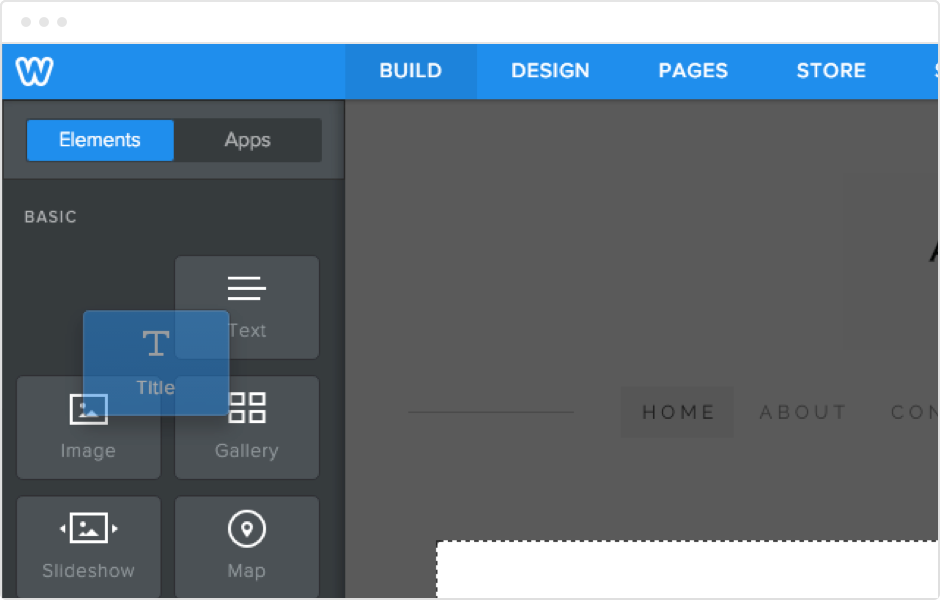
Many website builders like Wix, Weebly, and Squarespace accomplish this by include drag-and-drop editors. This allows you to simply drag different elements like text boxes or images around on a web page and place it where you’d like.

You’ll be able to see changes as they happen in real time.
The pros and cons of a website builder

Now that we know about a few specific things you should look for in a good website builder, let’s break down whether or not it’s really worth it.

Pro: Great for beginners

With most offering easy drag-and-drop builders, great out-of-the-box templates, and tutorials to hold your hand through every step of the website building process, they are a fantastic solution for beginners of all stripes.

Not only that, but it’s also a good solution for people who don’t need a lot out of a website. For example, you might just be a photographer who needs a portfolio for all of your images. Or you might need a website for your restaurant or business that just requires a landing page describing who and where you are.

All of those things can be accomplished easily with a website builder. Couple that with great tools like drag-and-drop editors or SEO tools, and you’ll be set.

Pro: Free plans

Many website builders also come with free plans. These are incredibly helpful for bloggers and entrepreneurs on a tight budget (which, let’s be honest, are most bloggers and entrepreneurs).

Websites like Wix and Weebly both offer a free plan, that includes a set of templates for you to choose from as well as a finite amount of storage and bandwidth.

You might also be limited in the ability to accept online payments, along with other tools such as Google Analytics. Websites such as Wix also require you to run Wix ads on every page along with the favicon in the URL.

But it’s a good option if you just want to get up and running for free.

Con: Limited customization

The website you create with a website builder will be fairly limited in terms of how you’ll be able to customize it.

Since most website builders only allow you to use their templates, they can result in looking like cookie-cutter imitations of one another. For example, you’ll only be able to put text in a certain spot or images/videos in another.

If you want to be able to further customize your website, you’ll need to turn to creating your own website with a CMS like WordPress for best results.

Con: Marketing and SEO

We mentioned above that a good feature for website builders is SEO tools. However, that doesn’t necessarily mean that website builders are the best choice if you’re looking to really go after your search engine rankings.

In fact, it’s quite the opposite.

Websites that are created with WordPress typically dominate when it comes to organic search traffic. Whereas, those that use website builders like Wix completely fall on their face.

This isn’t me just talking out of my behind either—there’s data to back this up.

In one study from Ahrefs, they found that 46.1% of WordPress websites got more monthly search traffic, whereas only 1.4% of Wix sites got monthly search traffic.
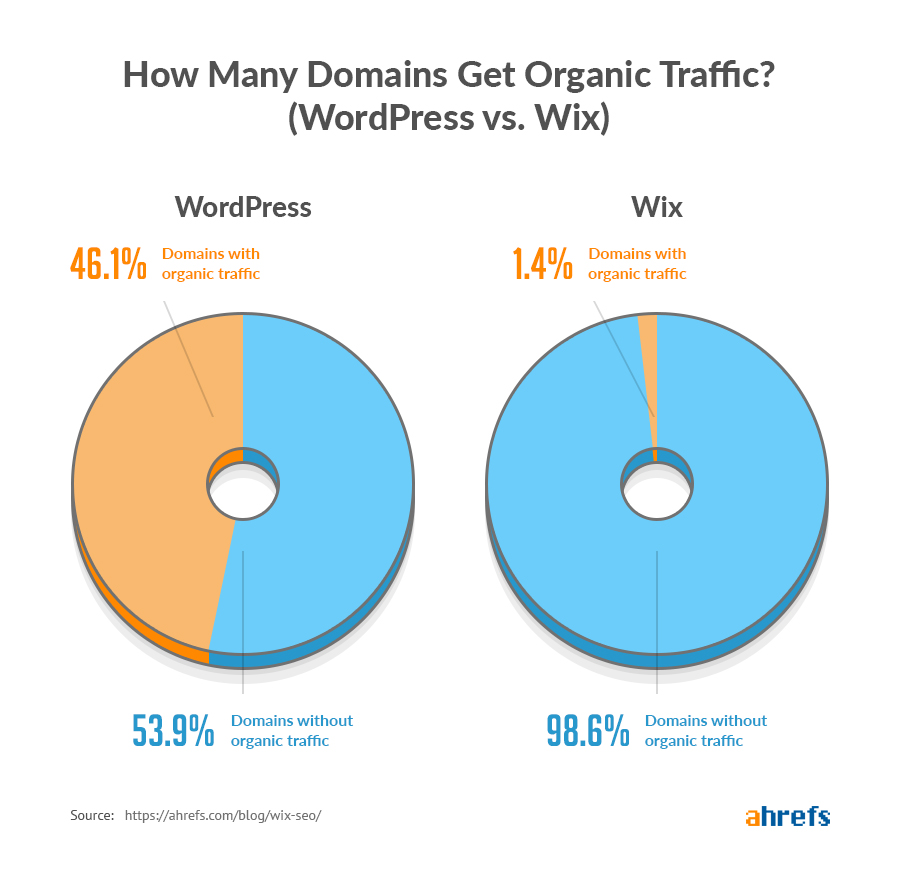
This doesn’t tell the whole story of course. For one, this merely shows that more SEO work has been done on WordPress websites than Wix. That makes sense since WordPress dominates the market when it comes to CMSs.

However, one thing is clear: The majority of people who are serious about SEO marketing typically don’t use website builders like Wix. Instead they turn to WordPress.

Conclusion: Which one is better? (Spoiler: Probably web hosting)

So which one do we think is better?

Like all things in life, it depends.

If you’re a beginner who’s looking for a simple, yet attractive website for your blog, portfolio, or business, go with a website builder. This is especially true if you’re looking to build an ecommerce website, as most website builders are tailor-made for that.

For everyone else though, I cannot recommend purchasing a domain, web host service, and CMS enough. It gives you fuller control over your website and platform. It also allows you to grow your website more effectively through SEO marketing.


from Quick Sprout https://ift.tt/380DtxP
via IFTTT

The Best Shared Hosting Plans

Want to jump straight to the answer? The best shared hosting company for most people is definitely Bluehost.

Shared hosting gets you the best value per dollar from your hosting.

Not only is the web hosting cheap, you’ll get more than enough power for your site.

The best hosts don’t feel like they’re shared.  The uptime, speed, and support are so good that you won’t even notice you’re sharing a server with other sites.

So which one is THE best?

I’ve identified the best shared hosting plans on the market today. You’ll save money and avoid problems with your site later.

Whether you’re launching a new site from scratch or looking to change hosting providers, you can use this guide to find the best option for your new website.

Compare the Top 9 Best Shared Hosting Companies

If you need a shared hosting plan for your website, these are the providers you should be considering.

  • Bluehost — Best unlimited plans.
  • DreamHost — Best cheap shared hosting provider.
  • Hostinger — Most bang for your buck for shared hosting providers.
  • A2 Hosting — Best for speed and site migrations.
  • InMotion — Best for quick and accessible support.
  • HostGator — Cost-effective with great support.
  • SiteGround — Best for scaling your shared hosting plan.
  • iPage — Most straightforward and cheap pricing.
  • GoDaddy — Biggest variety of plan options.

Read on for in-depth reviews of each one.

#1. Bluehost – Best unlimited plans

Normally $7.99/month
Free domain and SSL certificate
Recommended by WordPress
30-day money back guarantee
Get a 63% discount

Bluehost stands out for its performance compared to other web hosting companies.

They definitely don’t fall short of the competition in terms of uptimes and speed either.

Like most hosting providers, Bluehost offers a variety of plans, each with different features and price points. Although unlike most of the providers we’ve seen that offer just two or three plan options, Bluehost has four.

Basic

  • Starts at $2.95 per month (renews at $7.99)
  • 1 website
  • Unmetered bandwidth
  • 50 GB of SSD storage
  • 1 domain included
  • 25 sub domains

Plus

  • Starts at $5.45 per month (renews at $10.99)
  • Unlimited websites
  • Unmetered bandwidth
  • Unlimited SSD storage
  • Unlimited domains
  • Spam experts
  • Office 365 Mailbox (free for 30 days)

Choice Plus

  • Starts at $5.45 per month (renews at $14.99)
  • Unlimited websites
  • Unmetered bandwidth
  • Unlimited SSD storage
  • Unlimited domains
  • Spam experts
  • Domain privacy
  • Site backup

Pro

  • Starts at $13.95 per month (renews at $23.99)
  • Unlimited websites
  • Unmetered bandwidth
  • Unlimited SSD storage
  • Unlimited domains
  • 2 spam experts
  • Domain privacy
  • Site backup
  • Dedicated IP

My pick: The Choice Plan.

With a starting price point the same as Plus plan, it’s worth paying a few extra bucks per month when it comes time to renew.

But if you want the extra spam protection and dedicated IP, the Pro plan is well worth the cost too.

Bluehost is also highly scalable. With just a few clicks, you’ll be able to switch plans easily.

So if your site is brand new and you’re not planning to prioritize traffic for a couple of years, then you can definitely get away with the Basic plan for the time being.

Bluehost pricing is straightforward, but they will charge you for add-ons.

To get the best possible rate, then you need to lock in your plan for 36 months. That’s another reason why I lean toward Choice Plus over the Plus and Basic packages.

Even if you’re paying a little extra for resources that are going unused right now, it’s worth it for when your site eventually scales.

It will only end up costing you an extra $30 per year to go with Choice Plus over Basic for the first three years. That’s a great price for a reliable shared hosting service.

#2. DreamHost – Best cheap shared hosting provider

Normally $2.59/month
Month-to-month pricing at $4.95
Recommended by WordPress
4.6/5 rating from Trustpilot
Learn More

DreamHost offers cost-effective shared hosting, without sacrificing performance.

This is shared hosting made easy. They only offer two plans that are both very straightforward.

Shared Starter

  • Starting at $2.59 per month
  • Hosting for 1 website
  • 5 subdomains
  • Email starting at $1.67 per month
  • 50 GB of site storage

Shared Unlimited

  • Starting at $5.95 per month
  • Hosting for unlimited websites
  • Unlimited subdomains
  • Email included
  • Unlimited site storage

The Shared Starter plan is the best option for brand new websites. There is plenty of site storage and it comes with five subdomains. The biggest downside is that email accounts from your domain aren’t included, but you can add-on that option.

I recommend the Shared Unlimited plan. It comes with added benefits I like such as email, unlimited subdomains, and unlimited storage.

Both plans come with WordPress pre-installed, a WP site builder, SSD storage, and a free SSL certificate.

DreamHost guarantees a 100% uptime rate. If they fail to meet that promise, you’ll receive compensation for every hour of downtime, which is up to 10% of your next pre-paid renewal fee.

They also offer a 97-day money-back guarantee. In my experience, 30 days seems to be the industry standard. So DreamHost really stands behind their product by tripling that period.

For those of you who already have a WordPress site, the DreamHost experts will migrate the site to your new account for a $99 fee. If you fall into this category, I strongly recommend taking advantage of this service.

#3. Hostinger – Most bang for your buck

Normally $7.99/month
Month-to-month pricing
Free domain and SSL certificate
30-day money back guarantee
Get a 90% discount

Hostinger doesn’t sacrifice quality with their extremely affordable hosting service.

In fact, their plans start at $0.99/month for their Single Shared Hosting plan. Their most expensive plan is their Business Shared Hosting Plan that’s just $3.99/month.

Yes, you read that right.

Hostinger Pricing

The catch? These are promotional rates. When you renew, the price jumps up. But even when they do though, it’s still pretty cheap.

The best part is they offer premium web hosting at rock bottom prices. They have a 99.9% uptime guarantee, and their site speed is pretty decent.

However, that doesn’t mean they’ll necessarily perform as well as some other premium hosts. But if you’re looking for a decent shared web host on a budget, Hostinger is a fantastic option.

#4. A2 Hosting – Best for speed and site migrations

Normally $7.99/month
Month-to-month pricing at $9.99
Free domain and SSL certificate
30-day money back guarantee
Get a 63% discount

A2 is another top option for shared hosting. They offer one of the fastest shared hosting services available on the market today.

Here’s a side-by-side comparison of their three shared hosting plans.

A2 Hosting offers affordable pricing for all of their plans. The introductory rates rival some of the lowest we’ve seen in this guide.

With that said, I’d go with the Swift plan at a minimum.

While the Lite plan is the cheapest, you might as well upgrade to get unlimited databases, even if you’re not planning to take advantage of unlimited websites.

Swift is less than $1 more per month when you first sign up, and only $2 more per month when you renew. That extra $24 per year is worth double the resources.

For those of you who have a need for speed, the Turbo plan will be best for you. It’s probably the fastest shared hosting plan offered by any provider on our list. A2 is already known for its speed, and Turbo is their top of the line shared plan.

While it ends up being $18.99 when you renew, it’s still cheaper than some of the other high-end plans we’ve looked at so far. Overall, A2 hosting is priced in the middle range compared to the competition.

Furthermore, A2 Hosting offers free site migrations for their shared plans. If you recall, other providers charge an added fee for this service.

They have excellent customer support as well, which is always a nice bonus. Overall, I can’t find much of anything bad to say about A2’s shared hosting plans. Check out my full A2 Hosting review for more on their other features and plans.

#5. InMotion – Best for quick and accessible support

Normally $7.99/month
Free domain and SSL certificate
Free and unlimited email
90-day money back guarantee
Get a 57% discount

InMotion Hosting is a fantastic option for anyone who loves quality customer support.

Their rates fall in-between SiteGround and Dreamhost. However, the price jumps for InMotion’s renewal rates aren’t as drastic as the competition. So you won’t have to worry about paying triple price when it’s time to renew your plan.

InMotion has three shared hosting plans for you to choose from.

Launch

  • $6.39 per month (renews at $7.99)
  • 2 websites
  • Unlimited disk space
  • Unlimited bandwidth
  • Unlimited email
  • Free SSL

Power

  • $8.49 per month (renews at $9.99)
  • 6 websites
  • Unlimited disk space
  • Unlimited bandwidth
  • Unlimited email
  • Free SSL

Pro

  • $14.71 per month (renews at $15.99)
  • Unlimited websites
  • Unlimited disk space
  • Unlimited bandwidth
  • Unlimited email
  • Free SSL

Their shared hosting plans comes with a free domain, marketing tools, and security suite.

Unlike other plans we’ve seen so far, InMotion’s entry-level plan offers hosting for more than one website, unlimited disk space, and unlimited email. This is a great value for the price.

The Launch plan is the best option for beginners. Power is made for small business websites, and the Pro plan is made for developers and growing businesses.

Compared to some of the other providers on our list, InMotion really stands out when it comes to their customer support. This is definitely something to keep in mind as a new website owner.

If you’re having trouble and neep help, it’s nice to know that their team is available for you 24/7.

For those of you who decide to go with the Pro plan, you’ll get a 99.9% uptime guarantee. If InMotion fails to deliver on that promise, you’ll get credits toward free hosting.

Speaking of credits, all InMotion shared hosting plans come with $150 in free advertising credits, which can be very useful for a new website. It’s a great way to gain some exposure through popular search engines.

#6. HostGator – Most cost-effective with great support

Normally $6.95/month
Month-to-month at $10.95
Free domain and SSL certificate
45-day money back guarantee
Get a 61% discount

HostGator is another cheap shared hosting option. But for a cost-effective hosting solution, they still offer great support.

All HostGator shared plans come with unmetered bandwidth, unmetered storage, a free SSL certificate, and free domain. Pricing for each is:

  • Hatchling Plan — Starting at $2.75 per month (renews at $6.95)
  • Baby Plan — Starting at $3.95 per month (renews at $9.95)
  • Business Plan — Starting at $5.95 per month (renews at $14.95)

Both the Baby and Business plan come with unlimited domains, while the Hatchling plan is for a single domain.

The Business Plan comes with added benefits like a free dedicated IP, free SEO tools, and a free upgrade to Positive SSL.

Overall, HostGator is a great value. The new customer rates are definitely on the lower end of the spectrum, but the renewal rates aren’t too expensive. Plus, you can lock in the introductory rate for three years.

HostGator offers a $100 Google AdWords credit and a $100 Bing Ads credit for all shared hosting plans.

If you’re considering HostGator, I’d recommend the Business Plan, even for beginners.

It’s not often that I pick the top-tier pricing as the go-to plan for everyone. But with HostGator, I think that the value for that plan is the best. The add-ons that come with the Business Plan are worth the higher pricing. Ultimately, it’s still less than $15 per month, even after you renew.

In addition to 24/7 server monitoring, 24/7 live chat and phone support, HostGator also has more than 500 video tutorials and nearly 700 help articles if you want to learn how to do things on your own. They also offer pretty solid cloud hosting.

#7. SiteGround – Best for scaling your shared hosting plan

Normally $11.95/month
Free SSL, email, CDN, & backups
Recommended by WordPress
30 day money back guarantee
Get a 67% discount

While shared hosting is typically for new or smaller websites, SiteGround is a great choice because it gives you room to scale. They offer three different shared plans, each offering more web space and the capacity to handle more monthly visitors.

So you could start with their entry-level plan, and eventually upgrade as your site gains popularity.

Here’s a brief overview of SiteGround’s three shared hosting plans:

StartUp

  • Starting at $3.95 per month (renews at $11.95)
  • Hosting for 1 website
  • 10 GB of web space
  • Suitable for roughly 10,000 monthly visitors

GrowBig

  • Starting at $5.95 per month (renews at $19.95)
  • Hosting for unlimited sites
  • 20 GB of web space
  • Suitable for roughly 25,000 monthly visitors

GoGeek

  • Starting at $11.95 per month (renews at $34.95)
  • Hosting for unlimited sites
  • 30 GB of web space
  • Suitable for roughly 100,000 monthly visitors

If your website is brand new, you probably won’t be getting 10,000 monthly visitors for quite some time. But with that said, I’d still recommend the GrowBig plan over the StartUp option.

The introductory rate is only $2 more per month, and it can accommodate more than double the monthly traffic for when your site eventually scales.

Plus, the GrowBig plan comes with on-demand backups and a free site transfer. That’s an important feature for those of you who are switching to SiteGround from another hosting provider.

The GoGeek plan is for small, simple websites that are expecting tons of website site traffic. I’m sure the majority of you won’t fall into this category, but I know there are a handful of you out there.

GoGeek comes with three levels of super-caching, advanced priority support, white-label and client management services, and pre-installed Git.

#8. iPage – Most straightforward and cheap pricing

Normally $7.99/month
Free domain and SSL certificate
FREE drag and drop site builder
30-day money back guarantee
Get a 75% discount

Unlike other providers on our list that have multiple plan options, iPage offers just one plan for shared web hosting.

It’s about as straightforward as it gets. Their plan costs $1.99 per month when you sign up, and $7.99 per month when you renew. Overall, this definitely puts them in the best cheap web hosting category.

Even though they offer low prices, iPage has great features like:

  • Unlimited disk space
  • Scalable bandwidth
  • Unlimited domains
  • Free SSL certificate
  • Free domain for one year
  • Free ecommerce integration
  • 24/7 phone and live chat support

That’s a lot of “frees” and “unlimiteds” for such a low-cost plan. Even though iPage advertises a free online store, PayPal integration, and other ecommerce features, I wouldn’t use them if you have an ecommerce site.

Overall, iPage is best for smaller websites. Be aware, they do charge extras for things like site transfers, but that’s expected for a low-cost web host.

#9. GoDaddy – Biggest variety of plan options

Normally $8.99/month
24/7/365 U.S. based support
Free domain and 1 year of email
Guaranteed 99.9% uptime
Get a 33% discount

GoDaddy is another well-known name in the web hosting industry. They offer quality shared hosting plans at competitive rates.

If you decide to go with GoDaddy for shared web hosting, your site will benefit from high uptime rates and fast loading times. Both of which are crucial components of web hosting.

GoDaddy offers four shared hosting plans. Each one is made for different types of websites.

  • Economy — Best for basic starter websites. Starts at $5.99 per month (renews at $8.99).
  • Deluxe — Offers more space for multiple sites. Starts at $7.99 per month (renews at $11.99).
  • Ultimate — Best for sites with lots of traffic. Starts at $12.99 per month (renews at $16.99).
  • Maximum — Best for complex sites with lots of high-resolution images and videos. Starts at $19.99 (renews at $24.99).

As you can see, all of the GoDaddy plans are affordable. There’s something for everyone on this list, and it’s very straightforward.

If you’re starting a simple blog from scratch, you can get away with the Economy plan.

For those of you who have a small business and expect heavy site traffic, you’ll be better off with the Ultimate plan.

You always have the option to level-up if you need more resources. GoDaddy will actually send you an alert if you’re getting close to exceeding things like your memory or CPU. That way you can stay on top of things. Read my full Godaddy hosting review here.

What is shared web hosting?

Since the majority of you are probably new website owners, let me take a moment to explain exactly what shared hosting is and how it works.

With a shared hosting plan, your website will be hosted on the same server as other websites. This means that you’ll be sharing (hence the name) server resources with those other sites as well.

Shared Hosting

That’s the reason why shared hosting is so cost-effective compared to VPS hosting or dedicated hosting plans.

Shared hosting is like renting a bedroom in a house with other roommates. You have your own room, but you’re sharing supplies and resources in the house. If one of your roommates has a bunch of friends over and they eat all of the food or use all of the soap, there won’t be anything left for you.

This is the major downside of shared hosting. If another site on the same server has tons of traffic, it can slow down the loading speed on your website.

Shared hosting is an entry-level service offered by most web hosting providers.

Who is shared hosting for?

Shared hosting is best for new websites, small websites, bloggers, and small businesses. If your website is just a few pages and doesn’t require lots of on-site interaction, then shared hosting is the best option for you.

It’s an ideal choice for websites that aren’t expecting large volumes of site traffic.

Shared hosting is not scalable. So if you plan on doubling your traffic every month for the next six months until you reach 200,000 monthly visitors, you’ll need to find a VPS, dedicated server, or cloud hosting plan instead.

While I mentioned the downsides associated with shared hosting, it’s not something that new or smaller sites should worry about.

A small website can handle a little bit of downtime or slightly slower loading speeds once in a while in order to keep their web hostings costs down.

Conclusion

Shared web hosting is the most popular option for new websites, blogs, and smaller websites. The vast majority of you will be more than satisfied with this type of web hosting.

Here’s a recap of the best shared hosting plans on my list.

  • Bluehost — Best unlimited plans.
  • DreamHost — Best cheap shared hosting provider.
  • Hostinger — Most bang for your buck for shared hosting providers.
  • A2 Hosting — Best for speed and site migrations.
  • InMotion — Best for quick and accessible support.
  • HostGator — Cost-effective with great support.
  • SiteGround — Best for scaling your shared hosting plan.
  • iPage — Most straightforward and cheap pricing.
  • GoDaddy — Biggest variety of plan options.

No matter what type of website you’re creating, I’m confident that you’ll find the best web hosting plan for your needs in this guide.


from Quick Sprout https://ift.tt/2NmFfjo
via IFTTT
The Best VOIP Phone Systems For Your Business

Want to jump straight to the answer? The best VoIP phone systems for most small businesses are Nextiva, RingCentral, or Ooma VoIP.

Voice over internet protocol (VoIP) phone systems are great for remote workers and other employees on the go.

With dozens of VoIP phone services on the market, choosing one can be tough. Luckily, we’ve done all of the research and heavy lifting for you.

Below are in-depth reviews of each one, as well as pricing, features, and anything else that should be taken into consideration.

Let’s jump in.

Top 10 Best VoIP Phone Systems in 2020

These are the 10 best VoIP phone systems on the market today:

  1. Nextiva
  2. RingCentral
  3. Ooma
  4. Phone.com
  5. Grasshopper
  6. 8×8
  7. Vonage
  8. Jive
  9. 1-VoIP
  10. Mitel

Keep reading for more in-depth reviews of each service.

Nextiva

Starting at $19.95 per month
Affordable enterprise-level plans
Unlimited calls
Free local & toll-free number
Get Started for Free

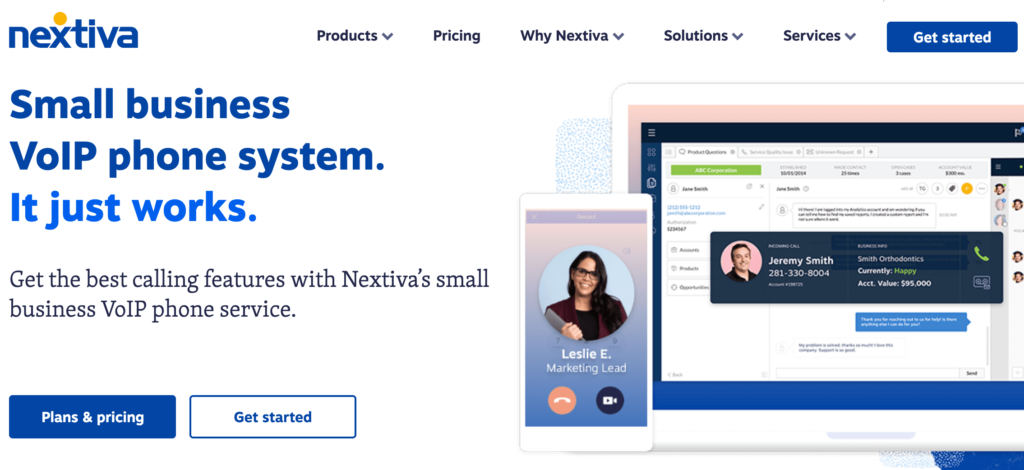
Nextiva offers a wide range of great services. In addition to its VoIP phone services, the company provides sales and service CRM software.

Some of the top Nextiva features include:

  • Nextiva desktop and mobile app
  • Text messaging
  • Auto attendant
  • Voicemail to email
  • Unlimited calling
  • Call queuing

While Nextiva is definitely a viable option for small businesses, they also offer exceptional plans for enterprises and call centers. It’s used by big national brands like Taco Bell, Stanley Steamer, and DirectBuy, and Ashley HomeStore.

Nextiva

The plans from Nextiva can be segmented into two main categories: small business and enterprise.

Like most VoIP phone services, the rates vary based on the number of users you have and the length of your contract. Nextiva has month-to-month and annual rates.

Overall Nextiva is easy to use and provides high-quality customer service. From small businesses to enterprises, Nextiva is a top choice consider.

Try Nextiva for free and see if it is the best choice for your business today.


RingCentral

Starting at $19.99 per month
100 toll-free minutes per month
On-demand call recording
Small to enterprise solutions
Get Started Now

RingCentral is the best overall VoIP phone system. Hands down.

Their features and services offers any business what you need for your VoIP needs.

The best part: No new hardware. To get started, you can easily use your existing phone number and phones to do calls over the Internet.

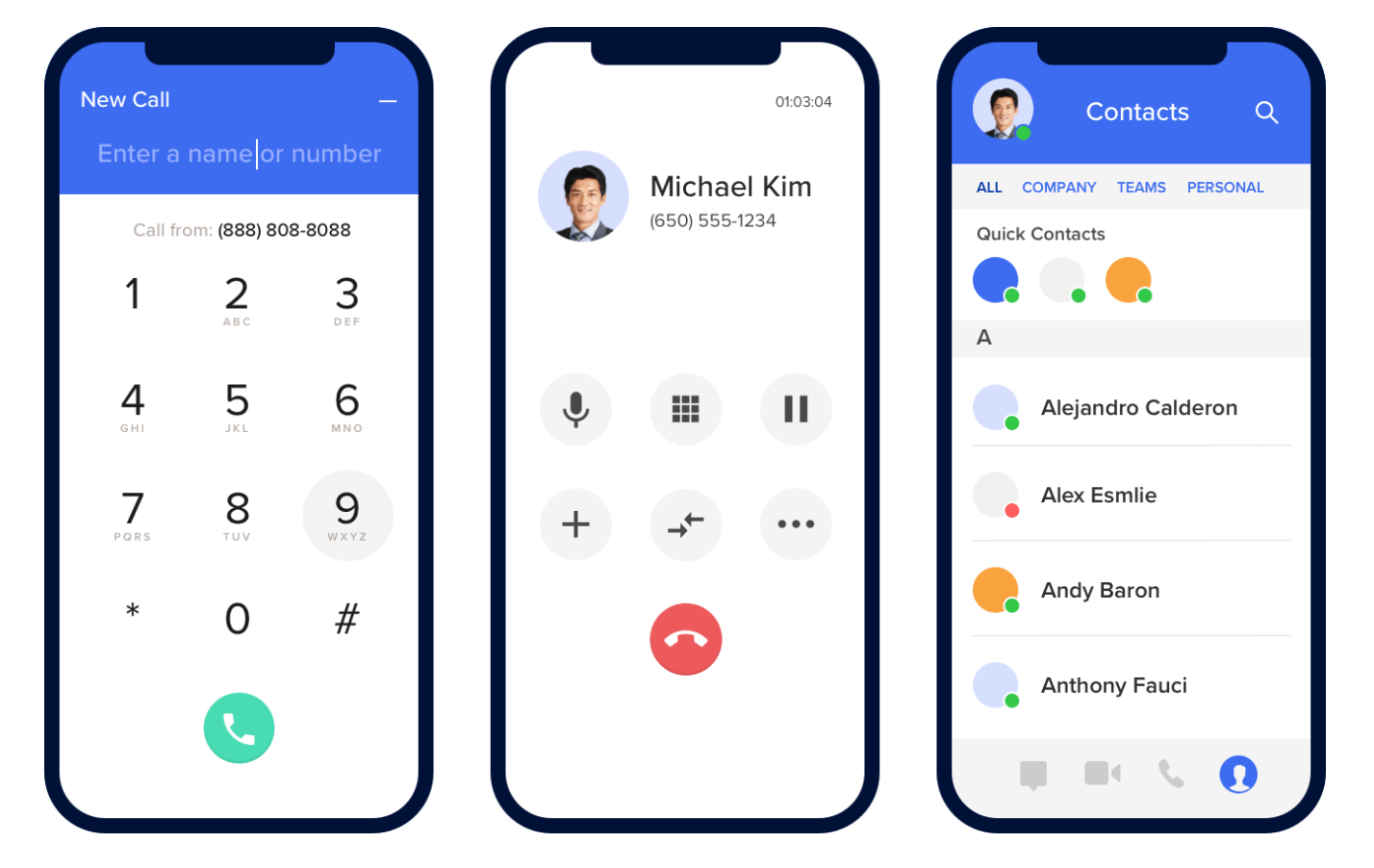
You can also access your business line from anywhere. You can use the phone service from any device. It’s probably the fastest and easiest way to get a business phone number on your current cellphone. Set up your RingCentral account and install the app:

RingCentral Mobile App

In addition to traditional phone calls, RingCentral offers a wide range of business phone needs. You can have access to messaging and video conferencing as well. In fact, RingCentral also ranked first on our list of the best video conferencing services.

Whether you’re looking for an all-in-one calling solution, or VoIP phones only, RingCentral has you covered.

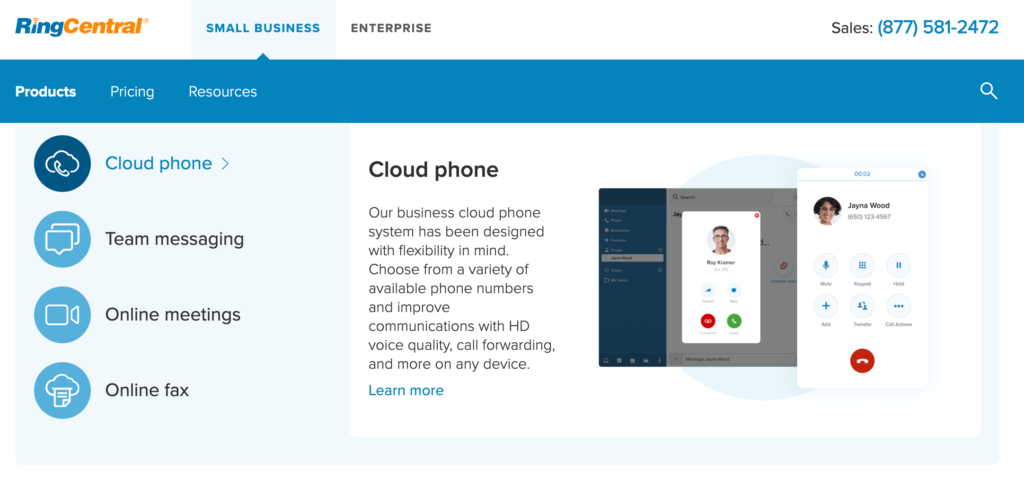
RingCentral

Pricing for a phone plan starts at $29.99 per month per user. But that’s for a month-to-month contract. You can save 33% with the annual rate.

If you have 20 or more users, you’ll need to upgrade to an all-in-one plan, which starts at $24.99 per month per user with an annual contract.

RingCentral is a perfect VoIP solution for any business.


Ooma

Starting at $19.95/user per month
Keep your number
Unlimited calling
No contracts, cancel any time
Get Started Now

Ooma VoIP is best for smaller businesses and startups. They give you the option of keeping your existing number or getting a new one.

The best part: set up is lightning fast. In fact, you can set everything up in less than 15 minutes.

Some of the top small business features of Ooma VoIP include:

  • Free mobile app
  • Virtual receptionist
  • SMS messaging
  • Spam call blocking
  • Call recording
  • Multi ring
  • Company directory
  • Custom extensions

Ooma gives you a great rate with no long-term contract. There are two main business phone plans offered by this provider:

  • Ooma Office — starting at $19.95 per month per user
  • Ooma Office Pro — starting at $24.95 per month per user

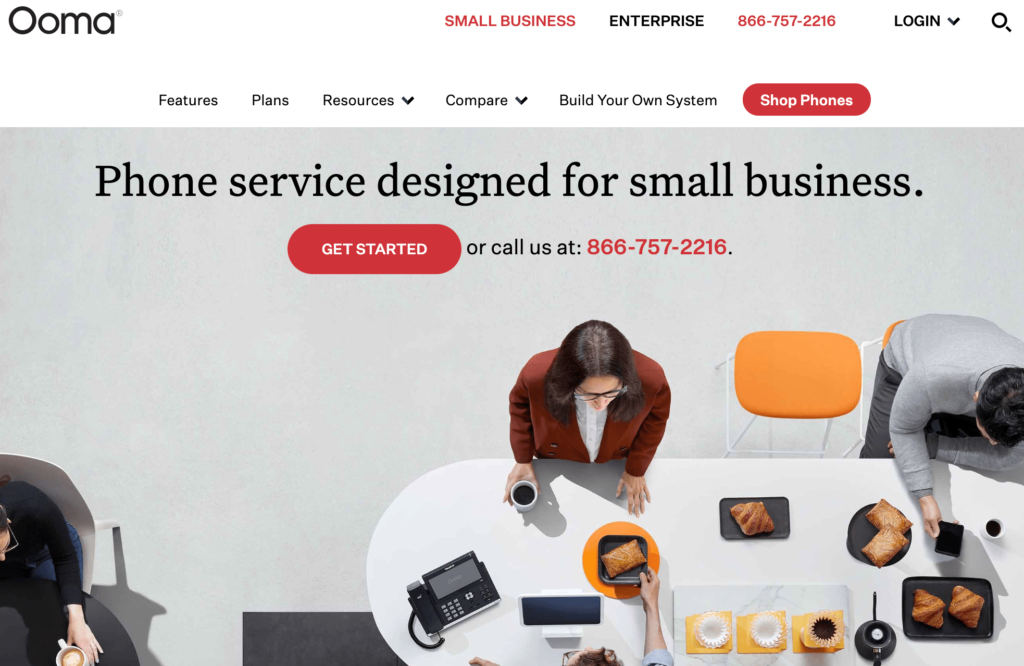
Ooma

The Office Pro plan is worth the extra $5. This plan comes with the most advanced features like call recording, call blocking, and voicemail transcription.

For small businesses looking for an all-in-one solution, you can use Ooma to build your own system from scratch. This will include hardware, separate conference phones, and a physical fax machine if needed.

If you’ve got a small company with five or ten employees, Ooma VoIP is a top choice for you to consider.


Phone.com

Starting at $9.99 per month
50+ standard features included
E911 dialing options
Premium feature addons
Get Started Now

Phone.com offers a budget friendly VoIP phone service.

In fact, they have some of the most cost-effective VoIP phone plans on the market today.

There are definitely cheaper plans offered elsewhere, but none that I would recommend. Phone.com is the one I’d point to if your budget is tight but you still want great service.

Phone.com

Here’s a brief overview of the pay-per-minute plans and pricing. All rates are for annual contracts.

Base — $9.99 per month

  • 300 minutes per month
  • Unlimited user extensions
  • 1 local or toll-free number
  • 2,000 SMS messages
  • 40+ standard features

Plus — $14.99 per month

  • 500 minutes per month
  • Unlimited user extensions
  • 2 local or toll-free numbers
  • 3,000 SMS messages
  • Automated voicemail to text
  • Premium hold music

Base — $29.99 per month

  • 1,000 monthly minutes
  • Unlimited user extensions
  • 3 local or toll-free numbers
  • Unlimited SMS messages
  • 300 call recording minutes
  • Call analytics
  • HD video conferencing

While the plans are affordable, they are definitely limited. If you’re going to exceed those monthly minute restrictions, you can consider switching to a Phone.com unlimited plan.

The unlimited plans start at $24.99, $32.99, and $49.99 per month, respectively. They are nearly identical to the plans listed above, except you’ll get unlimited monthly minutes.


Grasshopper

Starting at $26 per month
VoIP and Wifi calling
No calling limits
24/7 live support
Get Started Now

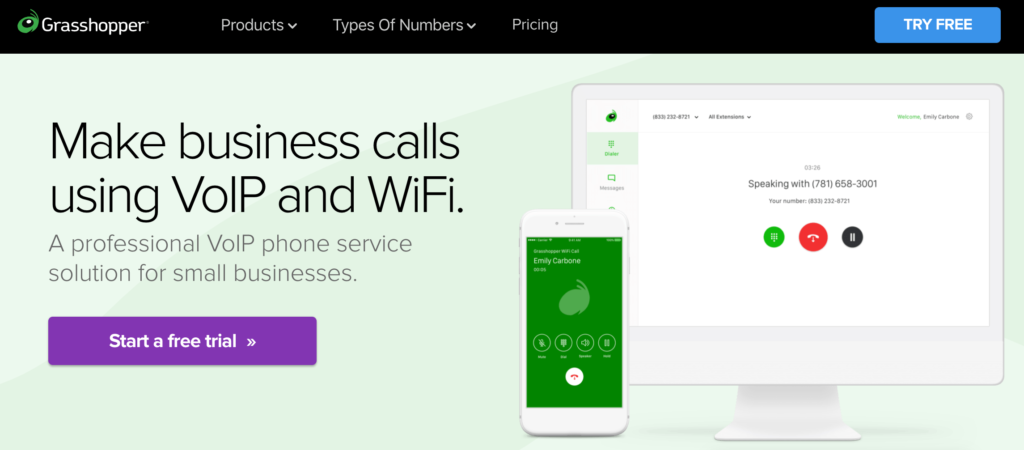
For those of you who need a business VoIP system for calls on the go, Grasshopper will be a top choice to consider.

Lots of VoIP phone services have a mobile app, but Grasshopper really stands out from the crowd. You’ll be able to use Grasshopper with your existing phone; no additional devices are required.

Grasshopper

The setup process is extremely simple.

Just choose the app (Grasshopper or Grasshopper Connect) based on your business needs. Then select a number (toll-free, vanity, local, current number) and download the app. Then you can start calling and texting using your number right away.

You can try using Grasshopper for free with a 7-day trial. No credit card required.

Assuming you’re happy with the service (which I’m sure you will), here’s an overview of the paid plans and pricing:

Grasshopper Solo

  • $29 per month ($26 with annual contract)
  • 1 number
  • 3 extensions

Grasshopper Partner

  • $49 per month ($44 with annual contract)
  • 3 numbers
  • 6 extensions

Grasshopper Small Business

  • $89 per month ($80 with annual contract)
  • 5 numbers
  • Unlimited extensions

Grasshopper Connect

  • $39 per month ($35 with annual contract)
  • 1 number
  • Email, text, and phone integration

As you can see, the Grasshopper plans are perfect for smaller organizations, startups, and solo entrepreneurs. The fact that you can sign up and use your VoIP phone service without any additional hardware is a huge bonus.


8×8

Starts at $12 per month per user
Unlimited US & Canada calls
International calling capabilities
Compare Quotes

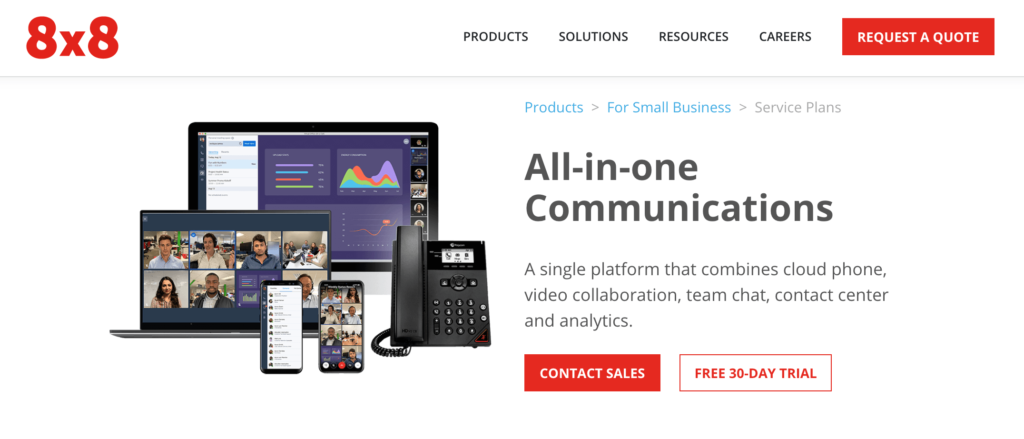
8×8 has more than one million business users across the globe. It’s trusted by international brands like McDonald’s, Regus, and NetSuite.

They offer a wide range of phone services, including VoIP phones, contact centers, and video conferencing. I’d recommend 8×8 to small and medium-sized organizations that need international calling capabilities.

8x8

Here’s an overview of the small business pricing plans for all-in-one communications.

8×8 Express — $12 per month per user

  • Unlimited calling in the US and Canada
  • Auto attendant
  • HD secure voice
  • Voicemail
  • Team messaging
  • HD audio and video meetings with screen sharing
  • Mobile and desktop apps

X Series X2 — $25 per month per user

  • Unlimited calling within 14 countries
  • Advanced caller ID, call forwarding, and call queues
  • Voicemail transcription
  • Single sign on and CRM integration
  • Call recording
  • Unlimited Internet fax
  • Cross-platform team messaging

X Series X4 — $45 per month per user

  • Unlimited calling within 47 countries
  • All X2 features
  • Operator switchboard
  • Analytics and call quality reporting

X Series X6 — $115 per month user

  • Unlimited calling within 47 countries
  • 4,000 minutes of contact center calling zone within 47 countries
  • Skills-based routing
  • Interactive voice response
  • Queued and web callback
  • Post call surveys
  • Native CRM
  • Contact center reports and analytics

If your organization has more than 100 users, you can contact the 8×8 sales team for a quote on an enterprise VoIP phone solution.


Vonage

50+ communication features
Compatible with Vonage Meetings
Simple to set up and scale
Compare Quotes

In terms of flexibility and product offerings, Vonage is second to none for business VoIP plans. They offer a wide range of communication packages, including:

  • Business phone systems
  • Office phone systems
  • Contact center solutions
  • Mobility
  • Conferencing
  • Marketing automation
  • Phones, accessories, and other hardware

Vonage integrates with popular tools and technology like G Suite, Salesforce, Office 365, Slack, and HubSpot.

Vonage

Another unique standout of Vonage is that the company offers industry-specific solutions as well as services based on business needs. For example, they have tools for accounting, law firms, healthcare, retail, real estate, and more.

The company also has tools for things like reducing communication costs, starting a call center, recording employee calls, or connecting virtual teams.

For VoIP phone plans, Vonage has three main plans; Mobile, Premium, and Advanced.

The rates vary based on how many lines you need, so there’s a wide range of prices offered. To give you some perspective, here are the rates of each plan for businesses who need 20+ lines:


  • Mobile — $14.99 per month per line
  • Premium — $24.99 per month per line
  • Advanced — $34.99 per month per line

If you need four lines or less, those rates would jump to $19.99, $29.99, and $39.99, respectively.

Based on the pricing structure and wide range of product offerings, Vonage is the perfect VoIP phone solution for growing businesses.


Jive

Lots of all-inclusive features
Call recording & monitoring
Custom greeting & hold music
Compare Quotes

Jive is an affordable VoIP phone service with arguably the most extensive feature list on the market today. It’s tough to get Jive’s offerings at a better price point elsewhere.

The platform has solutions for small businesses, mid-market, and enterprise, as well as products for voice, video, contact centers, and more.

Jive

But for now, we’ll just stick to the VoIP phone features:

  • Auto attendants
  • Custom greetings
  • Time-baed routing
  • Virtual fax
  • Voicemail to email
  • Fax to email
  • Hold music
  • Call recording
  • Call queues
  • Call analytics
  • Desktop integration
  • Conference bridge

The list is seemingly a mile long. In fact, there are over 80 different VoIP phone service features available with Jive. The best part? Features are all-inclusive with all Jive plans.

Pricing is based on the number of users you have, and ranges between $19.95 and $29.95 per month, per user. No long-term contracts or annual commitments. All plans are available month-to-month.

If you need a phone plan with 100+ users, contact Jive for a custom quote.


1-VoIP

40+ standard features
Pay for what you use plans
Cost-effective & flexible
Compare Quotes

1-VoIP has been providing phone services for 10 years. On average, business customers switching to 1-VoIP save 53% compared to their current plan, which makes this provider one of the most cost-effective options on the list.

Some of the top 1-VoIP business features include:

  • Call recording
  • Hold music
  • Virtual fax
  • Auto attendant
  • Hours of operation
  • Queues
  • Extension transfers

While 1-VoIP does have some traditional plans, I’d recommend the metered pricing option. This will be the best choice for businesses that only want to pay for what they use.

1-VoIP

If you’re a low-volume caller, the base rate is $14.97 per month for each extension. From there, you’ll pay just $0.02 per minute.

The package comes with all features included. There are no long-term contracts and no cancellation fees either.


Mitel

Starting at $20.99 per month
Industry leader in reliability
Runs on Google Cloud
Compare Quotes

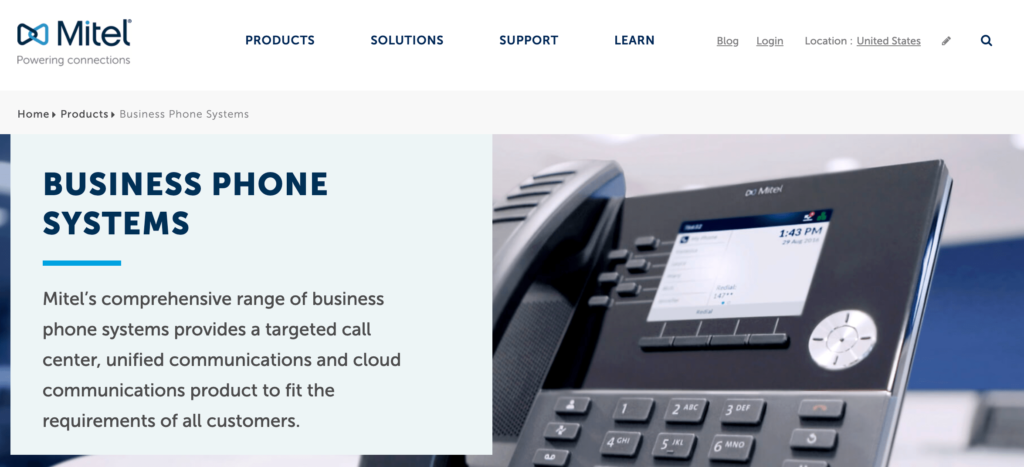
Mitel offers a VoIP phone service that runs on Google Cloud. So you know that you’re getting support from an industry leader in reliability, scalability, and security.

It has a modern interface that’s extremely easy to use. You’ll benefit from real-time management and a seamless experience across all of your devices.

Mitel is an all-in-one solution for communication, collaboration, and contact center services. It’s used by well-known names like Netflix, Smile Doctors, and Rewards Network.

Mitel

Here’s a brief overview of the plans and pricing:

Essentials — Starting at $20.99 per month per user

  • Unlimited minutes
  • 8-party audio conferencing
  • Instant messaging
  • Mobile apps
  • Outlook and G Suite integration

Premier — Starting at $26.59 per month per user

  • Unlimited minutes
  • 25-party audio conferencing
  • Salesforce CRM integration
  • Voicemail transcription
  • On-demand call recording

Elite — Starting at $38.49 per month per user

  • Unlimited minutes
  • 100-party audio conferencing
  • Constant call recording
  • Archiving
  • Operator

As you can see, Mitel has the ability to meet the needs of multiple business types and sizes. It’s a top solution for anyone who wants to take advantage of Google’s Cloud reliability.

What Is a VoIP Phone System?

VoIP stands for “voice over Internet protocol.” Instead of a traditional phone line, VoIP systems use the internet.

Incoming calls from a non-VoIP number can be converted to a VoIP line. You’ll receive calls from anyone regardless of their phone system.

VoIP phone systems have been growing in popularity for businesses over the past few years. That’s because these services are simple, cost-effective, and offer complete flexibility.

How to Choose the Best VOIP Phone Service For Your Business

Compare Quotes From The Best VOIP Phone Services

Get matched up with a VOIP phone service that fits your specific needs.

Compare Quotes


Now that you’ve had a chance to see some of the top VoIP phone services on the market today, it’s time to choose one for your business.

This is the methodology that we used to narrow our options. We recommend that you do the same for your business.

Hardware Requirements

Not every VoIP phone service is created equally. Some will allow you to use your existing hardware, while others will require you to get specific devices.

There are even VoIP business plans with no hardware requirements. You can simply make and receive calls directly from the mobile app.

It all depends on the needs of your business. A solo entrepreneur and an enterprise-grade calling center will obviously have different hardware preferences.

Pricing

For the most part, VoIP business plans are priced based on the number of users or lines you have. The more lines you need, the lower the per-user cost will be.

Some services charge you per-user, some give you unlimited minutes, and others provide minute restrictions based on your plan.

It’s important that you find a price point that’s within your budget, while still meeting your needs. If you’re a low-volume caller that only makes and receives two or three calls per day, you probably won’t need an unlimited plan.

You should also consider the length of your contract. Some companies force you to sign an annual contract to get the best rate, while others bill month-to-month.

Setup and Ease of Use

In theory, VoIP phone services are supposed to be easier than a traditional business landline. So avoid companies that have a lengthy setup process and complex functionality.

You can usually request a demo or free trial to test out a service before you commit.

See what the company’s existing customers say about the products and services by reading third-party reviews.

Features

It’s easy to get drawn toward a VoIP phone service with an extensive feature list. But with that said, you might not need every feature under the sun.

While some of these will definitely be useful, think about which ones you actually want or need. There’s no reason to pay extra for features you’ll never use. Feature lists are always a top selling point, but focus in on the features that will help your business.

Some services provide features all-inclusive, and others offer features based on your package.

Conclusion

If your business is ready to make the switch to a VoIP phone service, then the options above are the top ten that I’d recommend.

Overall my top 3 favorites are Nextiva, Ooma VoIP, and RingCentral. Compare them all to find the best for you.

No matter how big or small your business is, I’m confident that the perfect VoIP phone for your company can be found on this list.

Compare Quotes From The Best VOIP Phone Services

Get matched up with a VOIP phone service that fits your specific needs.

Compare Quotes


from Quick Sprout https://ift.tt/3cPX9nZ
via IFTTT