Want to jump straight to the answer? The best online payroll services for most businesses are definitely Gusto or OnPay.
Historically, payroll has been one of the most complex elements of running a business. Business owners need to make sure that everyone is paid with 100% accuracy, including calculations related to taxes, benefits, and more.
How hard can it be? Well, about one-third of small businesses are fined by the IRS each year because of payroll mistakes. With more businesses working with remote staff, freelancers, and independent contractors, payroll is no small feat.
But modern payroll solutions are changing to accommodate this. We’ll show you the best solutions up to the task.
The 7 Best Online Payroll Services
When it comes to something as important as payroll, you don’t want to take any chances with an inferior service. Depending on the size of your business, there are only seven online payroll services that I would recommend:
Read on about the features, pricing, pros, and cons of each service to find the best one for your business.
Gusto

- Starting at $39.99 per month
- Unlimited payroll cycles
- Calculates & files taxes
- Easy access to pay stubs & W-2s


Gusto offers one of the best online payroll services out there. They serve more than 100,000 businesses across the country.
The reason why so many companies are choosing Gusto for payroll is because of the platform’s simplicity. It’s easy for anyone to set up, manage, and pay workers.
With Gusto, you can run payroll in minutes. You can even run it on autopilot, assuming things aren’t changing each pay cycle.
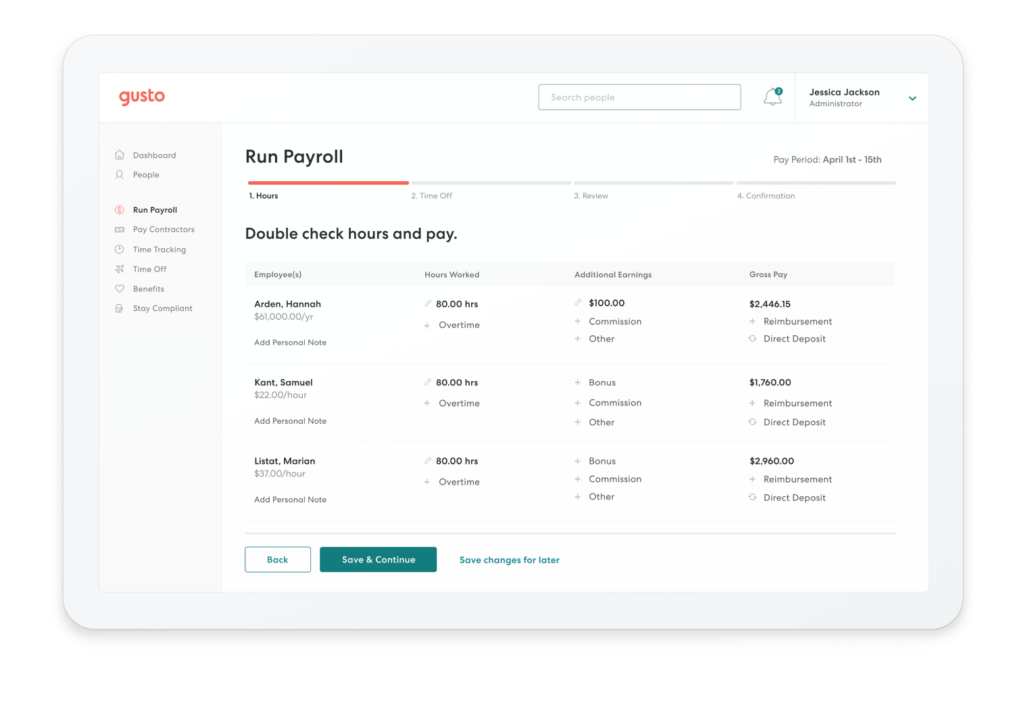
The user experience of Gusto is unparalleled too. It’s incredibly simple to use even if you’re completely inexperienced with online payroll services.
Not only does Gusto calculate your taxes, but it files everything for you. Local, state, and federal taxes are automatically paid to the right government office each time you run payroll. This benefit is 100% free, while competitors charge extra for it.
I love Gusto’s onboarding process for each employee. Whether you have a new W-2 hire or 1099 contractor, they can onboard themselves.
Your staff will have easy access to pay stubs, W-2s, and everything else they need online. Even former employees will still be able to view old payroll information.
Gusto offers unlimited payroll cycles, meaning you can issue payments whenever you want. You’re not locked into weekly or bi-weekly cycles.
Gusto helps you with compliance, time-tracking, PTO, employee benefits, and more, in addition to being a full-service online payroll company.
Pricing for Gusto is as follows:
Core — $39 per month
- $6 per month per person
- Employee self-service
- Health benefits administration
- Workers’ comp administration
- PTO policies
Complete — $39 per month
- $12 per month per person
- All Core features
- Employee offers and onboarding
- Time tracking
- Time-off requests
- Employee directory and surveys
Concierge — $149 per month
- $12 per month per person
- All Complete features
- Certified HR professionals
- HR resource center
The Core plan is perfect for small teams with basic payroll. As your team scales, you may want to upgrade to the Complete package. Gusto Concierge is designed for larger businesses as a full-service HR resource.
Workers’ comp and health benefits are free to integrate with Gusto. They don’t charge any administrative fees, so you’ll only pay for the premiums.
401k plans, 529 college savings plans, HSAs, FSAs, and commuter benefits come with additional monthly base rates, as well as extra charges for each participating employee.
Gusto has everything you need in an online payroll service. We use it here at QuickSprout, and I think it’s exceptional. The only potential drawback is the price. It used to be one of the cheapest payroll options on the market, which is no longer the case.
You can try Gusto free for one month. There is no charge for setting up an account, and you’ll only pay after you run your first payroll.
OnPay

- Starting at $36 per month
- Unlimited monthly pay cycles
- Automated tax filings
- Supports W-2 & 1099 workers
OnPay processes more than $50 billion in payroll each year. They’re reliable, secure, and you can bet they have all you need for your business.
The best part: They’re simple. There is just one plan to choose from, and it comes with everything you need all-inclusive. That’s why OnPay is my top recommendation for small business owners.
The all-in-one payroll service has straightforward and transparent pricing. It’s $36 per month plus $4 per employee.
This is a great value compared to some of the other options on our list, especially considering all of the features and benefits that you’ll get.
- Unlimited monthly pay cycles
- Automated tax filings and payments
- Supports W-2 and 1099 workers
- 2-day turnaround
- Pay via direct deposit, live check, or debit card
- Garnishments
- Flexible pay rates and schedules
- Unemployment insurance withholding
- 40+ reports
- Time-tracking integrations
OnPay also has specialized payroll solutions for businesses in specific industries with unique needs. Examples include restaurants (e.g. taxes, wage reporting), farming, nonprofits, and churches (e.g. tax exemptions).
Overall, OnPay is about as simple as it gets. You’ll get everything you need to run payroll for your small business, including HR benefits that can help negotiated mixed workforces (e.g. W2 employees and independent contractors). They’ll also work with the IRS on your behalf if there are any issues with taxes. . It’s easy to add on things like employee health and dental, workers’ comp, and retirement plans.
Employees can self service their own payroll too. Your staff can onboard themselves, access their accounts even after leaving the company, and change their personal information at any time. Employees can also manage voluntary deductions like their 401k plans directly online.
OnPay integrates with other software that you might be using to run your business, like QuickBooks, Xero, or TSheets.
Your first month using OnPay is free. They’ll also cover any migration costs from your old payroll provider.
The only major drawback of OnPay is that there they don’t have a mobile app. While the site is optimized for mobile devices, apps seem to be pretty standard in today’s day and age.
OnPay will charge you extra for any year-end forms that are mailed to your office or employees. But you could always print them out yourself to avoid those costs.
ADP Payroll

- Very popular payroll service
- Trusted by 700,000 small businesses
- Robust HR features
- Flexible plans
ADP Payroll is one of the most popular online payroll services out there.
They offer “payroll, global HCM, and outsourcing services” throughout 140+ countries worldwide.
When you take a look at their plans, you’ll see that they’re easily scalable too:
- Small business payroll. This is their service for smaller businesses with 1-49 employees. Great for start ups.
- Midsized to enterprise payroll. This is their service for bigger businesses with 50-1,000+ employees.
Across both levels, there are four different pricing plans your business can choose from. Expect everything from direct deposit and tax filings, to more unique benefits like legal assistance and HR training toolkits.
ADP Payroll also gives you hiring solutions. You’ll be able to conduct background checks, get access to 25,000+ job boards to find the right recruit, and also set up interview scheduling and offers of employment.
Their app integrations also benefit both employees and HR departments with perks like product discounts through LifeMart and integration with outsourced HR and a time clock software.
You’ll also be able to track your employees’ hours worked as well as manage their vacation days and PTO requests.
They help nearly 700,000 small businesses with their payroll solutions, according to their website. So you know you’ll be in good hands with them.
As for pricing, you’ll need to go to their website and get a free quote from them. Depending on the specific needs of your company though, you can expect to pay roughly $10 – $15 per employee.
Square Payroll

- Starting at $29 per month
- Get up and running fast
- Compatible with Square products
- Self-service onboarding
Square is best known for its POS software and credit card processing services. But Square Payroll is an excellent all-in-one payroll solution for any business.
The biggest draw of using Square Payroll is its compatibility with other Square solutions. So if you’re using Square POS, you can sync those timecards with your payroll system.
This is one of the best ways to digitally track employee hours without having to manually enter information for each pay cycle. Square will also help you calculate and split any employee credit card tips.
Another top benefit of Square Payroll is the setup. You can get up and running in just a few quick steps, all done online. Simply input your company info, add your workers’ information, and run your payroll.
Alternatively, you can invite your employees to enter their own information for self-service onboarding. Square Payroll has a great mobile app for managing payroll from anywhere.
Pricing for Square Payroll is affordable and straightforward. It costs $29 per month plus $5 per person paid.
Furthermore, Square Payroll offers a unique option for businesses paying contractors. It’s just $5 per contractor per month, with no base subscription fee. This is one of the most affordable pricing plans you’ll find.
Overall, Square Payroll is perfect for businesses already using the Square POS system. It’s got everything you need to process payroll.
With all of that said, I wouldn’t recommend it to larger businesses in need of more HR resources. Square Payroll is pretty limited in that sense.
QuickBooks Payroll
- Starting at $45 per month
- Easy integration with QuickBooks
- Full-service payroll
- Expert support
QuickBooks is best known for its small business accounting solutions. But the company also has an outstanding online payroll service that ranks high on our list.
QuickBooks Payroll is definitely something you should consider if you’re already using the company for bookkeeping software. You can easily add QuickBooks Payroll to your existing QuickBooks accounting plan.
The result will be a seamless all-in-one solution for your accounting, payroll, and HR needs.
All local, state, and federal taxes will be calculated and paid, automatically, each pay cycle. You can also run Auto Payroll after the initial set up to minimize the time spent running payroll each week.
One of my favorite parts about QuickBooks Payroll is that the company stands behind their product. They are so confident that their calculations will be accurate, that they’ll pay penalty fees incurred from filing errors.
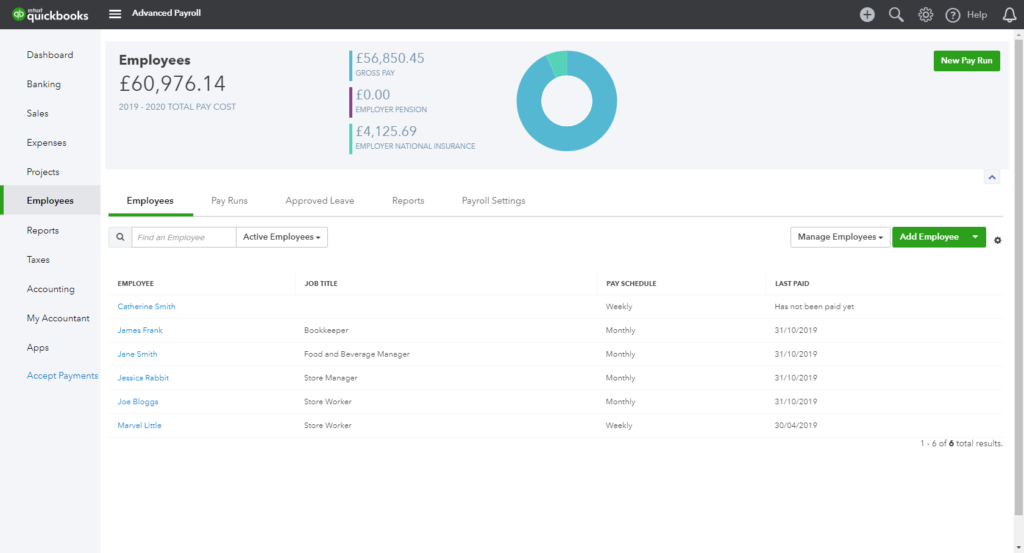
As you would probably expect, the biggest benefit of using QuickBooks Payroll is its integration with QuickBooks accounting software.
Your bookkeeping records and reports will be updated in real-time with each pay cycle. This also makes it easier for you to share payroll information with your accountant.
More than 1.4 million businesses use QuickBooks for payroll, so you know it’s a company and solution that you can trust.
Here’s a brief overview of the plans and pricing for QuickBooks Payroll:
Core — $45 per month
- $4 per month per employee
- Full-service payroll
- Auto payroll available
- Health benefits
- Expert support
- Next-day direct deposit
Premium — $75 per month
- $8 per month per employee
- All Core features
- Same-day direct deposit
- User permissions
- HR support center
- Premium time tracking with mobile app
Elite — $125 per month
- $10 per month per employee
- All Premium features
- Elite onboarding
- Elite time tracking with project planning and geofencing
- Tax penalty guarantee
- Personal HR advisor
Overall, QuickBooks Payroll is as solid as it gets. They offer exceptional customer support for such a large company. If you have any problems, questions, or need assistance, it’s easy to get things resolved.
QuickBooks Payroll falls a bit short in terms of employee benefits and HR guidance with all plans. But it’s still a top choice to consider, especially if you’re already using QuickBooks Online for your accounting needs. Click here to visit QuickBooks and learn more.
Paychex
- Starting at $59 per month
- Paychex Flex for large businesses
- 24/7 phone and live chat support
- Free mobile app
Paychex has been in the payroll business for nearly 50 years. They currently service the payroll needs of more than 650,000 companies.
Over the years, Paychex has evolved to adapt with the growing trends in the payroll industry. That’s what makes them such an appealing option for online payroll services.
While Paychex offers solutions for small business owners, I’d recommend this company to larger organizations seeking new payroll options.
The reason why Paychex is better for large corporations is because of its flexibility. Paychex offers solutions that go far and beyond basic payroll processing. They also provide HR administration, employee onboarding, background checks for new hires, and powerful analytics.
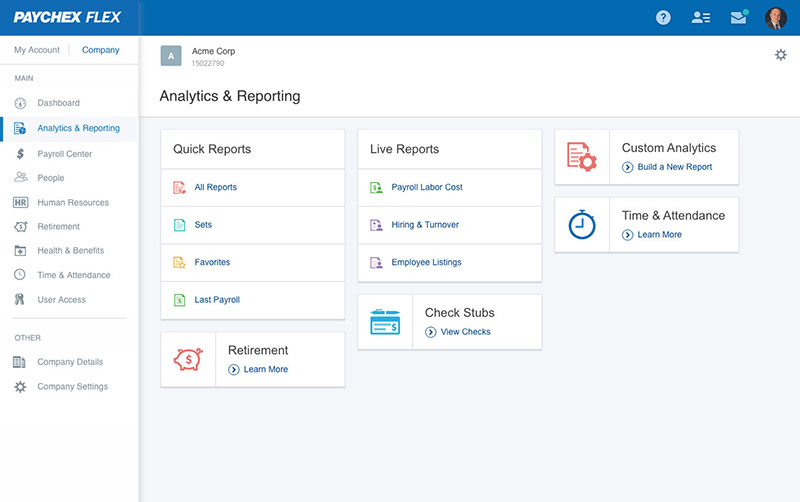
Depending on the plan you choose, employees can be paid via direct deposit, paper checks, or prepaid debit cards.
Paychex Go is the plan designed for small businesses. It starts at $59 per month plus $4 per employee. It’s easy to sign up and get started online by creating a free account. But overall the plan is pretty limited, and I’d look for other options as a small business owner.
Paychex Flex is the complete payroll and HR solution designed for larger companies. Pricing is customized based on your needs. Added benefits of Paychex Flex include:
- Free mobile app
- General ledger service
- Custom reports
- $1,000 in prepaid digital marketing services
- 24/7 phone and live chat support
- Dedicated payroll specialist
- Automatically deduct and remit garnished wages
The Flex plan also comes with employee services like extra payment options, onboarding essentials, HR administration, employee screening, and a financial wellness program.
I’d say the biggest downside of Paychex is that the sign up process isn’t as simple compared to some of the other options on our list. You’ll need to request a quote, so it’s not something that you can do on your own without any assistance.
SurePayroll

- Customized pricing
- Auto Payroll
- Helps you manage 401ks
- Exceptional customer support
SurePayroll has been around for about 20 years. In 2011, the company was acquired by Paychex. But it’s still run and sold as a separate payroll service, and it’s different from the Paychex plans that we reviewed earlier in this guide.
This payroll service is more equipped to meet the needs of small business owners, compared to its Paychex parent company.
All you need to do is enter the hours or salary for each employee, review the tax deductions, and approve the payroll to start processing. This is extremely easy for any small business owner to do online.
Run unlimited payrolls each month for no additional charge. You also have the option to run one-day and same-day payrolls.
If your business runs the same payroll each cycle, you can use Auto Payroll as a hands-off service.
SurePayroll helps you manage 401ks, HSAs, FSAs, commuter benefits, and garnishment deductions as well. They also have exceptional customer support via phone, email, and live chat. However, this is limited to six days per week during normal business hours.
In addition to small business owners, SurePayroll carves out a unique niche. They offer specific payroll solutions for nannys, caregivers, and other household employees.
This service helps homeowners avoid IRS fines and ensures compliance.
Like Paychex, you’ll need to request a quote from the sales team to learn more about your specific pricing options. So getting started isn’t necessarily a breeze. SurePayroll does offer two months free, which is one of the best promotions that I’ve seen in my research.
The Value of a Payroll Company
The main value of an online payroll company is simplifying your payroll process. Whether it’s for new hires, contractors, or just weekly payments for full-time employees, online payroll makes things easier.
With online payroll software, you don’t need to hire someone to manage payroll for you. The software takes care of everything, from tax filings to withholding deductions and more.
Another top benefit of online payroll is flexibility. Some companies offer on-demand payments, so your staff isn’t tied to specified pay cycles.
You’ll also have access to your entire payroll system from anywhere.
How to Find the Best Online Payroll Services
There are lots of different factors that need to be taken into consideration when you’re evaluating an online payroll service. This is the methodology that we used during our research to create this guide.
Business Size
Large and small business have different needs; payroll is no exception. A business with just five employees won’t be using the same payroll system as a company with 50 or 500 employees.
Recognize which payroll solutions are the best for your business size. If you’re planning on growing and hiring new people in the coming months or years, make sure you choose an online payroll solution that can scale with you.
Industry
Payroll can be as complex or as simple as the industry it serves.
For example, industries such as farms, nonprofits, food service, and contractor-reliant operations are going to require a more complex payroll system. Whereas a bootstrap startup with just three employees is going to be fairly simple.
Types of Employees
Who are you paying?
Most payroll services will accommodate businesses with full-time W-2 employees. However, there are better options if you have part-time staff or issue payments to independent contractors.
Automation
Your online payroll solution is supposed to make your life easier. So I always recommend systems with automated options.
If your payroll doesn’t change between each cycle, look for an option with an autopilot mode that allows you to just set it and forget it. The best online payroll services will automatically calculate and file taxes as well as other withholdings.
Employee Self-Service
If you choose an online payroll service that is employee-friendly, it’s going to make your life much easier too. The best payroll software allows employees to edit their personal information, manage their benefits and taxes, as well as view old pay stubs.
You can even find payroll services that offer self-onboarding for employees. Just invite them to join so they can enter personal details and bank information. Your W-2 and 1099 workers can use the self-service features to access tax documents each year, instead of you having to print and mail them on your own.
Benefits
Not every payroll system has built-in options for you to set up and manage employee benefits. I’m referring to things like:
- Workers’ compensation
- 401k plans
- HSAs
- Health insurance
- Vision and dental
So if you’re offering these types of benefits to your employees, you need to find a payroll system that’s accommodating.
Pay Cycles
How often do you want to run payroll?
Lots of online payroll systems won’t restrict you to just once per week or twice per month. There are plenty of options out there that offer unlimited payroll each month.
This is great for those of you who don’t want to be tied into a specific schedule. In some instances, you can even let your employees decide when and how they get paid.
Maybe you want employees on salary to get paid automatically each week. But you want to manually pay independent contractors for specific amounts only once per month. There are online payroll services that let you do both with ease.
Price
The cost of your payroll service will obviously be a factor in your decision.
In many cases, payroll plans are structured by a fixed monthly rate and an additional fee per employee. The monthly rates can range anywhere from $30 to $150. We’ve seen employee fees start as low as $4 per month and get as high as $12.
The price you pay will also have an impact on the features of your plan. If you’re looking for a full-service HR solution in addition to traditional payroll, you can expect to pay on the higher end of this spectrum.
Conclusion
Every business needs a payroll solution. But not every online payroll service is created equally. There are definitely options on the market that are better than others.
What’s the best online payroll service? The answer is different for each business owner. Here’s a quick recap of the best choices based on our methodology:
Whether you have a small business, large corporation, or have unique payroll needs, there is definitely a solution for you in this guide.


from Quick Sprout https://ift.tt/2sOeAm8
via IFTTT