A business without a CRM is at a disadvantage.
It is extremely tough to manage all of your customers while keeping track of everything else without any dedicated system. Leads are dropped, opportunities are missed.
The good news is that CRM software can help you automate and efficiently manage all these customer-related processes. The great news? A lot of the CRM software available today is free.
This software allows you to take all of your data across multiple platforms and departments and store it in one convenient place.
I’ve put together a list of the best free CRM software tools to help you decide which is right for your business.
The Top 8 Best Free CRM Software Tools:
- HubSpot — The Best Free CRM for Massive Contact Lists
- Insightly — The Best Free CRM Software for Project Management
- Streak — The Best Free CRM Software for Gmail
- SuiteCRM — The Best Free Open-Source CRM Software
- Flowlu — The Best Free CRM Software for Financial Management
- Freshworks — The Best Free CRM for Tech Support
- Bitrix24 — The Best Free CRM For Your First Year In Business
- Really Simple Systems — The Best Free CRM for Sales Forecasting
Now you know the list of free CRMs I’ll be reviewing, let’s dive into each of them.
#1 – HubSpot — The Best Free CRM for Massive Contact Lists

- Up to a million contacts, forever
- Track all contact records easily
- Forms and popups included
- Live chatbot available


HubSpot is a great choice when it comes to the number of contacts it offers. You’re looking at 1,000,000 contacts with no time limit or expiration date—no matter the size of your team.
There’s no doubt such a vast number of contacts would be more suitable for larger businesses in general, but it’s also a useful feature to have as you grow your business. You won’t have to worry about maxing your contact list out any time soon.
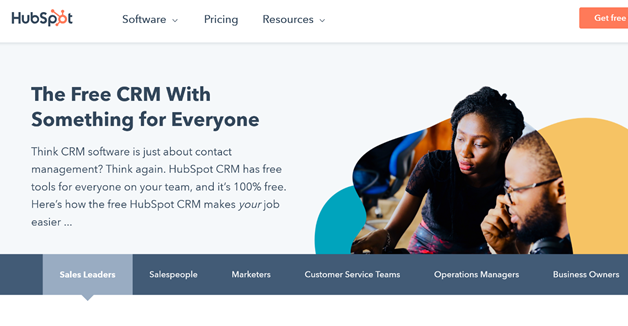
The CRM software’s contact records allow you to view everything about a contact, too. From your history of emails to the calls, meetings, and deals you’ve made.
Additional options include the ability to create forms and popups where you can start to acquire data about a contact, and there’s even a live chatbot to gather information and schedule meetings for your business.
In other words, HubSpot is aware of just how vital customer data is and keeps it all in a readily accessible place.
Other features of the CRM include:
- Email tracking
- You can set recurring tasks
- Shared history options
- Sales automation
- Social media integration
- Task planning, scheduling, and tracking
- Live chatbots to capture leads
- Call monitoring and email monitoring
I’ve said the HubSpot CRM is free to use, and that’s true, but there are extra features available for those that want more. For instance, higher pricing tiers allow for automation, traffic analytics, user roles, and Salesforce integration, to name a few.
It’s a good idea to get familiar with the CRM first before deciding which of these enhanced features you need.
#2 – Insightly — The Best Free CRM Software for Project Management

- Easy, accessible project pipeline
- Project automation included
- Pre-built project templates
- Gmail add-on available
Managing projects, large and small, is at the core of any business. You’ll need a robust system to be able to handle day-to-day operations. Insightly is my top pick for free CRM software that can manage multiple projects of all sizes.
Each project and sale are presented in an easy-to-use pipeline that you can customize to fit your business. What’s more, recurring projects can be automated to keep things running smoothly while saving you time.
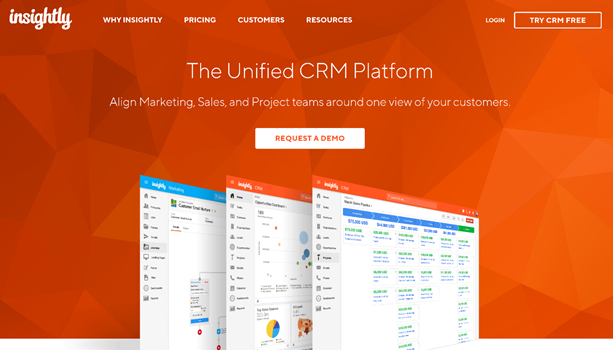
It’s worth mentioning that the free version of Insightly is aimed at a two-person team, but higher pricing tiers can provide you with more users. It’s a good starting point to see what the software can do, but it wouldn’t be suitable for larger teams.
Perhaps the most significant thing is that Insightly is just so simple to use for everything from building email campaigns to using pre-built templates for other crucial projects.
Visually speaking, you can also expect a clean, clear, and highly functional CRM that gets the job done without the fuss.
Project management proficiency aside for one second, Insightly also provides the following features:
- Native iOS and Android mobile apps
- Permission management
- Powerful Google and Microsoft calendar integration
- Quote generation
- Reporting and statistics
- Scheduled reporting
- Social media integration
- Tags and keywords
A useful Gmail add-on also allows you to view email opens, create leads, and projects.
The three tiers available for Insightly are Plus, Professional, and Enterprise. Plus starts at $29 per user per month and is billed annually. Professional and Enterprise are $49 and $99 per user per month, respectively.
#3 – Streak — The Best Free CRM Software for Gmail
- Fully integrates into Gmail
- Create pipelines in your inbox
- Auto-populate contact info
- “Integrate
I mentioned that Insightly had a Gmail add-on to help you manage projects from your inbox, but Streak takes that concept to the next level.
Simply put, this free CRM software allows you to control your entire business through Gmail. There’s no additional app or platform to log in and manage—it literally lives inside your inbox.
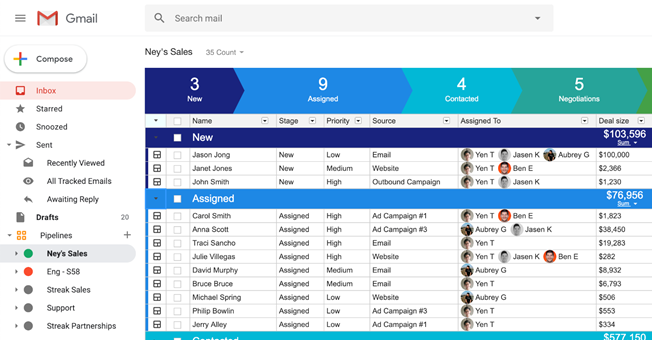
The immediate advantage of this is that you can use a familiar and most likely already frequently used email platform for so much more. For example, Streak allows you to create pre-made pipelines for your business projects, sales, and lead lists, all within the email interface.
Even more impressively, contact details from your emails can seamlessly be pulled into Streak, including company information. This process auto-populates, too, giving you more information to work with in less time.
Keep in mind that Streak’s free plan is for two users only. While you can certainly do everything you could possibly need with that in the right situation, larger teams will miss out unless you upgrade to the paid-for plans.
Other features of Streak include:
- “Send later” email scheduling
- Mass email/mail merge
- API access (including webhooks)
- Tasks/reminder/Google Calendar integration
- Import/Export via Google Sheets
- Call logs
- Meeting notes
There are four pricing plans for Streak overall, including the free plan. Solo starts at $15 per user per month, Pro is $49, and Enterprise is $129, each with increasingly more features.
#4 – SuiteCRM — The Best Free Open-Source CRM Software
- Massive customization capabilities
- Wide range of free add-ons
- Self-hosting available
- 30-day free trial on paid upgrades
One of the best things about SuiteCRM is that it’s both free and open-source CRM software.
By open-source, I mean the software itself can be customized almost any way you want. It also means it’s available to the public to enhance it collaboratively.
SuiteCRM is an excellent choice for businesses with a particular need to modify the software to their liking.
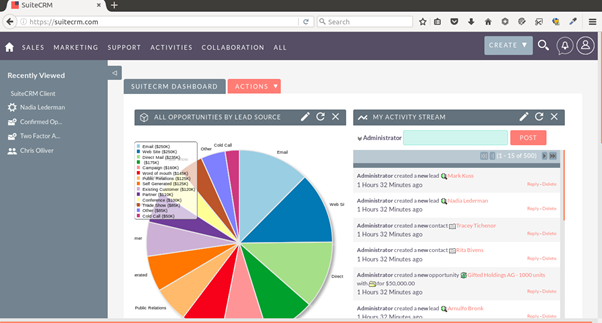
For example, let’s say you’re a business that needs the functionality of collecting multiple leads from numerous sources and then converting them into customers. Not a problem. SuiteCRM’s open-source and flexible nature allows you to tailor its modules to your bespoke goals.
Even better, there’s a wide variety of free add-ons that can be downloaded and added to the software to help you further achieve specific goals.
Other features include the following:
- Customer support
- Marketing automation
- Landing pages and web forms
- Calendar management
- Client portals
- Contact database
- Real-time data and reporting
- Sales reporting
- Search functionality
- Third-party integrations
The pure SuiteCRM is free to use and doesn’t expire, so there won’t be many extra costs from that point. You’ll be able to self-host the CRM, too, if you desire. However, it’s worth noting that customer support is only available through the forum for all but the highest package.
The other versions of SuiteCRM, which are hosted, and can be scaled to your business, are not free to use indefinitely—be aware that very few hosted CRMs are—but they do come with a 30-day trial, giving you more than enough time to decide.
#5 – Flowlu — The Best Free CRM Software for Financial Management
- Custom financial transactions
- Automatic status updates
- Auto-sent customer communication
- Five possible upgrades available
Flowlu shines on the financial side of things, making it a top choice for businesses that produce many invoices and need to keep up to date with transactions. If that’s you, then you might just have found the right software.
The creators consider it to be “business management software” first and foremost. There’s a deep focus on quotes, payments, and other financial priorities.
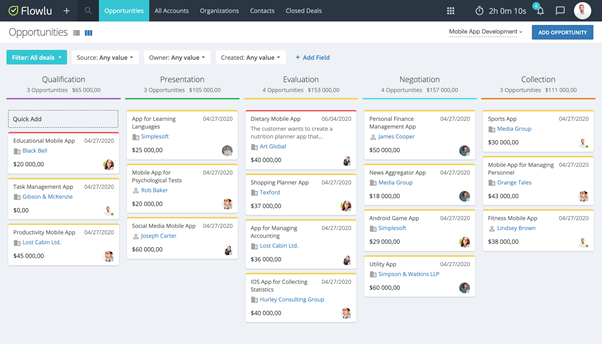
If you’re selling to a customer, for example, then you can create a custom invoice, choose your preferred payment method, and when you’ve been paid, the status of the invoice will update automatically.
What’s more, an automatic email can be sent out to the customer thanking them, and the entire transaction is then logged in the invoice record. Handy indeed.
Flowlu also includes the following valuable features:
- Mind maps
- Records and revenue management
- Sales reporting
- Security and encryption
- Status tracking
- Task management
- Time tracking
- Workflow management
Flowlu is free CRM software, but it’s worth mentioning that quite a few features are locked out if you remain on the initial plan. If you’re a business that needs multiple accounts for a large team, keep in mind that the free plan only offers two places and no user access control.
There are five overall tiers to the pricing, with the Enterprise plan offering everything along with a custom domain and two-factor authentication for extra security.
#6 – Freshworks — The Best Free CRM for Tech Support
- 24-hour weekday support
- Phone and email support included
- “Wide
- 21-day free trial of paid upgrades
How important is tech support for your business? If the answer is very important, then Freshworks is an excellent choice. Freshworks’ free CRM software comes with phone and email support five days a week, 24 hours a day.
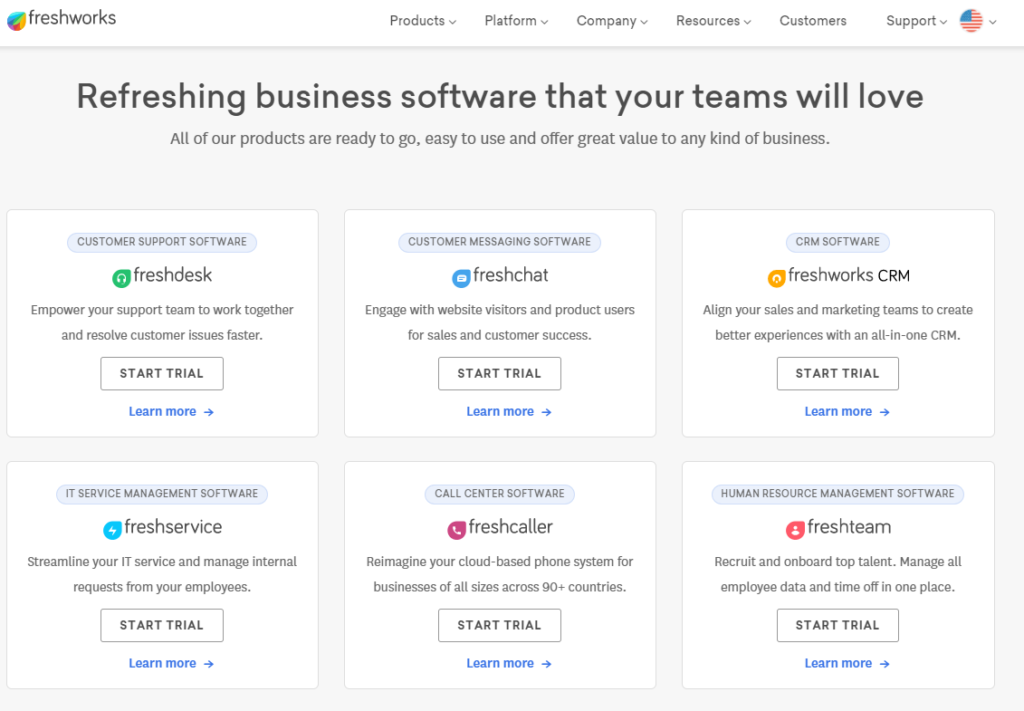
The highly-rated customer support makes this software ideal for smaller businesses, especially when ongoing help and care are crucial to long-term success.
With that said, any business that puts customer support as a top priority on their list should consider the software.
Some of the other highlights of the Freshworks CRM include the following:
- Lead scoring
- Lost deal analysis
- Mobile integration
- Open and click notifications
- Pipeline dashboard
- Preview reports
- Record calls
- Revenue analytics
- Sales campaigns
- Team segmentation
Individual add-ons can improve the CRM software further, but these can quickly become costly, which seems somewhat at odds with the rest of what Freshworks offers.
Still, I’m nitpicking here, and you shouldn’t let that stop you from checking the software out.
The best part is the startup plan that offers top-notch support is free forever, making it a generous proposal. Pricing for other plans starts at $29 per month per user. The free trial of the more advanced tiers includes everything, too, and gives you 21 days to see whether the software is worth buying.
The top tier of the pricing even features a dedicated account manager that can personally resolve issues and relay information to other specialists. Either way, whatever choice you make, Freshworks is unlikely to let your team down.
#7 – Bitrix24 — The Best Free CRM For Your First Year In Business
- Serves up to 12 users
- 5 GB storage included
- “Task
- Free trial of full platform available
While other CRMs on this list offer a free trial of their software, some even indefinitely, they are typically held back by limited features or a smaller number of users.
That’s where Bitrix24 comes in, and really, the strongest point about this CRM software is that the starting free plan provides businesses with enough to really get going. For some small companies, it may even be all they need.
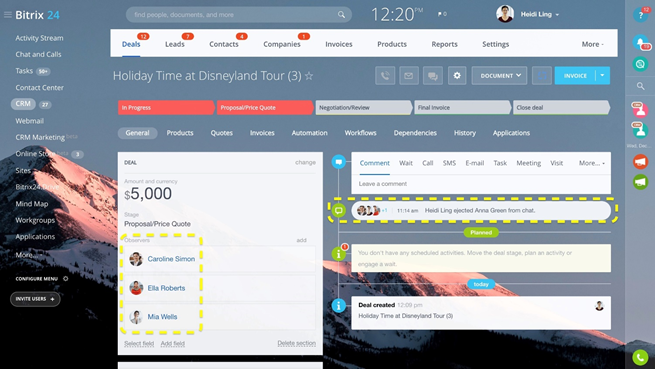
Bitrix24 provides a cloud-based CRM for up to 12 users, 5 GB of online storage, and most of the significant features of the other plans just scaled down a bit.
In other words, for the cost of $0, you’re getting an awful lot. It also allows you to try the software out, almost in its entirety, before deciding to opt for a more premium plan. It’s a good deal, and I’m impressed.
Other features of Bitrix24 include:
- Landing page creator
- Group chats
- Badges
- Ticket management
- Website forms
- Approval workflows
- Voice and video calls / conferencing
- Synchronous document editing
- Version control
- Customizable callback widget
- Document management
- Task management
Of course, just because the free starting plan is generous doesn’t mean that Bitrix24 is necessarily the best free CRM for your business.
For example, I think the customization features of Bitrix24 aren’t the strongest, and the UI can be confusing to navigate.
But for just getting your business off the ground, it’s a very solid choice.
#8 – Really Simple Systems — The Best Free CRM for Sales Forecasting
- Weighted and unweighted forecasting
- Mitigate long-term risk
- Customer support included free
- Auto-populate customer data
Sales forecasting is a vital part of any business, allowing you to see your available budget and what a given strategy or route will potentially return to you. It also helps mitigate risk, keeping your business healthy in the long term.
As the name suggests, Really Simple Systems makes sales forecasting as simple as it needs to be. This free CRM software provides you with a weighted and unweighted revenue forecast for all of your projects.
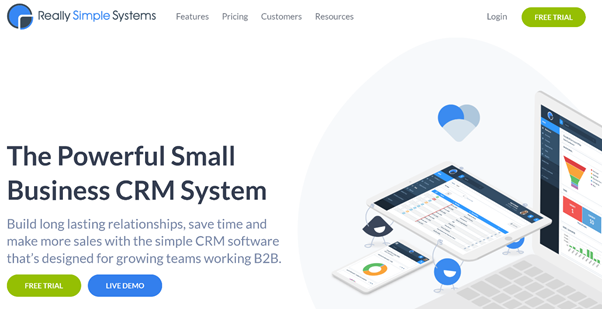
Effectively, the weighted figure gives your business a clear understanding and probability of closing a deal. The fields in which this data is located can be auto-populated, too, saving essential time for other areas and giving you more data to work with overall.
Accuracy is key to sales forecasting, and the more data you have, the more accurate you’ll be.
Other features I like in the Really Simple Systems free CRM are:
- Free customer support
- Two-way email integration
- Quotations
- User permission levels
- Integrated marketing module
- Web-to-Lead forms
- Automated campaigns
- In-product help drawers and tutorials
The free plan of Really Simple Systems isn’t free forever, and after the trial expires, you’ll need to upgrade to one of their other plans. It’s also worth mentioning that the free plan lacks quite a few features of the other more premium plans, including email integration, user profiles, and design templates.
The Starter package is $14 per user per month, the Professional is $30, and the Enterprise plan is $46 per user per month. The document storage on the free tier is only 100 MB, which can be easily used—if that’s important for your business, another CRM plan might be better.
How to Find The Best Free CRM Software For You
You’re interested in a free CRM, but you’re not sure which? Fret not. Here, I’ll explain the CRM categories and then go into the specific factors to consider in your search.
The first thing to think about is the kind of CRM you want for your business.
There are three main types of CRM software to consider:
- Operational
- Analytical
- Collaborative
The difference between these types of CRMs is the areas they focus on overall.
For example, an operational CRM system focuses on capturing leads and streamlines and automates the process. It would be suitable—although not exclusively—for small businesses that prefer automation and those which run a linear sales process. HubSpot is an example of an operational CRM.
An analytical CRM is all about the data, as you might assume from the name. So, here we’re talking about customer data and the insights you can get from it. Information from multiple channels will be structured and available for a team to use—for example, they might use the data which details customer preferences to improve customer relationships. Freshworks CRM delivers robust analytics through custom reports and a win-loss analysis.
The last type is the collaborative CRM. This is CRM software that looks at all of the interactions a business has with its customers. The central aim is to share customer information between departments to bolster the overall customer service and eliminate problems. This would be suitable for businesses with many different departments and those happy to share the data around in a considerable manner. Bitrix24 is an example of a good collaborative CRM.
In addition to the above three types of CRMs, these are the other key factors you need to think about when deciding on the right free CRM software for you:
Self-Hosted vs. Hosted
A CRM system can be self-hosted or hosted. What that essentially means is the difference between sorting out the server and security for yourself or letting someone else take care of it.
For example, most of the free CRMs on this list can take care of the hosting for you, and it’s included in almost all of the free and paid plans. SuiteCRM is an example of software that can be self-hosted or hosted through the cloud.
There are advantages and disadvantages of self-hosting vs. hosting a CRM.
In a nutshell, self-hosting gives you more control and is generally cheaper, but you will have to potentially manage and fix any problems that occur, such as a cybersecurity attack.
Hosted CRMs are generally more expensive and give you less control—in theory—but you have access to top customer service teams and better infrastructure. It’s the peace of mind knowing that any problems will be fixed by a team of experts that make this a popular choice, certainly for larger businesses.
Number of Users
The number of users that free CRM software allows varies greatly. As you might expect, most of the free CRMs on this list limit the number of users on the free plan but significantly increase it on the paid plans. My advice is to think carefully about the number of users your business needs.
For instance, does your business consist of a large team? Or maybe it’s a two-person effort?
Bitrix24 is generous and offers 12 users on their free plan, while conversely, Insightly is aimed at two people on their initial offering. The last thing you want is a team member locked out of the software. However, a two-person setup might be all you need.
Customer Support
The level of total customer support you’ll receive when using a free CRM isn’t consistent across the board. For example, Freshworks provides customer support five days a week on their free plan, while Flowlu and Streak’s offering is more basic.
It comes down to what your company needs right now.
Is it crucial that you receive as good customer support as possible at this stage in your business? Or would you rather test the waters with a free CRM and then upgrade later for better support? Think about what you need in your situation.
Type of Free Plan
The type of free plan on offer with CRM software fits into one of two main scenarios: the software is free forever but is probably limited in some ways. Or, there’s a free trial available for the software with most of the key features available, but once it expires, you will have to upgrade to a paid plan.
For instance, on our list, we can see that SuiteCRM is free forever but limited in some features, but if you’re happy with what that offers, you need not pay anymore. Others, such as Really Simple Systems, have free trials, and once they expire, you will need to move onto a paid plan to continue to access it.
The critical question is: what’s best for you and your business right now?
Summary
There isn’t any free CRM software on this list I would recommend entirely over the others because it really does depend on your business context. The one thing I can say for sure is that every single one of them has plenty to offer.
If you’re looking for customer service as a top priority, go for Freshworks, but if financial management is more the thing you need, Flowlu is a good bet. For a great free starting plan, Bitrix24 has you covered.
Maybe managing everything from Gmail is important. If so, I say go for Streak. Or perhaps powerful sales forecasting is what you’re after instead? In that case, Really Simple Systems is a strong choice.
Need CRM software that can manage countless contacts? HubSpot offers 1,000,000. For everything project management, you should turn to Insightly, and SuiteCRM is an open-source delight.
Use this guide carefully, and you’ll be up and running with free CRM software before you know it.


from Quick Sprout https://ift.tt/3EdRs05
via IFTTT