Friday, August 10, 2018

How to Correctly Manage Customer Testimonials to Increase Your Brand Credibility

Establishing credibility is important for all businesses.

There are only so many brand names today that speak for themselves. I’m referring to global giants such as Apple, Nike, and Walmart.

In these instances, consumers know those companies are legitimate. But the rest of us need all the help we can get to establish our credibility.

That’s why in the past, I’ve identified the top elements adding credibility to your website. Today, I want to explain one of those elements in much greater detail.

Customer testimonials.

Those of you currently displaying customer testimonials on your websites are off to the right start. But there is always room for improvement.

If you’re not using customer testimonials, that needs to change.

One of the reasons why these testimonials are so valuable for your business is because they create social proof.

Exactly how much of an impact will this have on your conversions? Here are some numbers you should take into consideration:

  • 92% of consumers say they read testimonials and customer reviews when they are deciding to make a purchase
  • 72% of consumers trust businesses more if they read positive testimonials about those businesses
  • 88% of consumers trust these testimonials just as much as a personal recommendation.

One of the best ways to learn how to do something is by following the examples of those who succeeded before you. I found some great examples of existing companies doing this right.

I’ll show you a bunch of different tips and tricks to help you correctly manage your customer testimonials. Here’s what you need to do to succeed.

Add a photo of the customer

Reading text without any visuals is boring. But adding photos will draw more attention to your testimonials.

Not sure what photos to add? Instead of using a stock image, use a photo of the customer who wrote the testimonial.

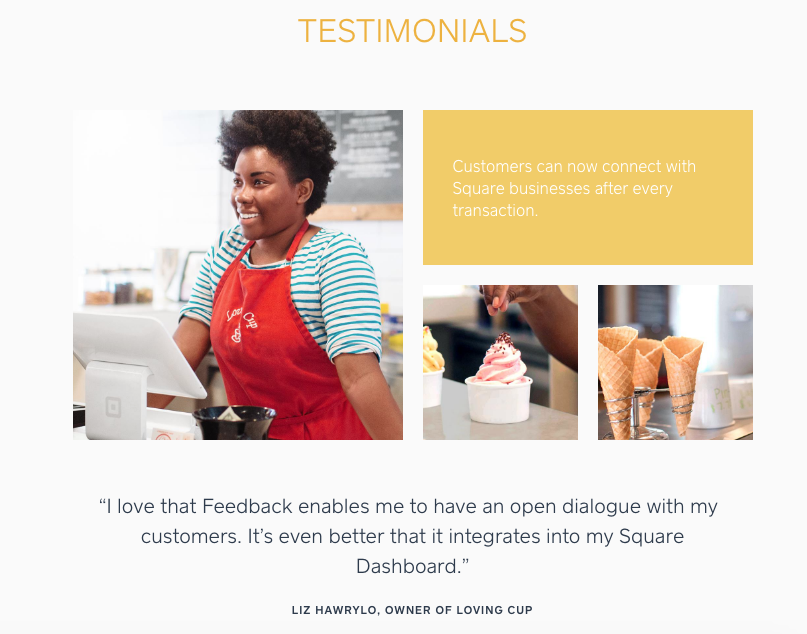
Check out this example from the Square testimonials page:
square

I really like the way this review is displayed.

It’s clean, neat, visually appealing, and easy to read. The images draw your eyes to the review.

Including a picture of the person who wrote the review makes it more personal. It shows that your testimonials weren’t fabricated.

People reading this can do some research and find out whether the reviewer actually exists.

If you use this strategy for designing your testimonials page, make sure the testimonials look professional. Refer back to the example above. The images are nearly flawless.

If you aren’t great at taking pictures, review my guide on how to take and edit photos without hiring a professional.

If the images look like they were taken on a flip phone from 2003, they won’t add credibility to your website. But a clean photo of the reviewer will make a huge difference.

Showcase the top testimonials on your homepage

Some of you may have your reviews in a separate section of your website. There’s nothing wrong with that.

In fact, I’ll discuss why it’s important to have a page dedicated to reviews and testimonials shortly.

That said, these testimonials shouldn’t be buried. Find your top testimonials, and add them to your homepage.

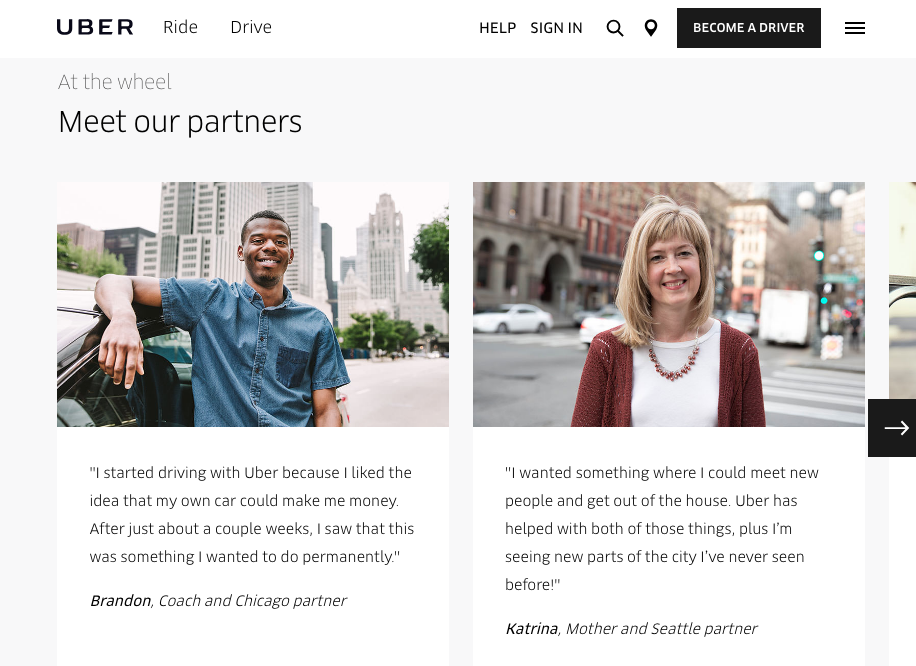
Here’s an example from the Uber website:
uber

If you scroll down the homepage, you’ll come across these testimonials from the company’s drivers.

When we think of Uber, we normally associate it with the brand providing people with transportation. However, Uber also needs to make it appealing to drivers to join its platform, or its operation won’t work.

That’s why it used these testimonials to appeal to prospective drivers.

These reviews from current drivers will help encourage other people to drive for the Uber network. Uber plastered these testimonials directly on its homepage.

As you can see, the company also included professional photographs of the people who wrote the reviews—a topic discussed above.

Now the testimonials have much more value than they would if they were just words without any visuals.

Those of you who already have lots of testimonials have an advantage over everyone else. Read through them, and select the top two or three to showcase on your homepage.

Share the customer’s credentials

You already know a photo of the customer is important. But what else can add credibility to the testimonial?

Show your website visitors who the customer is and what they do, assuming it’s relevant to your products and services.

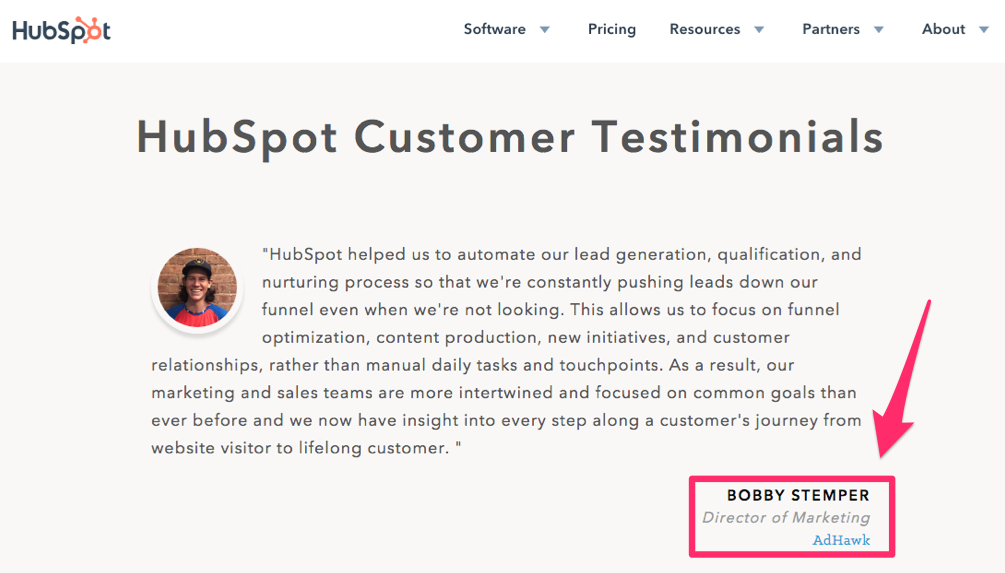
Let’s look at an example from HubSpot:
hubspot

If you are not familiar with this brand, HubSpot offers software designed for sales and inbound marketing.

Now, take a look at this testimonial. It’s from the director of marketing at AdHawk, another company in the digital advertising space.

Showing the customer’s credentials here is extremely relevant.

If the director of marketing at an advertising company was happy with the service, it will encourage other prospective customers to make a purchase as well. This definitely adds credibility to the brand.

Think of ways you can use the same concept on your own website.

For example, let’s say you own a business selling health and wellness supplements. Getting a testimonial from a doctor or physical therapist would add more credibility to your brand as opposed to a testimonial from a lawyer.

Sure, a lawyer may be perceived as someone who is intelligent and powerful, but it’s not relevant in this specific instance. Do you see the difference?

It may be an easy fix for you to add these credentials to your testimonials. You probably already have that information on file. Now just update it on your website.

Create a separate landing page specifically for testimonials

As I said before, you should create a dedicated landing page for customer testimonials.

Yes, your best ones should be highlighted and showcased on your homepage. But it wouldn’t make sense to fit dozens of these reviews on the first page of your site.

You should have a separate page because the volume of reviews will add credibility to the feedback.

Consumers are smarter than you give them credit for. They realize you wouldn’t put a negative review on your homepage. But how do the rest of your customers feel about you?

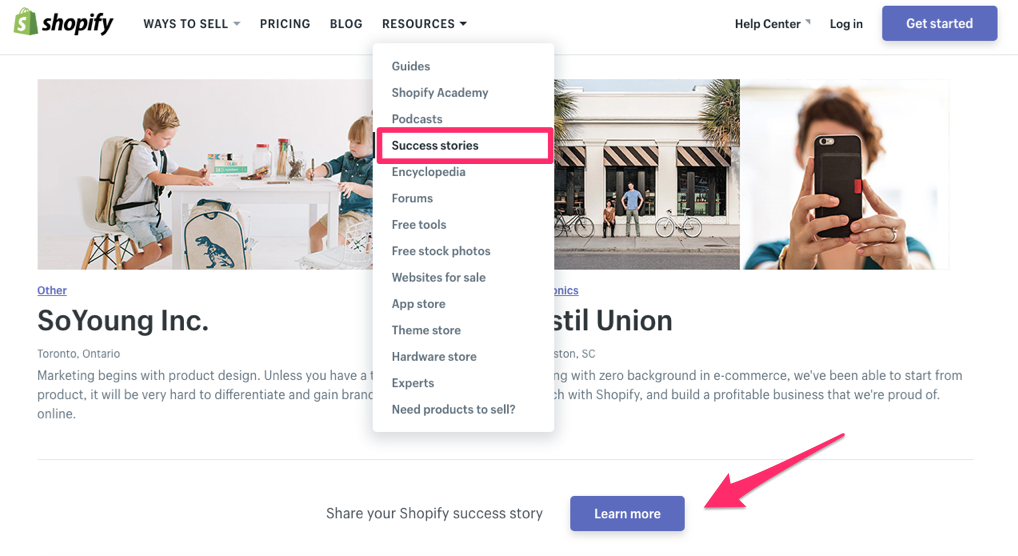
Website visitors will be able to find this information by navigating to your testimonials page. Here’s what this landing page looks like on the Shopify website:
shopify

One of my favorite parts about this page is the title. Rather than calling it the customer testimonials page, the brand refers to these reviews as customer success stories.

Automatically, these testimonials are perceived in a positive light.

Notice what I pointed out at the bottom of this page as well. The company asks customers to share their success stories. I’ll talk more about asking for testimonials in greater detail shortly.

This is another winning strategy for testimonial pages.

Highlight the best quotes

We’ve already talked about highlighting the best reviews. This strategy is very similar to that.

Some testimonials may be longer than others.

If a review is too long, website visitors might be less inclined to read the entire thing. But you still want to display these favorable reviews on your homepage.

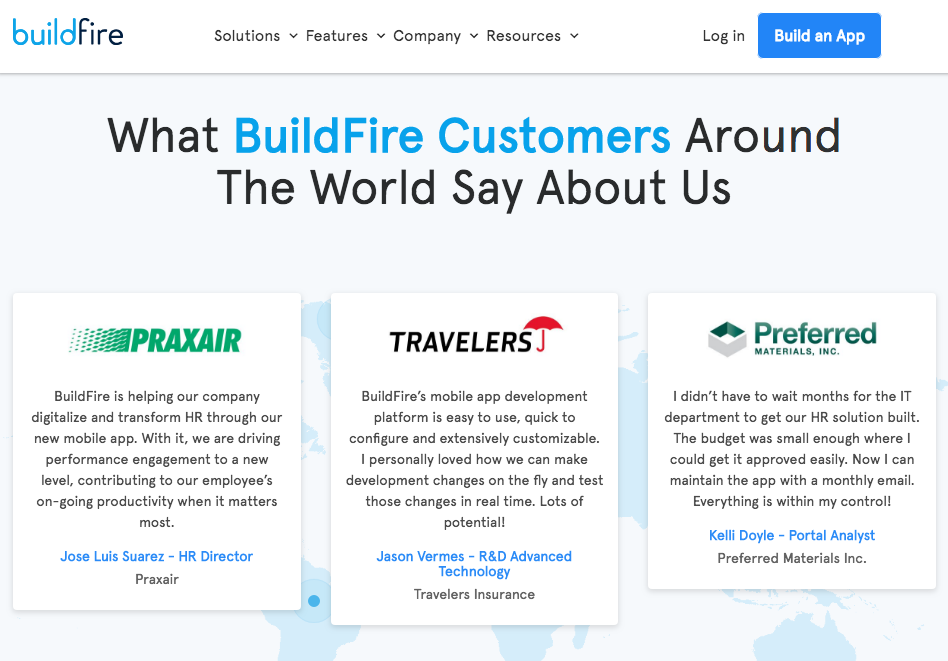
Take a snippet of those reviews, and highlight the best quotes from the longer testimonial. Look at how BuildFire implemented this strategy on its website:
buildfire

BuildFire is a platform for developing custom mobile applications.

It took three quotes from different customer testimonials and showcased them on its homepage. BuildFire did a lot of things right with this strategy.

First of all, it used three very different companies.

Praxair is a brand that supplies industrial gases. Travelers is an insurance company. Preferred Materials is an asphalt and paving company.

None of these businesses are related to one another.

Now, this may sound contradictory to what I said earlier in terms of providing relevant testimonials. But every business in any industry can benefit from a mobile application.

This idea is clearly displayed here by showing versatility of the app across multiple industries. Plus, these testimonials also include the credentials of the reviewer, which I previously discussed.

Ask your customers to provide a testimonial

How are you getting customer testimonials?

You can’t get something without asking. Get out there, and simply ask your customers to leave a review.

Ask right away. If you wait too long, your brand and the experience the customer had with you won’t be fresh in the customer’s head.

Be polite. Make it easy for the customer to leave a testimonial.

If you don’t get a response, you can follow up with them one more time. That’s it. Don’t be annoying or pester them for a review.

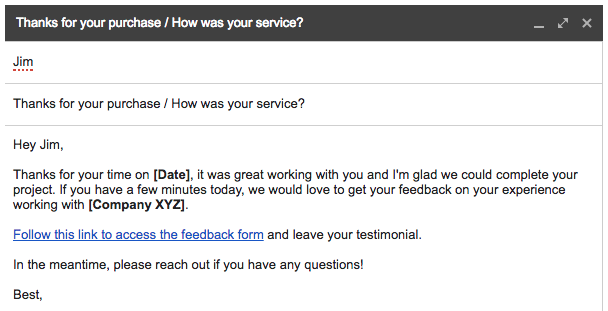
Here’s a great example of an email template that can be used when you’re asking for testimonials:
email

It’s short, sweet, and direct.

Use this template as a reference when you’re creating an email soliciting new testimonials.

Use a star-rating method

In addition to written testimonials, you can also incorporate a star-rating system.

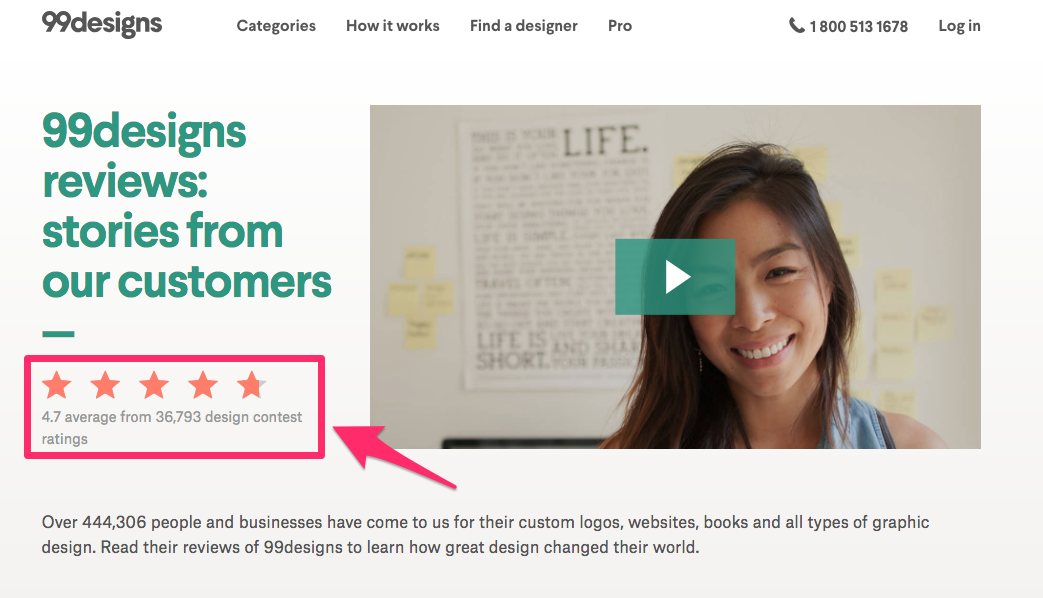
Check out this example from 99designs to see what I’m talking about:
99designs

This is relevant to the discussion about power in numbers. It’s easy for you to say your customers rate you 5 out of 5 stars.

But how many people rated you? If you have a 5-star ranking but only three people left a review, it’s not significant.

Refer back to the example above. 99designs has a 4.7-star rating from over 36,000 reviews.

In a weird way, it’s almost better it’s not a perfect 5-star review. If 36,000 people all gave your business a perfect score, it would be a little odd. Somewhere along the line, customers won’t have the best experience.

That’s OK.

These less than favorable testimonials will make the positive ones even more credible. It shows people your testimonials are legitimate.

Plus, a ranking scale like in the example above will increase your chances of getting more testimonials. It takes only a second to click on a star as opposed to several minutes to type up a written review.

Add testimonials to your product descriptions

All right. I’ve already said you should include customer testimonials on your homepage in addition to having a separate landing page.

But these are not the only places on your website where you can incorporate these reviews.

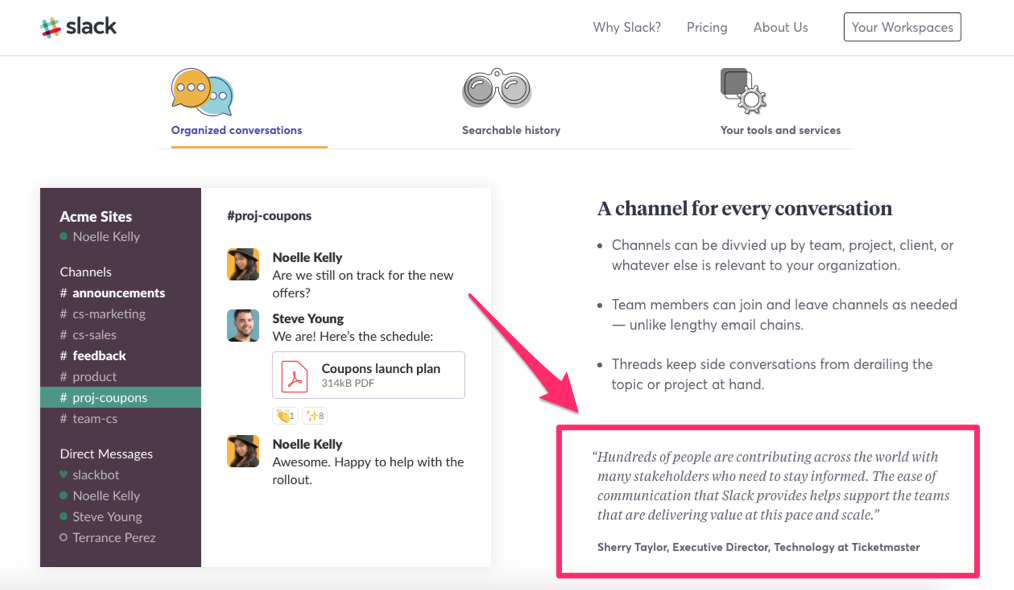
Try adding a testimonial to a product description page. Look at this example from Slack:
slack

This landing page is for the company’s product features. It’s giving an overview of the way the conversations on this communication platform are organized.

It includes a relevant customer testimonial in the bottom right corner.

The executive director of technology at a major company explains how his business uses Slack to communicate with people all over the world.

This endorsement is perfect for this product description page.

Include video testimonials

In addition to written testimonials, you can also incorporate video testimonials on your website.

A video has the same impact as a photo of the reviewer.

Adding a face to the review shows that it’s legitimate. Ultimately, it adds more credibility to your brand.

Furthermore, videos give off more emotion than photos. It’s a much more authentic representation of how the reviewer feels about your brand.

Here’s a look at how ChatNow uses video testimonials on its website:
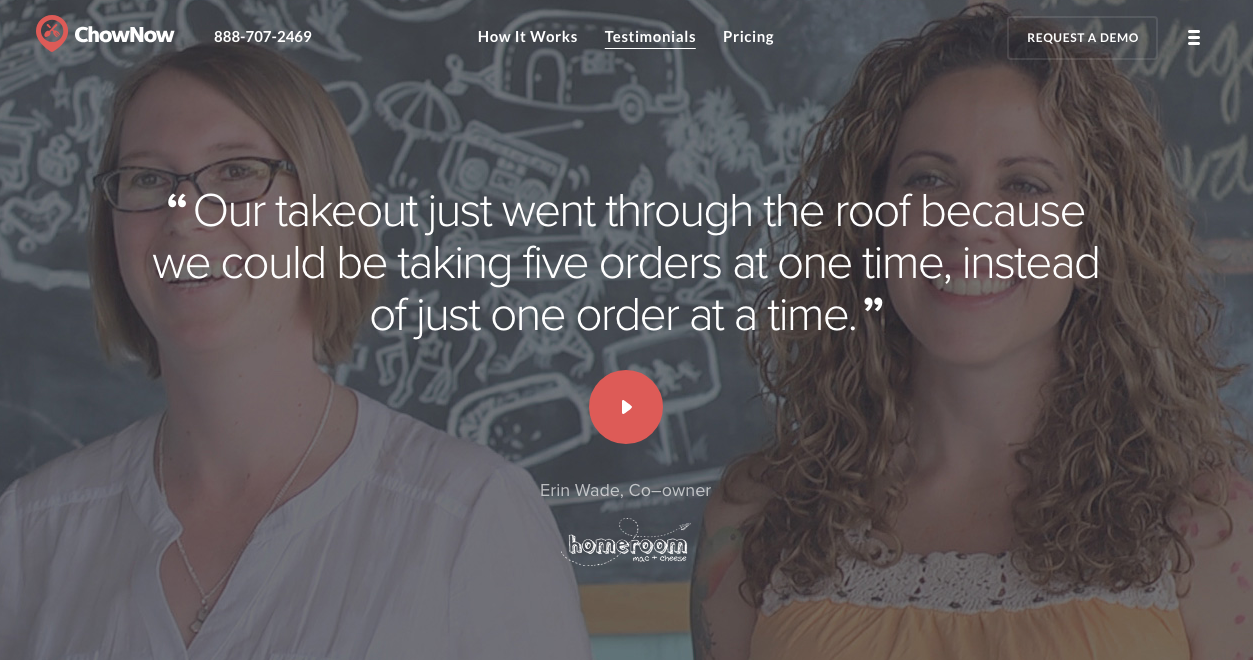
chatnow

As you can see, they also highlighted the best quote from the testimonial.

If you use this strategy, make sure the videos look professional.

Videos that are shaky with bad cuts and have poor quality won’t have a positive impact on your brand’s credibility.

But you can’t always rely on your customers to send you a professional quality video. Shoot these videos in-house if you can. You just need to find customers willing to be on film for you.

It may be worth offering them an incentive for participating.

Just make sure the incentive isn’t perceived as a bribe for a positive review. Let your customers be honest with their video testimonials. It will ultimately be up to you to decide which ones should be published on your website.

Turn testimonials into a case study

At times, numbers speak louder than words.

Just saying “Company XYZ really helped my business grow” is nice, but how did they do it? You can be more specific with a case study.

Look at these testimonials from Hootsuite as an example:
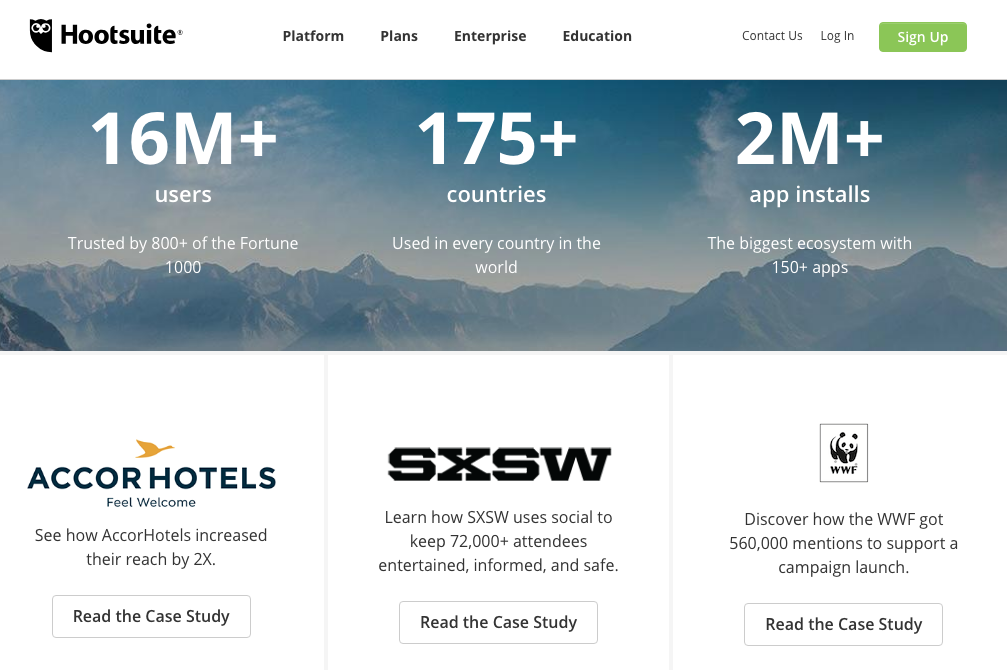
hootsuite

AccorHotels doubled its reach. WWF received 560,000 mentions for a campaign.

These are specific numbers that explain how the software works.

But those are just the highlights of the case study. The platform offers more in-depth descriptions of the results customers attained with the help of the product.

This strategy also adds a personal touch to the customer experience.

If your prospective customers read these case studies, they’ll know how much effort your brand puts into helping each customer with their individual needs.

I recommend employing this strategy if your business is results-oriented with measurable benchmarks.

Conclusion

Customer testimonials on your website add credibility to your brand—but only if they’re managed correctly.

Add photos of the customers who write a testimonial. Include their credentials as well.

Put the top testimonials on your homepage. But you should also have a separate page with the rest of the reviews.

You can’t get your customers to write testimonials unless you ask them.

Mix up the style, format, and placement of your testimonials. Consider having a star-rating system and film video reviews as well. Add a testimonial to your product descriptions page.

Those for you who are able to measure the results of your customer success stories, write a case study to go with the testimonial.

If you follow the advice I’ve outlined in this guide, you’ll be able to add more credibility to your brand by leveraging customer testimonials.

Where are the top customer testimonials displayed on your website?


from Quick Sprout https://ift.tt/2OSMf4Z
via IFTTT

Wednesday, August 8, 2018

How to Effectively Market Your Small Business on Social Media

Social media marketing is no longer optional for small businesses in 2018.

I see this problem all too often when I’m consulting small business owners. They have this mentality that social media won’t benefit their companies.

“Our customers know who we are, and they know where to find us.”

Does this sound familiar to you? Don’t get me wrong: it’s great that you have established a steady customer base. But using social media to market your small business will help you get more money from your existing customers in addition to acquiring new ones.

Failure to have an effective social media strategy can be detrimental to your small business.

While you may not think your lack of a social media presence is having an impact on you today, it will eventually catch up with you down the road. So don’t wait until it’s too late to get started.

You’ve got to keep up with the latest social media trends and apply them to your small business.

If you’re a small business owner not quite convinced you need to use social media to improve your business, you’ll benefit tremendously from reading this guide.

If you are currently using social media to market your small business but not seeing the results you hoped for, I’ll steer you toward the path to success.

Follow the marketing tips and strategies I’ve outlined in this guide, and you’ll set yourself up for sustainable growth today and in the future.

Create profiles on multiple platforms

“We’re on Facebook.”

I hear this all the time when I’m talking with small business owners about their social media strategies.

If you have a Facebook page for your business, that’s great. You’re headed in the right direction.

But Facebook alone won’t be enough to maximize your reach. You need to establish a presence on as many social platforms as possible.

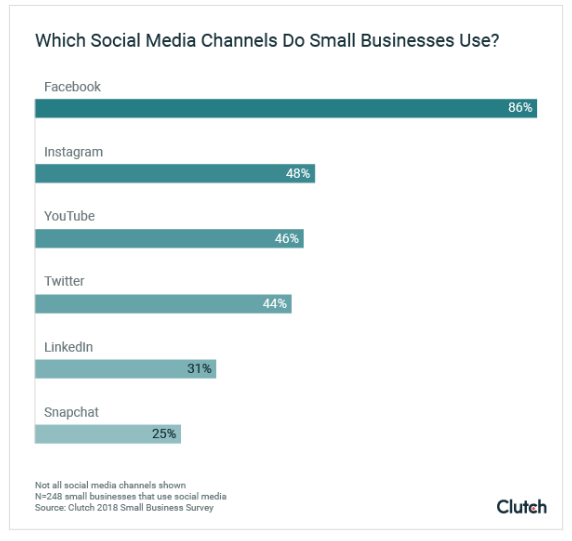
Here’s a look at the social media channels that small businesses use the most:

channels

As you can see, Facebook leads the way for small businesses.

Less than half of small businesses use Instagram, YouTube, and Twitter to market their brands. Furthermore, less than one-third of owners are taking advantage of LinkedIn and Snapchat.

Before you rush to create a profile on all the channels listed above, it’s important you understand your target market.

For example, LinkedIn is more beneficial to B2B companies. That’s because 80% of leads generated by B2B brands come from LinkedIn.

Let’s say your small business is targeting Generation Z as your primary audience. Well, 71% of Gen Z uses Snapchat at least six times each day. More than half of this generation uses Snapchat over 11 times daily.

But if your small business is trying to generate leads from Baby Boomers, it wouldn’t make sense to prioritize Snapchat.

For the most part, starting with a Facebook profile is a safe bet. With nearly 1.5 billion daily active users, you can assume your target audience has a presence there.

Believe it or not, after all these years, Facebook is still the fastest growing social network. So it’s not going anywhere in the near future.

After you create a Facebook page, you need to determine which other channels are suitable for your brand and marketing strategy. I’d recommend creating a YouTube channel.

The video content you upload to YouTube will be easy to repurpose for your other marketing channels. These videos will give you an excuse to post content on other platforms when you’re running low on ideas, but we’ll talk about that in greater detail shortly.

Define your marketing goals

You can’t just blindly start posting content on social media without some sort of rhyme or reason. Before you do anything else, you need to identify your marketing goals.

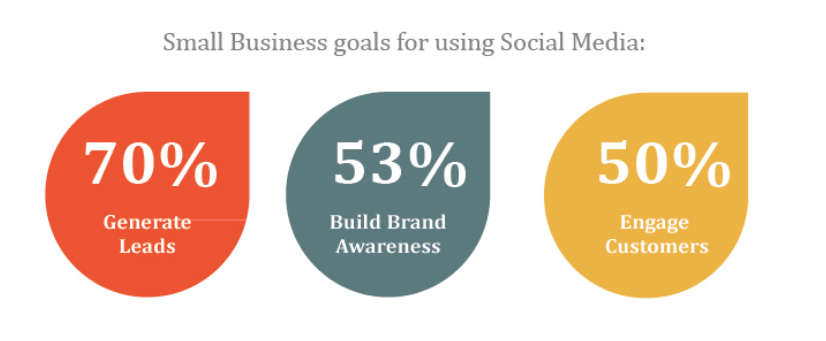
These are some of the top goals that small businesses are trying to accomplish with their social media strategies:

goals

While lead generation, brand awareness, and customer engagement are all good reasons to use social media, it doesn’t mean these should be yours.

You may be using social media to provide better customer service or directly drive sales.

Whatever your reasons, make sure they are clearly defined. Think of it as you would of any other marketing strategy for your company.

You wouldn’t run an ad on the radio or a print advertisement without establishing a goal first, so you need to treat your social media strategy the same way.

Once you decide the purpose of your social media campaigns, it will be much easier for you to come up with content to post. As we’ll discuss soon, it can be tough to think of ideas for new posts.

But if you can establish what you want to accomplish with your content, you’ll know what to post to achieve those goals.

Post content on a daily basis

Now that you have a social media profile on multiple platforms, you’ve got to make sure those accounts are active.

If someone stumbles upon one of your pages and the most recent post was from three weeks ago, they aren’t going to follow you. What’s the point of following a brand that doesn’t post content?

Furthermore, think about all the people already following your business page.

These people won’t just navigate to that page on their own to see what you’re up to. You need to post new content that will appear on their homepages and timelines.

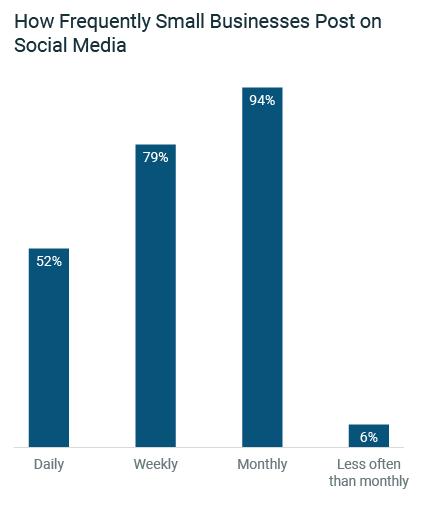
Let’s take a look at how frequently small businesses are posting on social media:

how frequent

As you can see from this graph, just over half of small businesses post on a daily basis.

This is your opportunity to stand out from your competitors. If your competition is only posting once a week or just a handful of times per month, it will be easier for you to make a lasting impression on your followers by posting daily.

Each time you post new content, you remind your followers that your brand exists.

When they need or want whatever you’re offering, they’ll think of your company as opposed to another small business in the area.

One of the reasons why small businesses aren’t posting content daily is because they simply don’t know what to post. If you fall into this category, refer back to your marketing goals.

For example, if your goal is to promote new products for sale on your ecommerce site, then post a promotional offer for those products.

Repurpose previously published content. I briefly mentioned this earlier when we discussed why you should create a YouTube channel.

Let’s say you have an instructional guide or tutorial on how to use a product that you published to your YouTube page. You can post that same video or snippets of that video to your other distribution channels.

Share new content from your website. Post links to your most recently published posts.

In addition to posting content daily, it’s also important for you to respond to your customers. I’m referring to direct messages as well as comments.

48% of consumers say that when a company is responsive on social media, it will prompt them to make a purchase.

Give consumers a reason to follow you

In order to have a successful social media marketing strategy for your small business, you need to have lots of followers. Otherwise, nobody is going to see your content.

Once you’re able to grow your social following, it will be easier for you to convert your followers into customers.

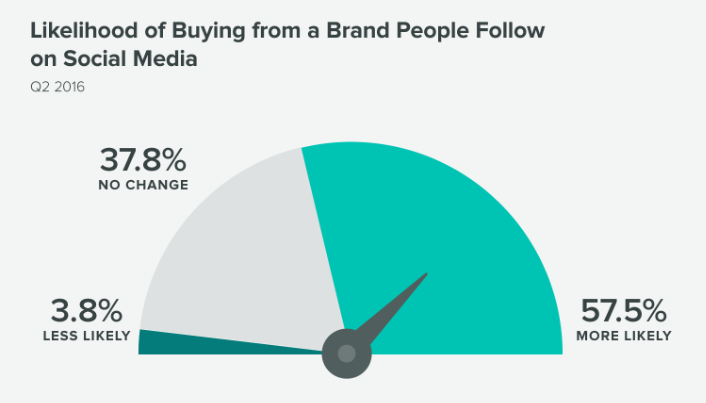
That’s because consumers are more likely to buy from brands they follow on social media.

buying from brand you follow

Here are some of the top reasons why people would be interested in following your small business on social media:

  • they’re curious about your products or services
  • you offer exclusive promotions
  • your content is entertaining
  • they need to reach a customer service representative
  • you offered an incentive
  • their friends or family follow your brand

So make sure your content is worth following. As you’ve seen, getting more followers will ultimately increase your chances of driving more sales.

Run a contest. Promote flash sales and discounts.

Just don’t post too many promotions, or it will cause people to unfollow you. In fact, 46% of consumers say they’ll unfollow brands that post too much promotional content.

There is a difference between posting daily and spamming your followers.

People don’t just want to see posts from your brand. If you’re posting several times per day, these posts will flood the timelines and homepages of your followers. Nobody wants to see that.

If you want to post content multiple times per day, consider sharing ephemeral content, which we’ll discuss in greater detail shortly.

Form relationships with social influencers

What if I told you there was a way for you to increase your social media presence without posting any content to your page?

Well, as I’m sure you were able to guess, this is definitely a possibility.

When people think of social influencers, they think of celebrities and athletes. But partnering with a celebrity probably won’t fit within the marketing budget of a small business.

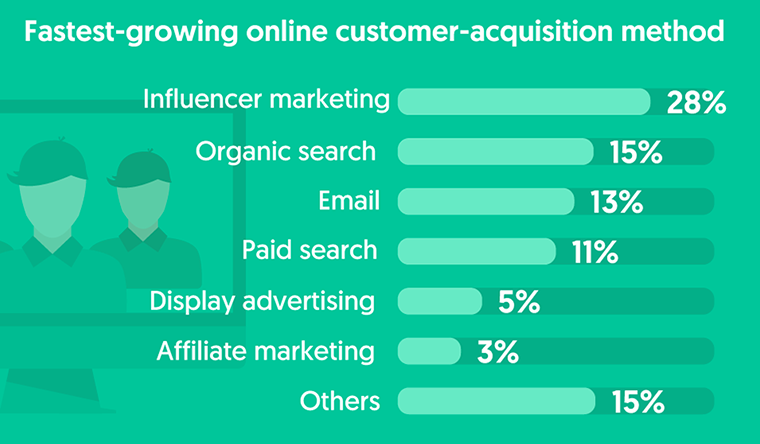
However, influencer marketing is the fastest growing method for customer acquisition in the digital world.

influencer

Furthermore, 67% of brands are planning to increase their influencer marketing budget within the next year.

So how can a small business afford to implement a strategy like this? You can find social influencers who are much more cost-efficient than a celebrity.

Try partnering with micro influencers to increase your product credibility.

This type of influencer may not have millions of followers, but you can get them to post content about your brand for a few hundred dollars. You may even be able to get away with offering just offering them free products in exchange for a post about your brand.

This strategy is effective because micro influencers have stronger engagement metrics with their followers. That’s because they are just regular people.

An average citizen can’t relate to the lives of Kanye West and the Kardashians. But they can definitely relate to someone who has a regular job.

Consider searching for social influencers who live within the area or region of your small business. It’s more likely that their followers will be interested in supporting your brand.

Implement automation tools

I know what you’re thinking. Everything that we discussed so far sounds extremely time-consuming.

As a small business owner, you need to wear multiple hats throughout the day. Depending on the size of your business, you might be handling the majority of the company’s responsibilities.

Becoming a social media content manager wasn’t something you planned for, and it might feel as if there aren’t enough hours in the day for you to handle this.

Plus, hiring someone to take on these tasks can be expensive. That may not be something that your business can afford right now.

Fortunately, automation resources will solve this problem for you. Check out my favorite time saving social media marketing tools.

Using an automation platform will allow you to schedule your posts in advance. You can take time once at the beginning of your week to set the dates and times for your posts in the future.

Another benefit of using an automation tool is the ability to respond to messages in a timely fashion.

Rather than having to check each social platform individually for these messages, you can find software that sends all messages to one inbox. Then you can reply directly from the software.

I highly recommend these tools for small business owners who feel they don’t have enough time to effectively manage their social media profiles.

Don’t let that impair your marketing strategy.

Encourage user-generated content

This connects to my discussion about the type of content you should be posting.

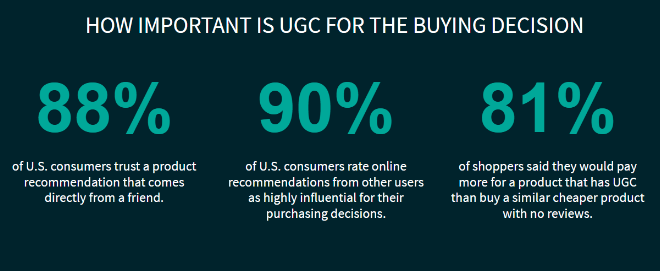
You can’t go wrong by sharing content that encourages UGC.

UGC

As you can see from these numbers, user-generated content has a direct correlation with the consumer buying decision.

UGC will also help you build brand awareness. Here’s why.

Let’s say you run a contest on Instagram where participants have to post pictures featuring them using one of your products.

Your small business just got exposed to a wider audience. Anyone who follows people who enter the contest will see your brand being promoted, even if those people don’t follow you.

A whopping 92% of consumers say they trust a referral if it comes from someone they know.

UGC is a great way for you to get more followers and ultimately turn those new followers into buyers.

Take advantage of ephemeral content

Ephemeral content is different from a regular post. This type of content is only displayed for a short period of time, such as 24 hours.

The most common places where you’ll find ephemeral content for social media is on Instagram and Snapchat. Both of these platforms have a “story” feature.

I highly recommend using an Instagram story to promote your business.

I briefly mentioned this earlier when discussing how frequently you should post content.

If you want to post several times per day, do it on your story. This won’t spam the timelines of your followers.

If you haven’t used ephemeral content just yet, give it a try in your next promotion to see how it goes.

Broadcast live video streams

Small businesses can also benefit from broadcasting live video content on social media platforms.

Facebook, YouTube, and Instagram all have options to do this.

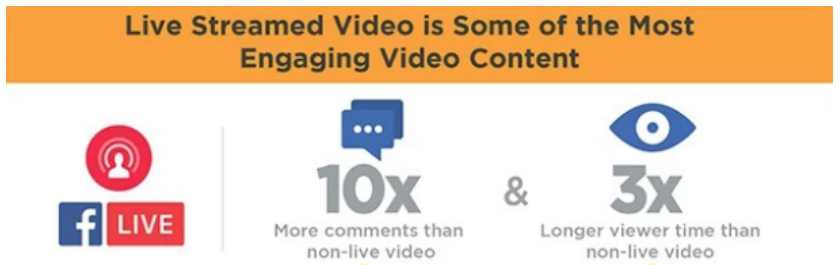
Just take a look at some of these statistics about Facebook Live:

live video

Basically, your live stream will boost your engagement metrics. It will also give you a more authentic interaction with your audience.

You can use your live broadcast in many different ways. But one of my favorites for small businesses is a behind the scenes look.

Show your followers what happens behind closed doors at your business. Give them a tour of your production facility, office, and introduce them to your staff.

This will make them feel as if they are seeing something that’s exclusive and ultimately bring them closer to your brand.

Live video is also a great distribution method for product demonstrations, events, or Q&A sessions.

Your live audience will be able to comment on your stream in real time. Make sure you acknowledge those comments and respond to your followers.

Conclusion

Your small business needs to use social media to stay relevant in today’s day and age.

Just having a Facebook profile alone is no longer acceptable if you want to maximize your social media marketing proficiency.

Create profiles on multiple platforms as long as your target audience is active on those channels.

You need to post content on a regular basis. Just make sure your posts are all related to your clearly established marketing goals.

Your profiles need to be appealing to consumers. Run campaigns designed to get more followers.

To further extend your reach, find social influencers to promote your business. Encourage user-generated content.

Add ephemeral content and live broadcasts to your social media marketing strategy.

If you don’t have time to manage all your social media pages, consider using automation tools to make your life easier.

Follow the advice I’ve outlined in this guide, and it will bring the social media marketing strategy of your small business to the next level.

How is your small business leveraging social media to increase brand awareness and drive sales?


from Quick Sprout https://ift.tt/2ORZMti
via IFTTT
Monday, August 6, 2018

How to Use SEO Tactics to Drive Ecommerce Sales

The ecommerce industry is a highly competitive space.

That’s because the popularity of online shopping is growing at a rapid rate.

Last year, retail ecommerce sales surpassed 2.3 billion dollars across the globe. This number is expected to double within the next three years.

It’s safe to say that consumers will continue buying from ecommerce platforms.

This news should be extremely encouraging to ecommerce brands. But with so many competitors across the world, you’ll need to come up with ways to separate yourself from the crowd if you want to survive and thrive.

In the past, I’ve told you how to get your first sale from your new ecommerce website.

But now that you’ve got those initial sales out of the way, you need to come up with a sustainable growth strategy.

You can do this in a number of ways. For example, leveraging social commerce to increase ecommerce sales is a profitable marketing tactic.

Offering discounts, targeting the right audience, and accepting lots of payment options are just a few of my favorite ways to boost ecommerce sales fast.

However, you need to take this strategy one step further and understand the consumer buying behavior. We know that 85% of consumers use Google to find products before making a purchase.

Roughly 33% of clicks go to the top result of Google’s SERP. And 75% of all clicks are made on the first page of search results.

What does this mean for you?

Basically, if your ecommerce site isn’t a top result when a consumer starts a product search, you won’t generate new leads with organic traffic.

How do you improve your search ranking? Search engine optimization.

Follow the tips I’ve outlined in this guide, and you’ll be able to drive ecommerce sales with SEO tactics.

Conduct keyword research

If you want to have a successful SEO strategy, you need to start with keyword research.

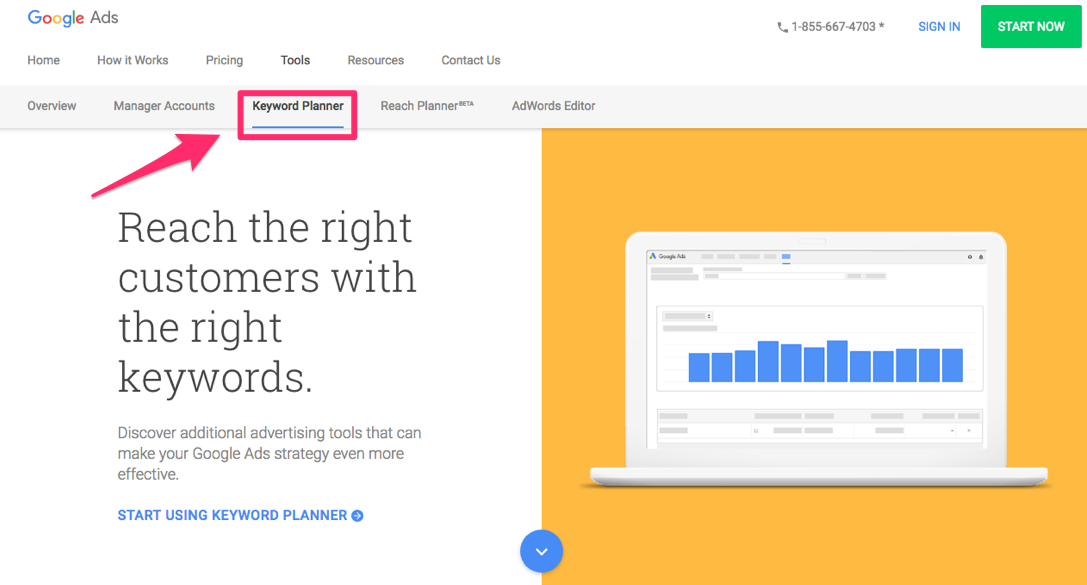
This will help you understand the search terms that consumers type when they’re shopping for products you’re selling. Google AdWords is a great place to start.

google ads

The keyword planner tool will show you words and phrases related to your products, services, and industry.

You’ll be able to see how frequently people search for these words. The results will also show you how the volume of these words and terms change each month.

Using this information, you’ll be able to update your site accordingly so it matches the most popular search terms.

These subtle changes on your ecommerce site will increase the chances that your pages will appear as a top search result.

Now you’ll receive more organic search traffic that will ultimately help you drive sales.

Start blogging

Once you have your keywords, you’ll need to add them to your website.

Sure, you can add them to your product pages and descriptions, but that alone won’t maximize your reach. You want to include these keywords in as many places as possible on your site.

That’s why you need to add a blog to your ecommerce site.

Research shows that the average number of words on the first page of Google results is 1,890 words. I’m willing to bet your product descriptions aren’t that long.

But that’s the perfect length for a blog post.

There are lots of benefits to blogging, in addition to being a place for you to use keywords:

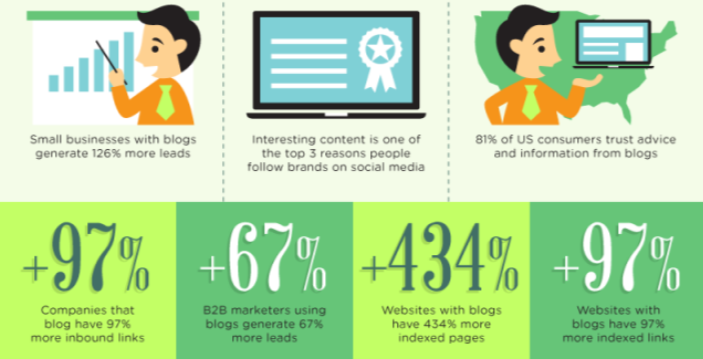
blogging

Your blog gives you the opportunity to create internal links. These links can direct visitors to other blog posts or to product pages.

Blogging increases the chances that your brand will be able to create backlinks as well.

Other websites may reference or feature information from one of your posts. As a result, they’ll credit you as the source with a link.

The combination of these internal links and backlinks will improve your organic search ranking.

Plus, these blogs will give you an opportunity to showcase your products and services. You can provide demonstrations or step-by-step guides that encourage visitors to make a purchase.

Use long-tail keywords in product names and descriptions

More than half of all searches are at least four words.

You need to keep this in mind when you’re conducting keyword research, which we discussed earlier.

Add long-tail keywords to your ecommerce site. Put them in the names of your products and their descriptions.

Long-tail keywords don’t have as high of a search volume. This means there is less competition from other brands using keywords for their SEO strategies.

But it will increase the chances you’ll be a top search result for these specific terms. That’s why long-tail keywords typically have higher conversion rates.

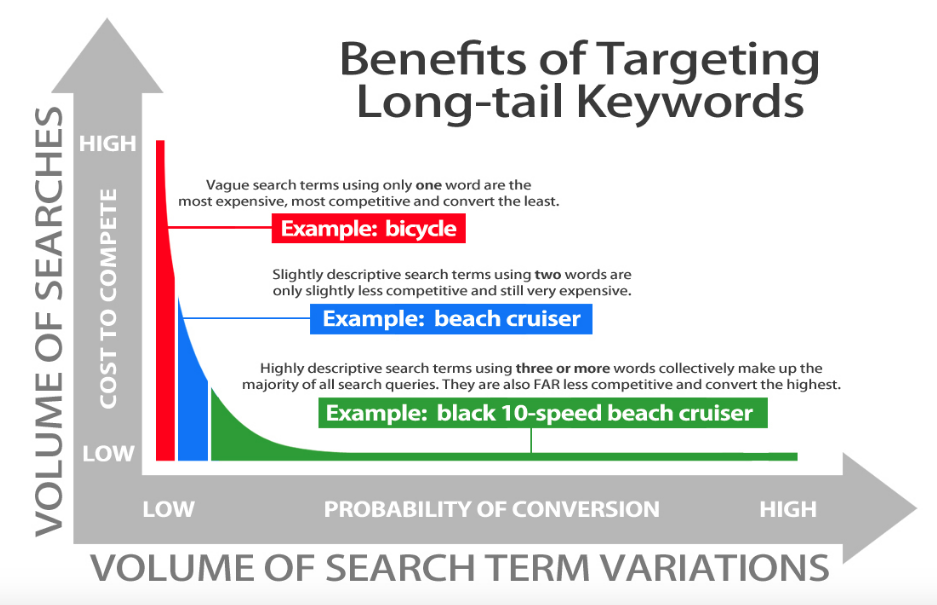
Here’s an example of how long-tail keywords work:

long tail

Using the example above, let’s say you’re an ecommerce site selling bicycles. You obviously have a ton of competition in this space.

Unless you’re a global giant, it’s unlikely your site will be a top search result for the word “bicycle.”

But if you sell beach cruisers, that’s a little bit more specific. The search volume for the phrase won’t be as high, and your likelihood of conversions will increase slightly.

Take that one step further, and add even more descriptive information.

If you use “black 10-speed beach cruiser” as a long-tail keyword, you’ll reach a very specific audience. Chances are, if someone uses this phrase to search for the item, you’ll be one of the top results.

This makes the consumer’s life easier too. Instead of manually scrolling through product pages on a website to find a specific item, they’ll just search for it using descriptive keywords.

Since you’re offering exactly what they’re looking for, they’ll be more likely to buy from your ecommerce site.

Don’t complicate your website architecture

Without getting too technical here, I’m going to explain the basic concepts of crawling and indexing.

All major search engines, such as Google, use bots to index the information contained on websites. These automated bots are also known as web crawlers.

The information on these pages is stored in the search engine’s index.

When a consumer searches for a term, the search engine references the index and chooses the pages with the most relevant results.

But if the architecture of your website is too complicated, the bots may not index the results properly, and your site won’t be a top search result.

By simplifying your architecture, you will make your site easier to read, and it will appear more trustworthy as well.

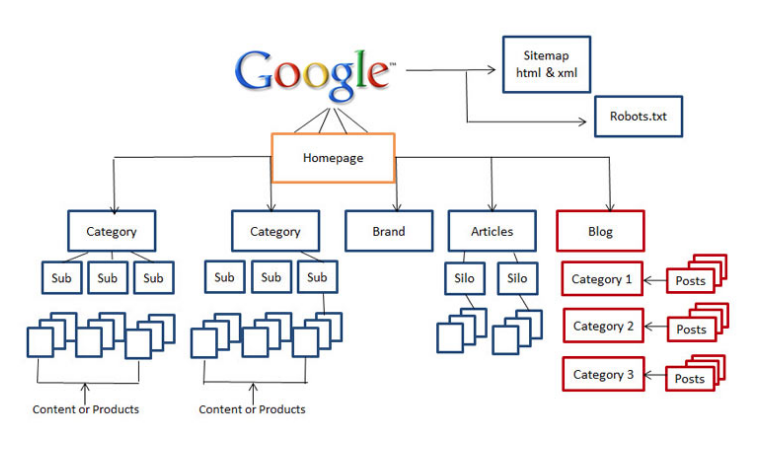
Here’s a basic architecture format you can follow:

architecture

A simple site architecture will also make it easier for your visitors to navigate once they land on your page.

This will help increase your chances of getting more conversions as well. But we’ll talk more about simple designs shortly.

Identify and fix any errors

Errors on your site will have a negative impact on your search ranking.

As I just discussed, search engines use bots to scan content on the web. Those search engines don’t want to send consumers to sites that have problems.

Some common errors with websites include:

  • redirects
  • broken links
  • duplicate content
  • problems with images

I’m assuming you don’t intentionally have problems with your site. You may have some broken links without knowing it.

That’s why you need to have tools in place to help you identify any errors so you can fix them as soon as possible.

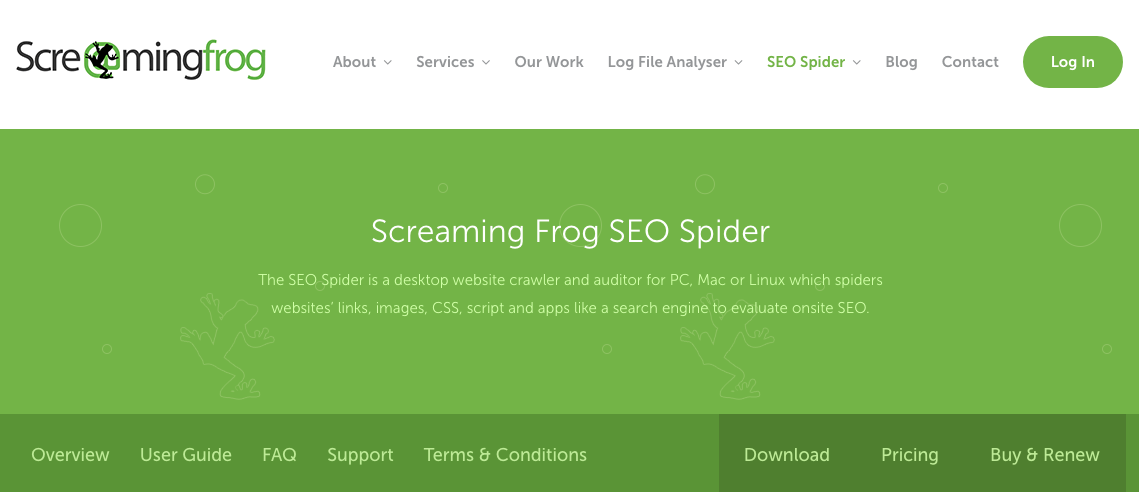
I recommend trying a tool such as the SEO Spider from Screaming Frog:

screaming frog

This tool is a website crawler, similar to the ones used by search engines.

You can get the SEO of your pages analyzed to see what needs to be improved or fixed.

The tool will identify server errors, broken links, and audit redirects. This software will even analyze the titles of your pages and find duplicate content.

You can integrate the Screaming Frog software with your Google analytics. This will help you get more relevant results in terms of your conversions, bounce rates, and ecommerce transactions.

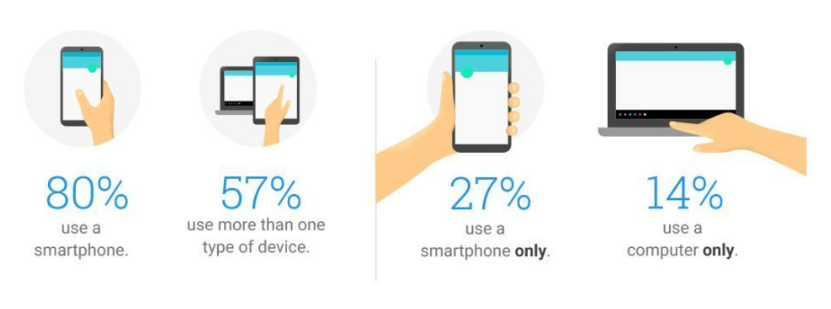
Optimize your site for mobile devices

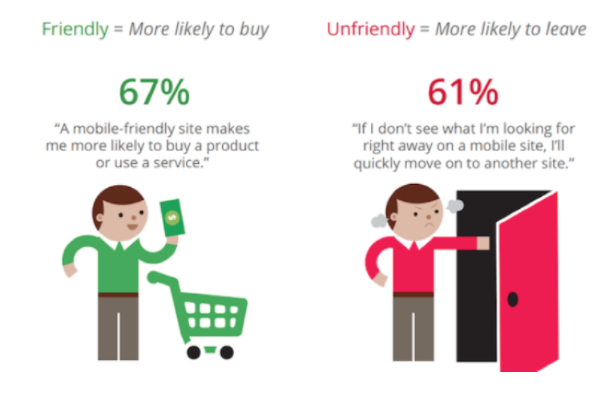
We know that 60% of all searches come from mobile devices. If your website isn’t mobile-friendly, it won’t be a top search result.

You need to recognize how people use mobile devices.

mobile

As you can see, 80% of people use smartphones. Just 14% of people use only a computer without a mobile device.

Your ecommerce brand needs to understand the mobile trends dominating 2018. Use the knowledge to update your ecommerce site.

According to Alexa rankings, more than 80% of the top websites are mobile-friendly.

Furthermore, 48% of consumers use search engines to conduct research from these devices.

Let all of this information sink in for a moment. Ask yourself whether your ecommerce site has adapted to these trends.

If not, it could be the reason why search engines aren’t giving your site a high ranking.

Optimizing your ecommerce site for mobile devices will help you get more traffic from consumers browsing from their smartphones and tablets.

Improve your page loading speed

If your pages take too long to load, search engines will penalize your ranking.

This is relevant to the earlier discussion about identifying and fixing errors on your site. Sometimes, these problems could be the reason why your pages are taking so long to open.

If there aren’t any errors on your site, you may just have a design that’s too complicated. But we’ll talk about that in greater detail soon.

Some of you may just need to upgrade your web hosting service. It can be tempting to select the cheapest option, but it’ll hurt you in the long run.

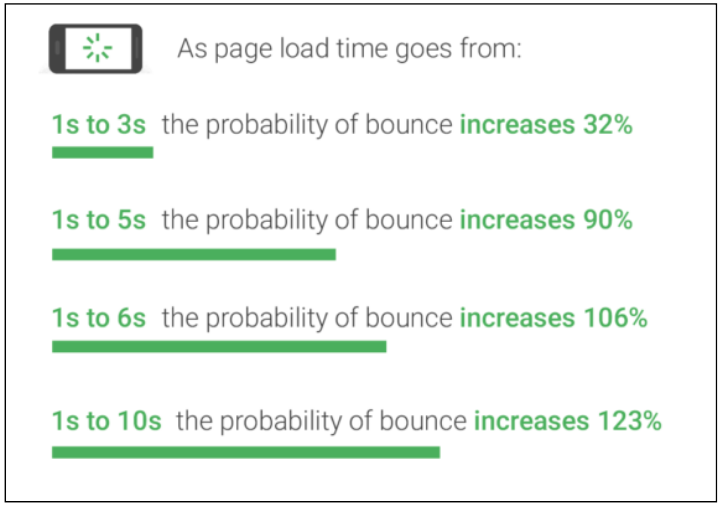
In addition to your SEO strategy, your page loading speed will also impact visitor browsing behavior:

page loading speed

As you can see, just a few seconds can drastically change your bounce rates. This is obviously not good for your business.

Let’s say you were able to get ranked on the first page of search results.

A prospective customer clicks on your page. That’s great news. But the page takes too long to load, so they leave and go to a competitor’s site instead.

You just lost your chance to make a sale.

Do whatever you can to increase your page loading speed. You want it to be as fast as possible. This will improve your search ranking and help you drive sales.

Simplify the design of your ecommerce site

A complicated design could be one of the reasons why your site isn’t loading fast. That’s why websites with simple designs have higher conversion rates.

This also relates to your site’s architecture—a topic I discussed above.

If your pages are cluttered and tough to navigate, search engines won’t rank them high.

Furthermore, the simplicity of your website will encourage users to stay on the pages longer. Google’s algorithm will recognize this and rank you accordingly.

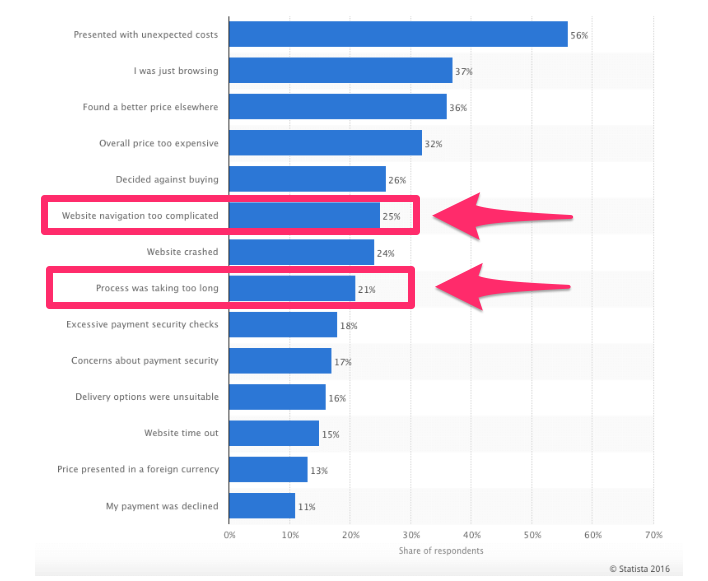
It’s also worth taking a look at the top reasons for shopping cart abandonment:

cart abandonment

Yes, you’re obviously trying to improve your SEO.

But ultimately, you want to drive sales. Websites with complicated navigations and long checkout procedures cause consumers to abandon their shopping carts.

Here’s something else to keep in mind: 75% of consumers say they judge a brand’s credibility based on the design of the website.

And 85% of a website visitor’s first impression of a site is related to its design.

Add meta descriptions to your pages

If you are not familiar with meta descriptions, allow me to explain what they are.

These are short, 155-character-long, summaries of pages’ contents.

From a consumer perspective, a page meta description gives them more information about what to expect when they click on a link from search results.

There is some debate as to whether these descriptions directly impact SEO. However, it’s clear that the right meta description can help increase the chances of getting clicks when your site comes up in search results.

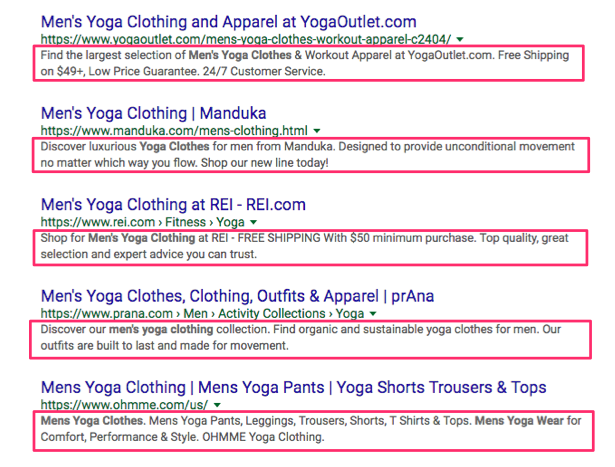
I’ve highlighted the meta descriptions that came up when I searched Google for “Men’s yoga apparel”—a very broad search parameter:

meta description

The best meta descriptions contain actionable words. Look at some of the examples above:

  • find
  • discover
  • shop

Meta descriptions should contain keywords as well. Try to make yours unique so it stands apart from the crowd.

As you can see from the results above, each site uses a slightly different strategy to give it an edge over competors.

Conclusion

To generate new leads and maximize the reach of your ecommerce website, you need to focus on your SEO strategy.

Ultimately, this will help you drive sales.

Conduct keyword research. Add long-tail keywords to your product descriptions and titles. Start blogging, and add keywords to your posts.

Simplify your website architecture and the design of your pages.

Use tools to help you identify site errors so you can fix them as fast as possible.

Focus on your page loading speed, and optimize your site for mobile devices. This will not only improve your search ranking but also help you increase conversions.

Add actionable meta descriptions to your pages that encourage consumers to click on your site over other options in the search results.

Use this guide as a reference to enhance your ecommerce SEO strategy.

How is your ecommerce site using SEO tactics to drive sales?


from Quick Sprout https://ift.tt/2LSXblf
via IFTTT
Friday, August 3, 2018

How to Design a Checkout Process That Generates High Conversion Rates

Ecommerce websites live and die by their conversions.

For those of you who have a high volume of traffic to your website, that’s great news. But traffic alone doesn’t generate sales.

Is your website traffic translating to conversions?

There are certain metrics you can use to measure this. Look at your bounce rates. Analyze your shopping cart abandonment rates.

If your website visitors aren’t converting, your ecommerce site won’t make money.

Don’t get me wrong: the products you’re selling might be amazing. That’s not necessarily the issue here.

The design of your website and the checkout process might be what’s hurting you.

For the most part, simple website designs have higher conversion rates. This same concept needs to be applied to your checkout process.

The information in this guide will help you identify any flaws with your checkout procedure that could be hindering your conversions.

If you have just launched a startup company and are in the process of designing your website for the first time, these useful tips and best practices will help you as well.

Here’s what you need to do to design a checkout process that converts.

Add multiple checkout buttons

For website visitors to make a purchase, they need to be able to navigate to your checkout page.

Once someone decides to buy, they’ll add the items they want to their shopping cart. In a perfect world, you want them to continue shopping so they spend more money.

But if the checkout buttons aren’t clearly labeled, the customer may ultimately leave the items in the cart without buying them.

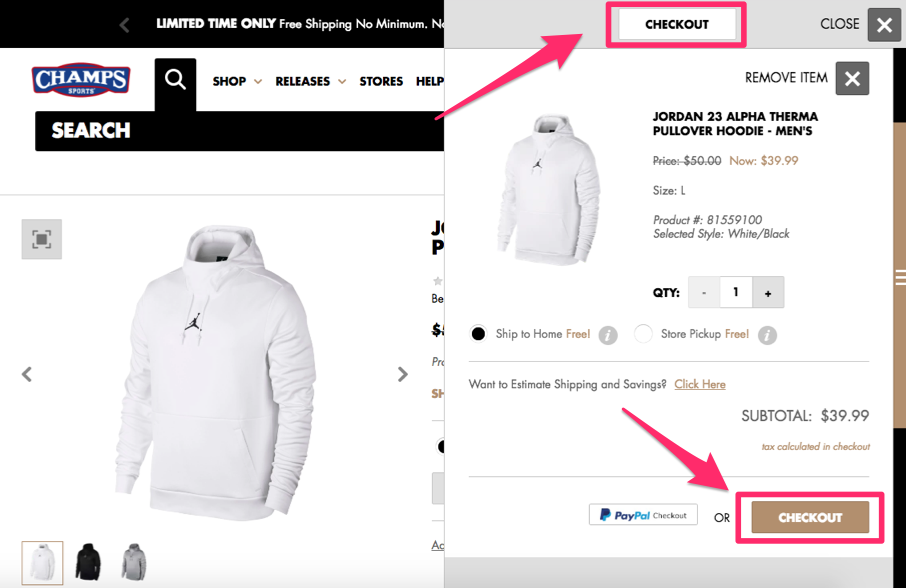
This could be why your shopping cart abandonment rates are so high. Instead, include checkout buttons on both the top and bottom of the screen.

Check out this example from the Champs Sports website:

champs

Positioning the checkout buttons in two places ensures the visitor will see and have access to both buttons.

The word “checkout” will stay in their line of vision, regardless of where they’re looking on the screen.

I also want you to notice that the location of the shopping cart on the right side of the screen allows the customer to continue shopping on the left.

This increases the likelihood that the average order amount will be higher and conversion rates remain high as well.

You can implement the same strategy on your ecommerce page to drive sales.

Secure the checkout process

Security needs to be a top priority for your ecommerce site. If your pages appear untrustworthy, people won’t want to buy anything.

In the past five years alone, 46% of people in the United States have been affected by credit card fraud.

There’s a high probability that nearly half of your website visitors have experienced this. Even if they haven’t personally fallen victims to fraud, I’m sure they know at least one person who has.

This puts people on high alert.

If your checkout process isn’t secure, people won’t feel safe entering their credit card information, which is ultimately what you need to make money.

You must understand and implement the top elements that add credibility to your website.

All pages of the checkout process must be secure. It’s also in your best interest to include security badges, such as Norton, McAfee, or whatever else you’re using to protect your customers.

Eliminate shipping costs

Here’s a common mentality I see from ecommerce sites all the time. If it costs you money to ship your products, that means you should charge your customers for shipping, right?

Wrong.

While this may sound like a reasonable justification to you, your customers don’t see it that way.

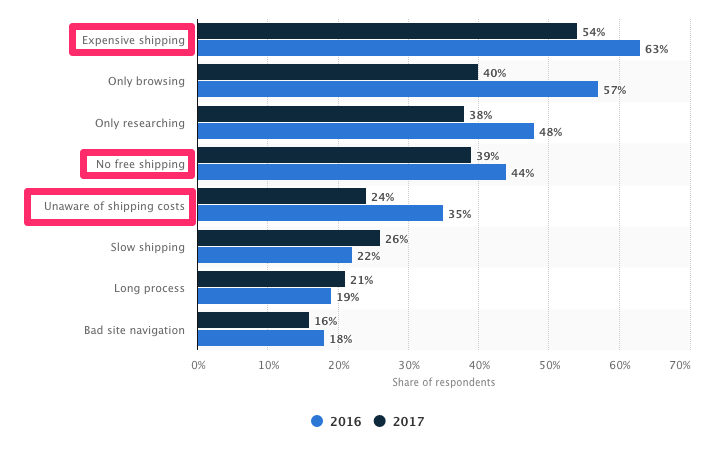
In fact, shipping costs play a major role in why shopping carts are abandoned in the United States:

shipping

Do not charge your customers for shipping.

But you still need to make sure you’re turning a profit, even if you’re offering free shipping.

You’re better off raising the prices of your items so that the shipping costs are built into the base prices. Psychologically, this won’t impact your conversions.

That’s because customers won’t be surprised when they see additional charges when they check out. If your product is listed for $50 on the site, that’s what they expect to pay. But if the costs add up to $70 with taxes and shipping, it’ll hurt your conversions.

I’m not expecting you to be unrealistic here. Don’t ship your customers a piano overnight for free.

All I’m saying is you shouldn’t charge for standard ground shipping. If a customer wants the delivery to be expedited, you can let them pay an additional charge.

Reduce the number of form fields

A website visitor is ready to buy something. They’ve already made up their mind.

Don’t give them a chance to change their mind and abandon the cart. If your checkout process is long and complicated, you won’t have high conversion rates.

But if you can simplify the process by eliminating unneeded steps, you’ll make more money.

Ask yourself what information you really need from the customer to complete the purchase. Do you need the customer’s name?

Yes, but you don’t have to ask for it several times.

If a name is required to process the payment method or shipping information, don’t make them type those details twice.

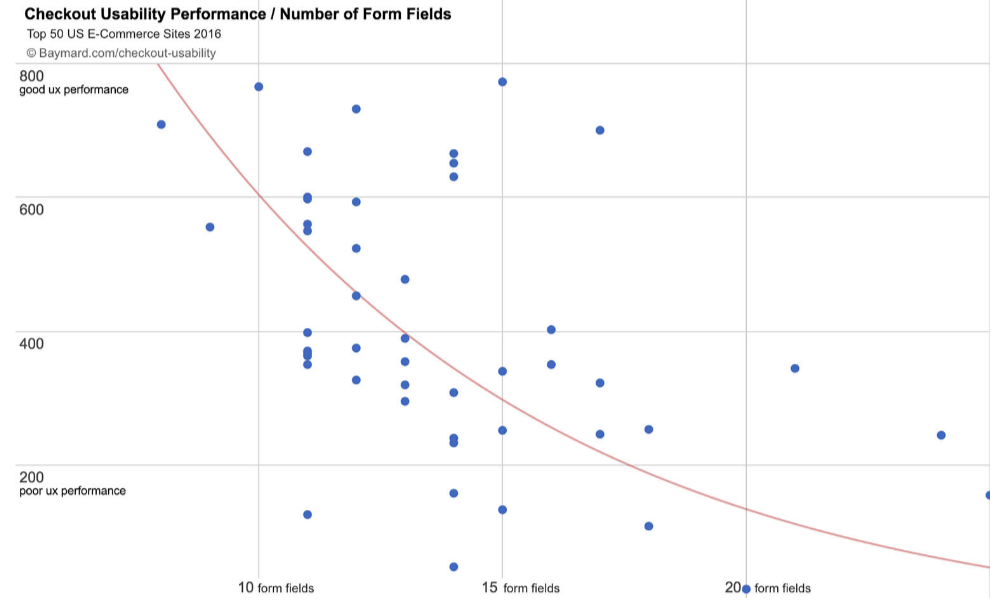
Research shows that websites with fewer form fields have a higher performance rate during checkout:

form fields

Only ask for information required to complete the transaction.

If the customer’s shipping and billing addresses are the same, they should be able to check off a box indicating that—instead of having to type their address twice, for shipping and billing.

That alone shaves an extra step off the process and significantly reduces the number of form fields.

Offer a guest checkout option

I get it. You want to learn as much information about your customers as possible.

In a perfect world, everyone who visits your site will create a customer profile. This allows you to monitor their browsing behavior and suggest items to them based on this behavior and their purchase history.

Customer profiles allow you to segment your audience based on the customers’ locations and make it easier for you to add subscribers to your ecommerce email list.

When a customer is browsing from their customer profile, they can also place repeat orders with just a couple of clicks.

Customers can save their payment information to their accounts, which reduces the number of steps in the checkout process and makes it easier for them to convert.

If you’re encouraging customers to create a profile, I’m all for it.

But there is a big difference between encouraging and forcing. Does a website visitor need to have a customer profile to convert? Absolutely not.

Forcing people to create a profile could be hurting your conversions.

People want to buy something. Let them give you their money.

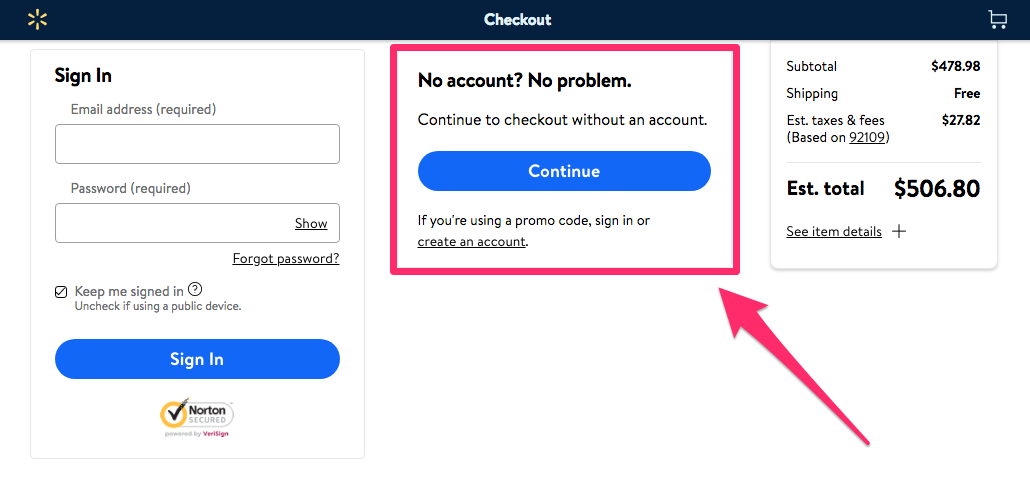
Don’t prioritize your content marketing strategy over actual sales. Here’s an example of how a global giant Walmart implemented this strategy:

walmart

It’s always a good idea to follow the lead of the companies that have had major success in a particular space.

Offering a guest checkout is also reduces unnecessary steps, which I discussed earlier. Creating a customer profile is not necessary to complete a purchase, so don’t make it so. Otherwise it will turn some customers away.

Make it easy to shop from mobile devices

It’s no secret that we’re living in a mobile world. Ecommerce brands need to recognize this if they want to succeed.

In fact, 62% of people who own a smartphone used their devices to make purchases online within the last six months alone.

It’s estimated that in the next three years, mobile retail sales will control 54% of the ecommerce market share in the United States.

Why is this the case?

It’s because technology has made it more convenient to shop from mobile devices.

People aren’t walking around with laptops in their pockets all day. But phones are seemingly always within an arm’s reach, if they’re not already glued to the consumers’ hands.

If someone visits your ecommerce site from a mobile phone, they need to have a great experience.

If your site isn’t optimized for mobile devices, there’s a slim chance you’ll be able to generate conversions.

mobile

Just look at these numbers.

The design of your mobile site can be the difference between customers buying something or bouncing and buying from your competitors instead.

But 74% of mobile users are more likely to revisit websites that are mobile-friendly.

If your site is properly optimized, it will increase the chances of your website visitors not only converting but also coming back and buying again in the future.

A/B test the elements of your checkout process

You can never truly be sure your checkout process is designed for the maximum number of conversions unless you put your theory to the test.

The best way to determine which elements are driving the highest conversions is through A/B testing.

If you’ve never run an A/B test before, the concept is very simple. You start by identifying one element of the page you want to test.

Then 50% of your site traffic will see version A, while the other 50% will see version B. Compare the conversion rates between the two variations to see which one yielded the best results.

When testing the checkout page, it makes sense to start with the “purchase/buy now” button, or whatever your final CTA button is that completes the transaction.

There are lots of potential tests you can run on this button:

  • size
  • color
  • placement
  • wording

Test only one element at a time.

For example, let’s say you test the conversion button at the bottom right side of the screen compared to the bottom left side of the screen.

Once you have conclusive results, you can implement that change and then move on to testing the wording of the button, e.g., “purchase” versus “buy.”

Accept alternative forms of payment

Ultimately, the most important aspect of a checkout procedure is the payment step.

Without the payment step, transactions can’t happen.

From your perspective, you may think it’s in your best interest to accept only certain credit cards. I know you pay higher transaction fees for some cards compared to others.

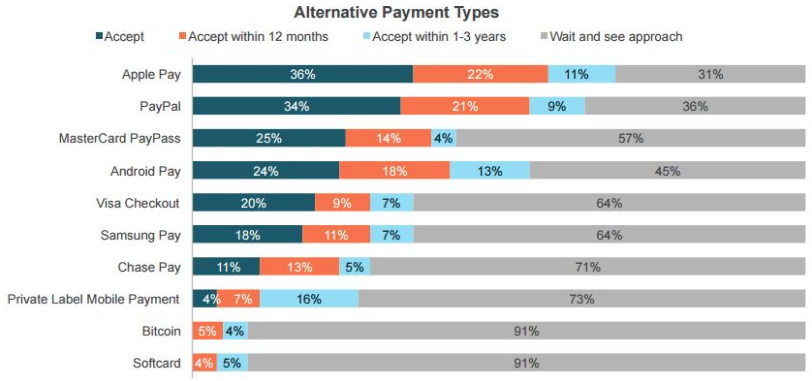
That said, you need to accept as many payment methods as possible, including alternative forms of payment:

alternative payment

Let’s not get carried away here. In 2018, it’s probably not necessary to accept Bitcoin and other cryptocurrencies.

But in addition to all major credit cards, you need to accept alternatives such as Apple Pay and PayPal.

You don’t want your customers to leave your site without buying anything because you don’t accept the payment method they want to use.

Even if they have the options you accept, they still may go to one of your competitors instead so they can use their favorite method of payment.

The days of accepting only Visa and Mastercard are over. It’s time for you to adapt and add these other payment options to your checkout process.

Conclusion

If you’re driving lots of traffic to your ecommerce site but those visitors aren’t converting, you need to analyze the design of your checkout process.

Add multiple checkout buttons to different areas of the page.

Customers care about security, so the entire checkout procedure needs to be safe and secure.

Do not charge for shipping. Eliminate unnecessary steps, and reduce the number of form fields required to make a purchase.

Don’t force your site visitors to create customer profiles. Have a guest checkout option.

Optimize your ecommerce site for mobile devices.

Use A/B tests to see which design elements maximize your conversion rates.

And accept as many forms of payment as possible.

If you follow these best practices, your ecommerce checkout process will yield high conversions and, ultimately, increase your profits.

What elements of your checkout process do you need to change to drive higher ecommerce conversions?


from Quick Sprout https://ift.tt/2Az7lSG
via IFTTT
Wednesday, August 1, 2018

How to Increase Profits by Focusing on Customer Retention Strategies

There’s a common misconception that businesses need to acquire new customers if they want to make more money.

Getting new customers is obviously beneficial and can help your business grow. But that’s not the only way to boost your profits.

Focusing on customer retention is a much more viable and cost-effective marketing strategy.

In fact, it will cost you six to seven times more money to acquire a new customer than it will to retain an existing one.

Not only is retention cheaper than acquisition, but it also has a very high ROI. Research shows that you can increase your profits anywhere from 25-95% just by increasing your retention rates by 5%.

Imagine how much more money you’ll make if you increase those retention rates by 10% or even 20%.

Don’t get me wrong: I’m not saying you should completely ignore your acquisition efforts. But if you are looking for ways to market your company on a budget, it’s in your best interest to focus on your existing customers.

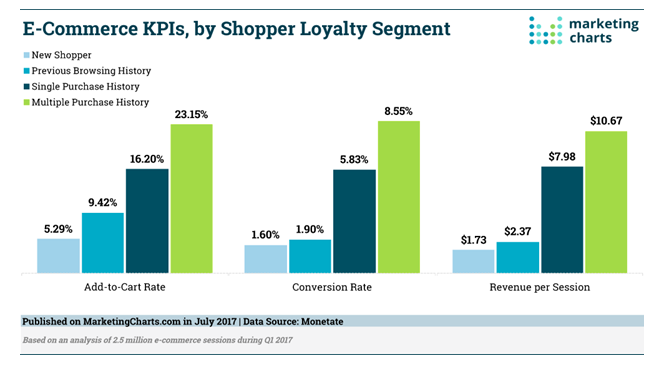
Take a look at these loyalty statistics for ecommerce brands:

loyal shopper

As you can see, customers who have made multiple purchases with a brand have a higher add-to-cart rate and conversion rate than new shoppers.

These customers also generate more than six times the revenue per session than new shoppers.

So it only makes sense that you should be prioritizing these customers.

I’m sure you’ve heard this age-old proverb: “A bird in the hand is worth two in the bush.”

You’ve already got these customers in your hand. Don’t risk losing them by putting all your effort into customer acquisition.

I’ll show you the best ways to increase profits with customer retention.

Leverage your blog to establish loyal readers

Most people may not associate blogging with customer retention. But blogging overall is one of my favorite content marketing strategies.

In addition to helping you increase website traffic and generate new leads, blogging can also help you engage with your loyal customers. This is especially true for ecommerce brands.

Ask yourself this question.

How often does the same customer visit your website?

I’m guessing you’re not getting repeat purchases from the same customer on a daily basis.

But if you’re releasing new blog posts each day, or even a few times per week, you give your customers a reason to keep checking your website.

Hook these readers with your content. If they use your products and read your blog, your brand will be on their minds more often.

Plus, the more they visit your site, the greater chance you have of getting them to buy something else. This strategy is extremely cost-effective.

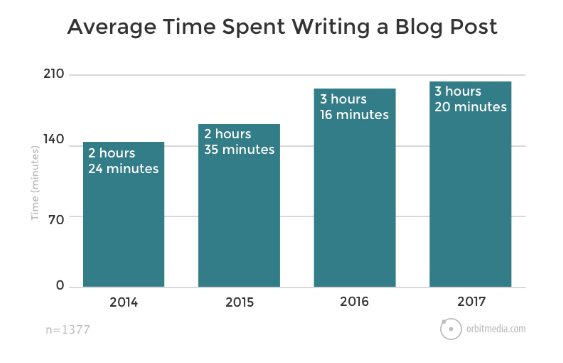
The only major cost is the time it takes to write each post. In 2017, the average time it took people to write a blog post was just over three hours.

blog post

It’s well worth your time and effort if you’re able to leverage this strategy to create loyal readers and retain your existing customers.

Use surveys and interviews to get feedback

In order for you to properly focus on retention, it’s important for you to understand what causes customers to leave a business.

Research shows 68% of consumers leave a business because they don’t feel the brand is valuing them.

Only 14% will leave because they’re unhappy with your product or service. And 9% of customers leave because of your prices.

What does this tell you?

Customers care significantly more about how they’re treated than the products and prices of what they’re buying.

One of the best ways to show your customers how much you care about their opinions is by asking them directly. You can use surveys and interviews to generate more revenue for your business.

This strategy accomplishes a few things.

First, it shows customers you care about them, which we already established. But the results of these surveys and interviews can also help you make your business better.

If you’re doing something wrong or your brand could use some improvement, you’ll find out from these campaigns.

Once you’re able to identify what needs to be fixed, customers will be happy to see these changes get applied.

This type of service enhances the customer experience, which I’ll elaborate on in greater detail shortly.

Implement a customer loyalty program

The name says it all. The purpose of establishing a customer loyalty program is to create loyal customers.

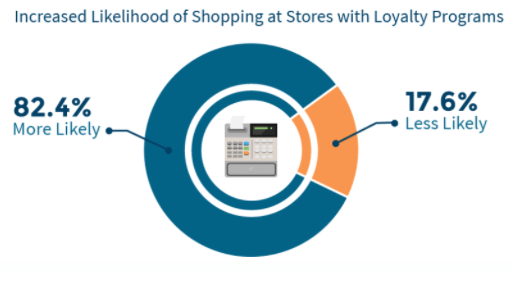
Research shows that consumers are much more likely to shop at stores with loyalty programs.

increase chances of shopping

Give your customers what they want.

There are many different ways to approach your loyalty program. For example, you can reward your customers based on how often they shop.

These types of programs have been around forever, and I’m sure you’ve participated in them during your life.

A local pizza shop in town may give out punch cards to their customers. After ten visits, they get a free pizza.

But with the advancements in technology, this type of “punch card system” has evolved. Businesses with mobile apps have been able to eliminate the need for customers to carry a physical card. We’ll discuss mobile apps in greater depth as we continue.

If your business operates online, you can track your customers’ purchases through their profiles.

Another type of loyalty program rewards your best customers. For example, let’s say two customers each made a purchase from your store ten times in the last six months.

Should they both be rewarded equally?

If one customer spent $100 and the other customer spent $1,000, it makes sense to reward the customer who spends more money.

You can implement a customer loyalty program with various spending tiers. Each time a new customer reaches another level, they’ll receive a more significant benefit.

This strategy gives your existing customers an incentive to spend more money since they know they’ll be rewarded. As a result, it will be much easier to retain these customers.

Grow your email list

Another great way to focus on customer retention is through email marketing.

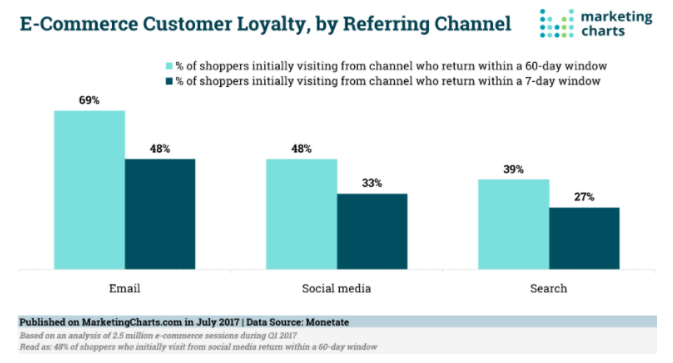
ecommerce email

As you can see from this chart, email yielded the highest results for customers who return to ecommerce websites compared to other referring channels.

You should be collecting email addresses from your current customers.

Once you have their email addresses added to your list, you’ll be able to send them exclusive offers and promotions.

This will increase the chances of them buying again. They won’t not be making repeat purchases so frequently if you aren’t reminding them of these offers via email.

Just don’t go overboard with these messages, or it could backfire.

Don’t send promotional content to your subscribers on a daily basis. This will annoy them and lead to lots of unsubscribes from your list.

Instead, only send content that adds value to their lives. For the most part, you can’t go wrong with a discount. It’s a great way to drive sales from your existing customers.

Incentivize customer referrals

Most businesses would consider customer referral programs as an acquisition strategy.

While I’m not disputing that, I want you to understand that they can also double as a retention strategy if you set them up properly.

The whole idea of a referral program is to get your current clientele to bring in new customers. But most people won’t do this out of the kindness of their hearts.

Sure, they might like your brand and be happy with your products, but do they love you enough to go out of their way to spread the word to their friends and family?

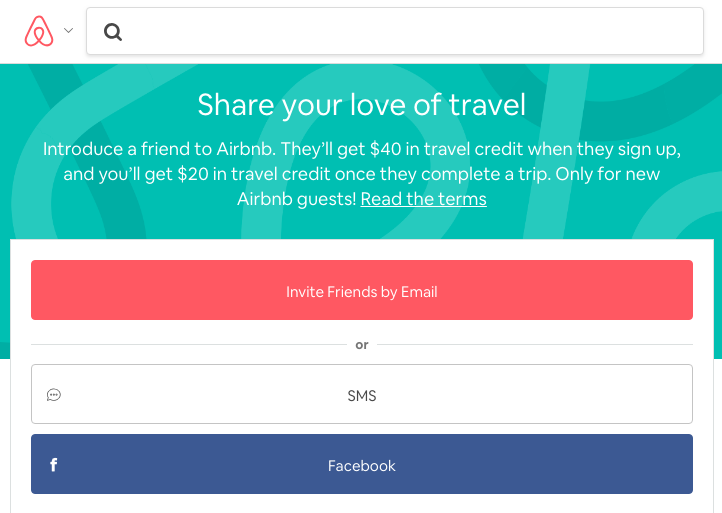
That’s why you need to offer an incentive for referrals. Check out this example from Airbnb.

airbnb

It’s a simple structure. Customers who refer their friends will receive a $20 credit after the person they referred books a trip.

So yes, they’re getting a new customer. But their existing customer also has a reason to make another purchase since they want to take advantage of their credit.

The more people they refer, the more money they’ll receive in travel credits.

You can implement this same type of referral structure to your business. It will reward your customers for their efforts and give them a reason to continue making purchases in the future.

Offer product suggestions

You should be encouraging your customers to create a profile on your platform.

This will help you personalize their shopping experience. Personalization has major benefits to consumers and brands alike.

These customer profiles will allow you to monitor their purchase history and browsing behavior.

Now you can use this information to recommend products to your customers.

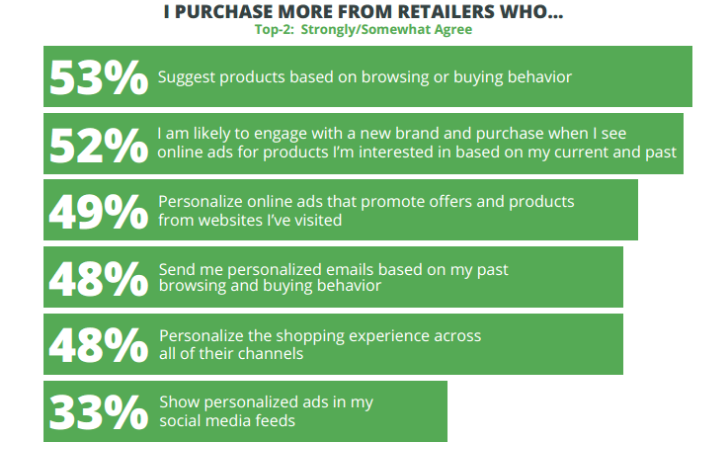
product suggestions

As you can see from these numbers, consumers are more likely to buy from brands that suggest products based on their purchases and browsing behavior.

Nearly half of consumers say they purchase more from retailers who personalize their shopping experience and send personalized emails.

These product suggestions are a great way to make more money. For example, let’s say you have an ecommerce store that sells sporting goods.

If a customer adds soccer cleats and a soccer ball to their shopping cart, it’s a pretty good indication that they’re playing soccer.

So before they checkout and complete the purchase, you could recommend shin guards, soccer socks, and a water bottle as potential suggested items they might be interested in buying.

This will help increase the average amount of each transaction.

Provide excellent customer service

I briefly touched on this subject earlier when we talked about using surveys and interviews to get feedback from your customers.

But excellent customer service goes far beyond that.

This needs to be a priority for your business. Customer service needs to part of your overall company culture.

From the CEO all the way down to the employees at the bottom of the organizational chain, everyone needs to know how to treat customers.

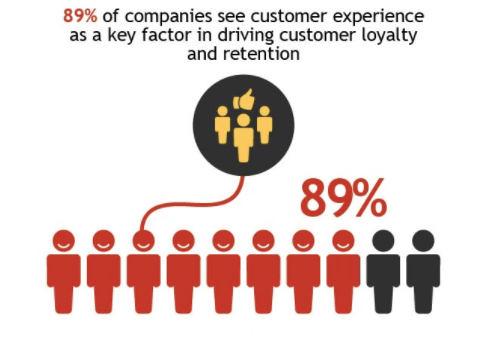
Improving the customer experience will help you drive loyalty and retention.

customer experience

Make sure you’re available to help your customers.

Let them reach out to customer service agents via as many methods as possible:

  • phone
  • email
  • live chat

Just because your business operates from 9 AM to 5 PM EST on Monday through Friday doesn’t mean your customer service hours end then.

What if a customer on the West coast has a question on Friday at 6 PM local time? Don’t make them wait until Monday morning to call you.

Give them options. Go the extra mile to keep your customers happy.

According to studies, 86% of people say they are willing to pay more money for better customer service.

That’s right. You could charge more for your products and services if you treat your customers the right way. They’ll still keep coming back to buy more.

Segment your email list

Earlier I explained that you need to add subscribers to your email list.

Now I’m telling you to take that strategy one step further. You need to segment your subscribers to maximize your email campaigns.

There are plenty of ways in which you can do this. For example, you can put them in lists based on their age, gender, or location.

You can even segment your target audience with generational marketing.

Putting your email subscribers on separate lists helps you deliver more personalized content to each person.

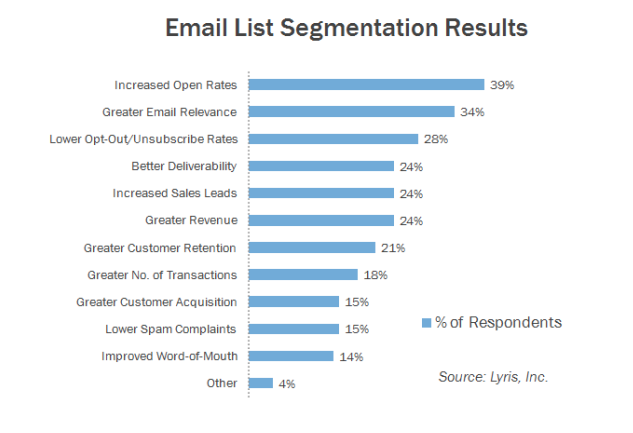
Take a look at some of the top benefits of email segmentation:

email segment

If you go through each one of these benefits, you’ll notice they all translate into one common result.

All of these will help you generate more profits.

Develop a mobile app

We live in a world where mobile technology has seemingly taken over.

When was the last time you saw someone without a cellphone?

Building a mobile app can have tons of benefits for your business.

As I explained earlier, an app can replace a physical customer loyalty card. You can also use your app to implement other strategies I’ve discussed, such as a customer referral program, product suggestions, and a platform for customer surveys.

Furthermore, you can use your app to improve your customer service. Allow app users to contact a representative directly from within the app.

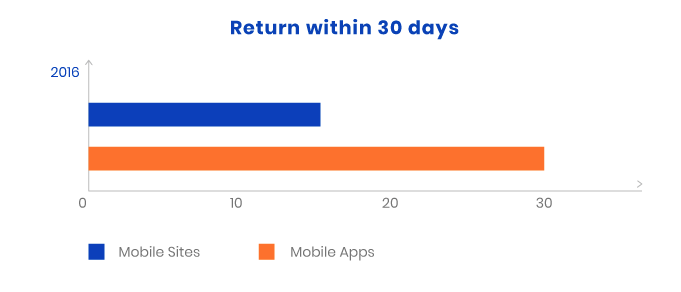
As far as retention goes, mobile apps create a 50% greater chance that an ecommerce customer will return to your online store within 30 days.

mobile app

Mobile apps also have extremely low shopping cart abandonment rates.

The average shopping cart abandonment rate for a desktop site is 68%. When customers add an item to their shopping carts from a mobile browser, that number jumps to 97%.

But with mobile apps, the shopping cart abandonment rate is only 20%.

You can get that percentage down even lower if you follow my high ROI shopping cart abandonment prevention tactics.

Conclusion

New customers aren’t the only way to increase profits for your business. Focusing on customer loyalty is more effective and cost-efficient.

Use your blog as a way to get your customers to visit your website on a more frequent basis.

Show your customers you care about them by asking their opinions with surveys and interviews. Create a customer loyalty program.

Provide incentives to your customers who refer friends and family.

Add customers to your email list and segment those subscribers to personalize your marketing campaigns. Take that personalization one step further, and suggest products based on the browsing history and previous purchases of your customers.

If you enhance your customer service, you can even charge more money for your products and services.

Develop a mobile app to help you implement these strategies and drive more sales.

By prioritizing customer retention, you’ll be able to generate higher profits.

What customer retention strategies does your brand use to drive more sales?


from Quick Sprout https://ift.tt/2n2EJI7
via IFTTT